Question

NAMING IPADS DEP

  • January 30, 2018
  • 7 replies
  • 40 views

Forum|alt.badge.img+3

Our district names our ipads according the school and room number. Does this mean I cannot have this done through DEP? If it can please share. What I see as the only options are really one generic name or by serial number.

I used to just choose to name them ipad which would then allow me to run a script that would put in the names I wanted which would then trigger a configuration profile to make it where the name can't be changed. I had it set not to run that profile on anything named specifically iPad. However in the last few weeks DEP is naming them iPad (1) iPad (2) etc. and so now I can no longer do that and not sure if there is a way to change it. I know this may sound confusing but any suggestions or what I need to clarify would be greatly appreciated

7 replies

Forum|alt.badge.img+6

Hi mb81369, You can use pre-stage enrollments to have your iPads named something and a serial number or just the serial number. Then the next step would be to use a tool called JSS Mut. You can use this tool to add a name to your iPads, add them to a static group, as well as several other things.

My school district has this issue as well. So I use Pre-Stage enrollments to name the devices by school site and serial number. Then I use The Mut tool to change the name, add a teacher name, and so forth. You can also use Pre-Stage enrollments to add a department. I hope this helps!


Forum|alt.badge.img+3
  • Author
  • New Contributor
  • January 31, 2018

After I change the name through MUT the way I want them do I have to then enable the enforce name rule individually or can I do it all at once after I run the MUT? If I can do it all at once please share :)


Forum|alt.badge.img+3
  • Author
  • New Contributor
  • January 31, 2018

I could have sworn there was a don't allow device name change option you could set in a configuration profile but I no longer see it


Forum|alt.badge.img+6

You can enforce the name yes. Two places Pre-Stage enrollment (Options > Mobile Device Name > Enforce Mobile Device Name). I believe this checks it for everything. OR device record > Inventory Tab > General > Edit General > checkbox above the name (Enforce Mobile Device Name). Mine in the device records are automatically checked. I hope this helps .


Forum|alt.badge.img+26
  • Esteemed Contributor
  • February 13, 2018

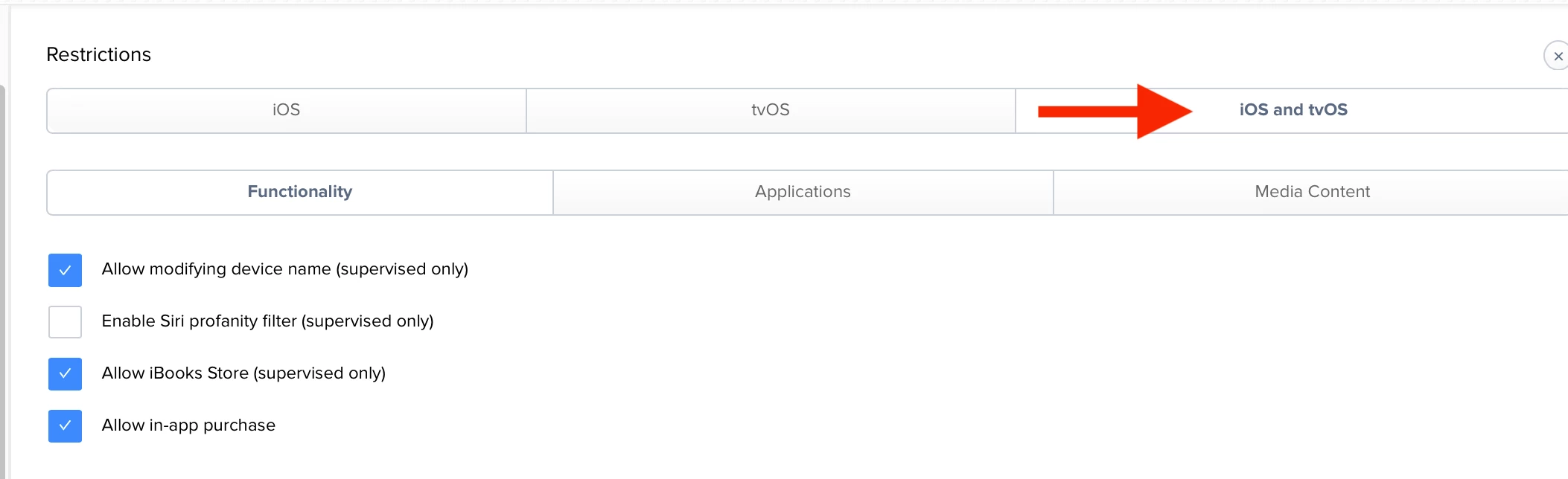
You can also prevent device name change using Config Profile:


Forum|alt.badge.img+9
  • New Contributor
  • January 17, 2019

The options in the JSS to name an ipad need to be improved! We should not have to use a different tool to do this.

Please vote: https://www.jamf.com/jamf-nation/feature-requests/2723/more-options-for-naming-convention-for-mobile-devices


Forum|alt.badge.img+7
  • Contributor
  • January 10, 2020

Maybe because we are a small board, we can do this, but I have a PreStage Enrollment profile for each and every iPad!! I could literally wipe all my iPads, ask the teacher to connect them to Wifi and they would all rename themselves correctly, fall into the right smart groups, based on names and all apps come back.