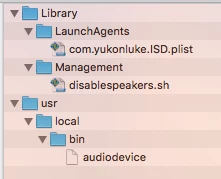
Hey all,
I'm trying to disable internal speakers (but leave headphone functionality intact) on some iMacs (currently running 10.11.5).
I'm using the script from here: https://www.jamf.com/jamf-nation/discussions/8965/ot-mute-internal-speakers, with a 10 second sleep built into the while loop.
I've verified that the script works when run from terminal, but I can't seem to get the LaunchDaemon to call the script on Startup.
I've been trying for hours now. So far I've tried:
- Getting rid of the while loop from the script and using the "StartInterval" key instead.
- Using the "KeepAlive" key
- Moving the plist into the "/Library/LaunchAgents/" folder
- Moving the plist into the "~/Library/LaunchAgents/" folder for the local student account
- I've tried without the "AbandonProcessGroup" key
So far, still no love.
I even tried just creating a policy to run the script on login by using the Files & Processes tab. I put in "/Library/Management/disablespeakers.sh &" (I was thinking the ampersand at the end would release the shell), but it just sits at pending and it doesn't work.
Anyways, here's my LaunchDaemon:
<?xml version="1.0" encoding="UTF-8"?>
<!DOCTYPE plist PUBLIC -//Apple Computer//DTD PLIST 1.0//EN
           http://www.apple.com/DTDs/PropertyList-1.0.dtd >
<plist version="1.0">
<dict>
    <key>AbandonProcessGroup</key>
    <true/>
    <key>Label</key>
    <string>com.yukonluke.ISD</string>
    <key>ProgramArguments</key>
    <array>
        <string>/Library/Management/disablespeakers.sh</string>
    </array>
    <key>RunAtLoad</key>
            <true/>
</dict>
</plist>
Please help me. If I can't get this to work soon, my boss is going to make me take this entire lab apart and manually disconnect the speaker connectors, and I'm hoping that I won't have to do that.