Question

NETBOOT not working...

  • March 5, 2015
  • 14 replies
  • 38 views

Forum|alt.badge.img+5

external image link

14 replies

Forum|alt.badge.img+5
  • Contributor
  • March 5, 2015

Did it work before?
If no
- how did you setup netboot?
- which version did you use?

If yes
- are you sure that you want to use nfs?


Forum|alt.badge.img+5
  • Author
  • Contributor
  • March 5, 2015

It never worked. I created it using AutoCasper in the server itself. Should I create it on a new machine? I've used OS X Mavericks (Created from AutoDMG).

Here's the steps how i setup NetBoot...
1. Use AutoCasper with OS X Mavericks (Created from AutoDMG). 2. Setup OS X Server >> NetInstall
3. Map the .Nbi
4. Setup NetBoot in Jss pointing to the said NetInstall settings

Then I got that Error message when NetBooting.... not sure what I'm missing. I'm sure I'm missing a few steps. Hope you can help. Many thanks.


Forum|alt.badge.img+7
  • Contributor
  • March 5, 2015

Not to hijacked the thread, but I'm having almost the same issue. Mine just skips and does a regular reboot. I've tried both 10.10 and 10.9 created with AutoDMG.


Forum|alt.badge.img+5
  • Contributor
  • March 5, 2015

Well the error message says that it could not connect to the NFS server.
paste the output of

grep  "root-path" /etc/dhcpd.conf

(ofc you need to execute that on your NetSUS)


Forum|alt.badge.img+5
  • Author
  • Contributor
  • March 5, 2015

Now I can boot :)
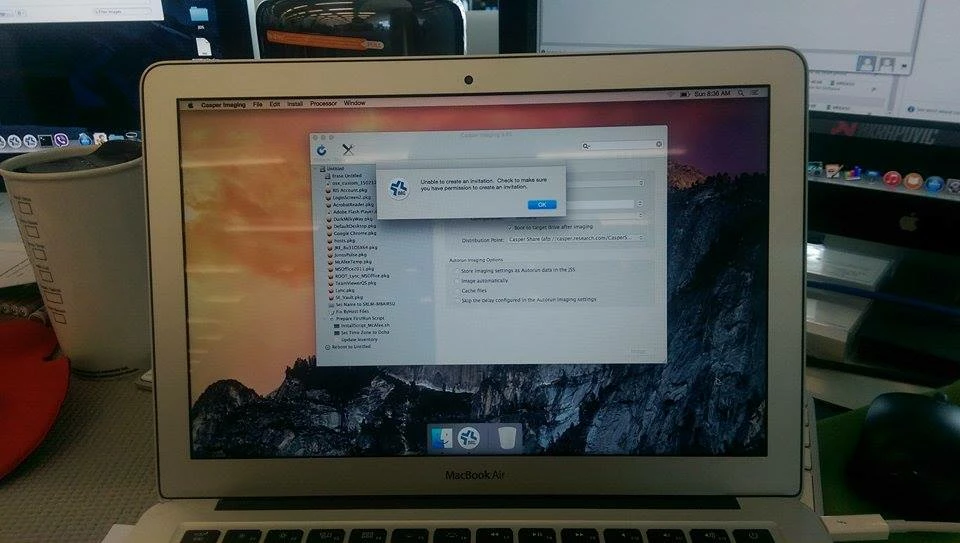
However... hahaha!! It's damn slow and it says something "Unable to create an invitation"
Dunno what the heck it is.


RobertHammen
Forum|alt.badge.img+29
  • Esteemed Contributor
  • March 5, 2015

You're running OS X Server, not the NetSUS, right?

What is the exact error message you are seeing "Unable to create an invitation"? in which app, Finder?


Forum|alt.badge.img+10
  • New Contributor
  • March 6, 2015

what machine are you trying to netboot? ie what hardware/model identifier?
what OS version exactly ie what build of Mavericks did you create with AutoDMG?

That kernal panic is usually something i see when a machine trys to boot too old of an OS


Forum|alt.badge.img+10
  • New Contributor
  • March 6, 2015

Generally you should always create any images on the newest most up to date hardware you have. And generally NEVER create your images from your server's installation


dlondon
Forum|alt.badge.img+14
  • Honored Contributor
  • March 6, 2015

Hi Michael,

I'm not clear on whether you solved the NFS issue you had in your post and if so what you did to fix. If you didn't, then this is what you do ...

To confirm NFS is working run the following on a client

open terminal
mkdir /tmp/mnt
mount_nfs <NetBoot Server IP>:/Library/NetBoot/NetBootSP0 /tmp/mnt

e.g. in my case I have the NetBoot files on another volume

mount_nfs 1netboot_server_ip:/Volumes/Data/Library/NetBoot/NetBootSP0 /tmp/mnt

You should then be able to see your NetBoot images in that folder. That is in /tmp/mnt

Regards,

David


Forum|alt.badge.img+5
  • Author
  • Contributor
  • March 8, 2015

Hi guys... it worked for me now but there's a new error message and I don't know what the heck it is.

Says something "Unable to create an invitation. Check to make sure you have permission to create an invitation"
Seems like a party invitation for me :)

I change it from NFS to HTTPS because i can't make it boot using NFS.


RobertHammen
Forum|alt.badge.img+29
  • Esteemed Contributor
  • March 8, 2015

Is there autorun data for the client you are imaging? What happens if you re-open Casper Imaging with the Option key held down?


Forum|alt.badge.img+5
  • Author
  • Contributor
  • March 9, 2015

There's no auto run data. Tried re-opening Casper Imaging but still the same issue. If I press the option key, it only ask to enter the JSS server details.


Any idea what's this error about? Thanks.


bentoms
Forum|alt.badge.img+35
  • Hall of Fame
  • March 9, 2015

@mreaso Can you check the permissions of the account that you've logged into Casper Imaging with?

If you have an account with full permission can you try that?


Forum|alt.badge.img+5
  • Author
  • Contributor
  • March 10, 2015

Hi @bentoms ... my account has FULL permission. I've tried creating a new account as well with all permissions set. I'm stuck on this crap.