Question

New to MacOS How do I add Apps

  • March 2, 2022
  • 2 replies
  • 17 views

Forum|alt.badge.img+3

I'm used to the Mobile devices, but not the MacOS.


I Enrolled the device, but I can't find Self Service on the laptop.


Is there a step by step guide to taking a mac laptop, adding it to JAMF, (already done but not completely i guess) and adding purchased software.


Bill Swope

2 replies

atomczynski11
Forum|alt.badge.img+18

Self Service app should install to the 


/Applications


folder

You may want to open the Terminal app and try the above commands


sudo jamf update sudo jamf manage


mm2270
Forum|alt.badge.img+24
  • Legendary Contributor
  • March 3, 2022

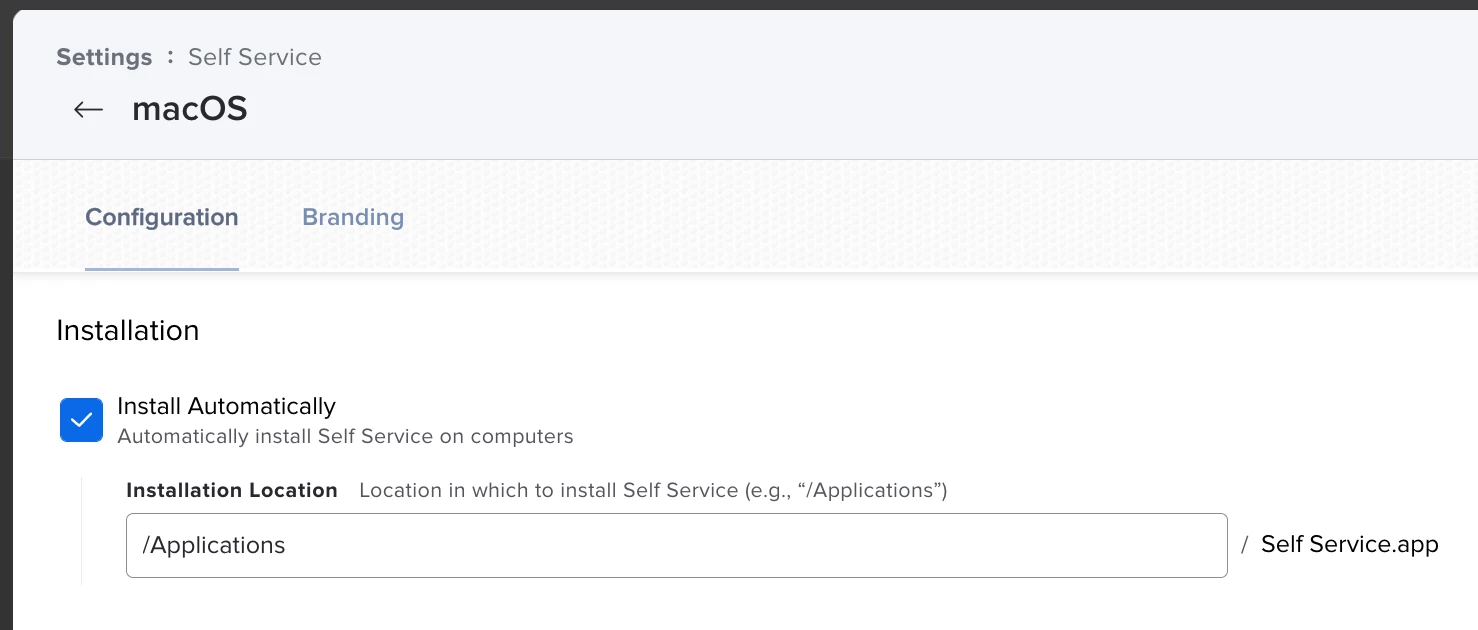
It's possible you don't have your Jamf Pro server configured to automatically install the Self Service application on macOS devices. I don't believe it's "on" by default.

Click the gear icon to go to Settings and navigate to Self Service > macOS and make sure the "Install Automatically" option there is enabled. See screenshot for an illustration.