Question

Newest HP Printers

  • March 17, 2016
  • 91 replies
  • 407 views

Show first post

91 replies

apizz
Forum|alt.badge.img+15
  • Honored Contributor
  • May 9, 2017

@Absolem You will still need to upload the driver PKG and push it to your machines before installing your printer(s).

All that Casper Admin does is point to the correct driver for the configured printer. If the driver isn't installed it will still install your printer but be configured with the generic printer driver.


Forum|alt.badge.img+14
  • Valued Contributor
  • May 9, 2017

@aporlebeke So that actually works or worked for people? I gave up on doing printers through Casper admin long ago because it never did point to the correct driver after capture...it was always generic. Once I learned how to configure through a command line statement I not only made deploying printers easier in that regard but it also allowed me to move to domain based printing from ipp and lpd. When I tried capturing through Casper admin and then would deploy it, the print jobs would hang.

At any rate I'm now a proponent of doing printer installs with a simple one line script. No capturing necessary but, yes, I still need to install the pkg on the station so the driver is there.


apizz
Forum|alt.badge.img+15
  • Honored Contributor
  • May 9, 2017

@jhuls we're still back on 9.82 (we started with 9.73) and this is how we've been deploying printers. Haven't had any issues yet.

My process:

  1. On a test machine install HP driver PKG
  2. Configure each individual printer in System preferences and choose the specific driver for it.
  3. Upload through Casper Admin.
  4. Remove printer from test machine and test install the printer via policy or Casper Remote to verify correct settings and driver is configured.

Forum|alt.badge.img+14
  • Valued Contributor
  • May 9, 2017

@aporlebeke I don't remember when I started switching over but your process is the same as mine was. If I went into JSS and looked there, it would always be configured for generic. The printers worked and no one complained but in my environment some users would rather complain than report issues so I didn't like deploying them like that. Like I said though it helped move things along to run printing through our domain print servers so that printing could be audited. It worked out best this way in the end. Some day maybe I'll come back and check it out again. It might make it easier for the non-Mac folks if I'm not around.


apizz
Forum|alt.badge.img+15
  • Honored Contributor
  • May 9, 2017

@jhuls I can confirm in the JSS that our printers are set to use the generic PPD file, however when installed via policy or self service it does still correctly assign the printer driver and configure other settings (like duplex) on the computer


Forum|alt.badge.img+14
  • Valued Contributor
  • May 9, 2017

Well, that's good to know. Thanks for mentioning that. It's entirely possible that was the exact case back then. I was still pretty young at knowing some of the ins and outs to supporting OSX. Are you deploying printers that print through active directory print servers? If you have that working too, I'm somewhat intrigued just for the fact that printer deployment might be more understandable like that by those who don't have their head buried in Macs and scripting.


apizz
Forum|alt.badge.img+15
  • Honored Contributor
  • May 9, 2017

@jhuls we have a Windows print server.

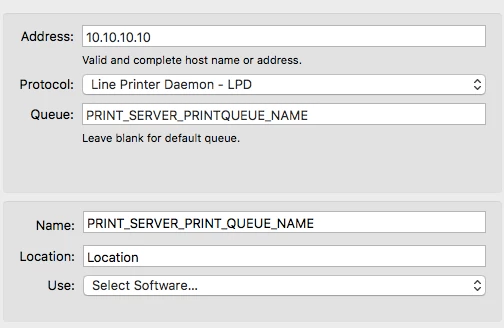
In my printer config I choose Line Printer Daemon as the protocol and then enter the IP address of the print server in the Address field. Whatever the printer queue name is on the server is then what you'll want to enter in the Queue field.

From there it's giving the printer a name, location, and then manually selecting the driver from the software list.


dstranathan
Forum|alt.badge.img+19
  • Valued Contributor
  • May 10, 2017

Thanks @aporlebeke

Questions:

Curious why you provide an IP address and not a DNS hostname?
Thoughts on why you chose LPD versus SMB or IPP?
Are you in an AD environment?
What version of Windows print services are you running?
Do you have to specifiy a PPD on the Mac client, or will the Windows server handle the "last mile" of the print process accordingly?

Thanks


Forum|alt.badge.img+14
  • Valued Contributor
  • May 10, 2017

@aporlebeke That's where things go different directions. I'm going through smb. Unless I'm mistaken that lpd method doesn't authenticate thus it's open to everyone.


apizz
Forum|alt.badge.img+15
  • Honored Contributor
  • May 10, 2017

@dstranathan we supply an IP because that's what we've done in the past. Either or.

We are an AD environment running Print Management 6.1.7600...

We don't have to specify a PPD on the Mac, the print server handles the last mile, as you say.

@jhuls You're right that anyone could print to the printer using our method. We currently don't have anything set up requiring users to authenticate.

However, our users aren't admins, so our students for example can only print to the one or two printers we configure on our cart & lab machines. They won't be able to add printers because they're not admins and therefore aren't part of the lpadmin group. We give Faculty access to install all our available printers through Self Service, but a few we limit access to based on a user's AD sec group (in Scope limitations).

You may find this article helpful for adding Windows SMB printers on Macs - https://support.apple.com/en-us/HT3049


Forum|alt.badge.img+14
  • Valued Contributor
  • May 10, 2017

@aporlebeke In our environment we couldn't do that or instructors would abuse the nicer photo printers and plotters. We currently have a project open to remove a number of network and desktop printers and move to more centralized printing through printer/copiers wherever possible. It's meeting a lot of resistance but that's the plan for now. The idea for all of this is to reduce printing costs. We're using Papercut to help with this for specific student areas but not campus wide or I think that might be an option. I'm not involved in the administration of that so I don't know its capabilities.

I appreciate the link but the problem before wasn't with setting up Windows SMB printers on the Mac. That was the easy part. It was when using Casper to capture and deploy that it failed. It was only when I moved to a command line configuration that it started working correctly.


apizz
Forum|alt.badge.img+15
  • Honored Contributor
  • May 10, 2017

@jhuls gotcha. We have Papercut as well, although we don't use it currently to limit or charge for printing. Just an avenue for students to print from personal computers and release jobs with their IDs copiers.


dstranathan
Forum|alt.badge.img+19
  • Valued Contributor
  • August 1, 2017

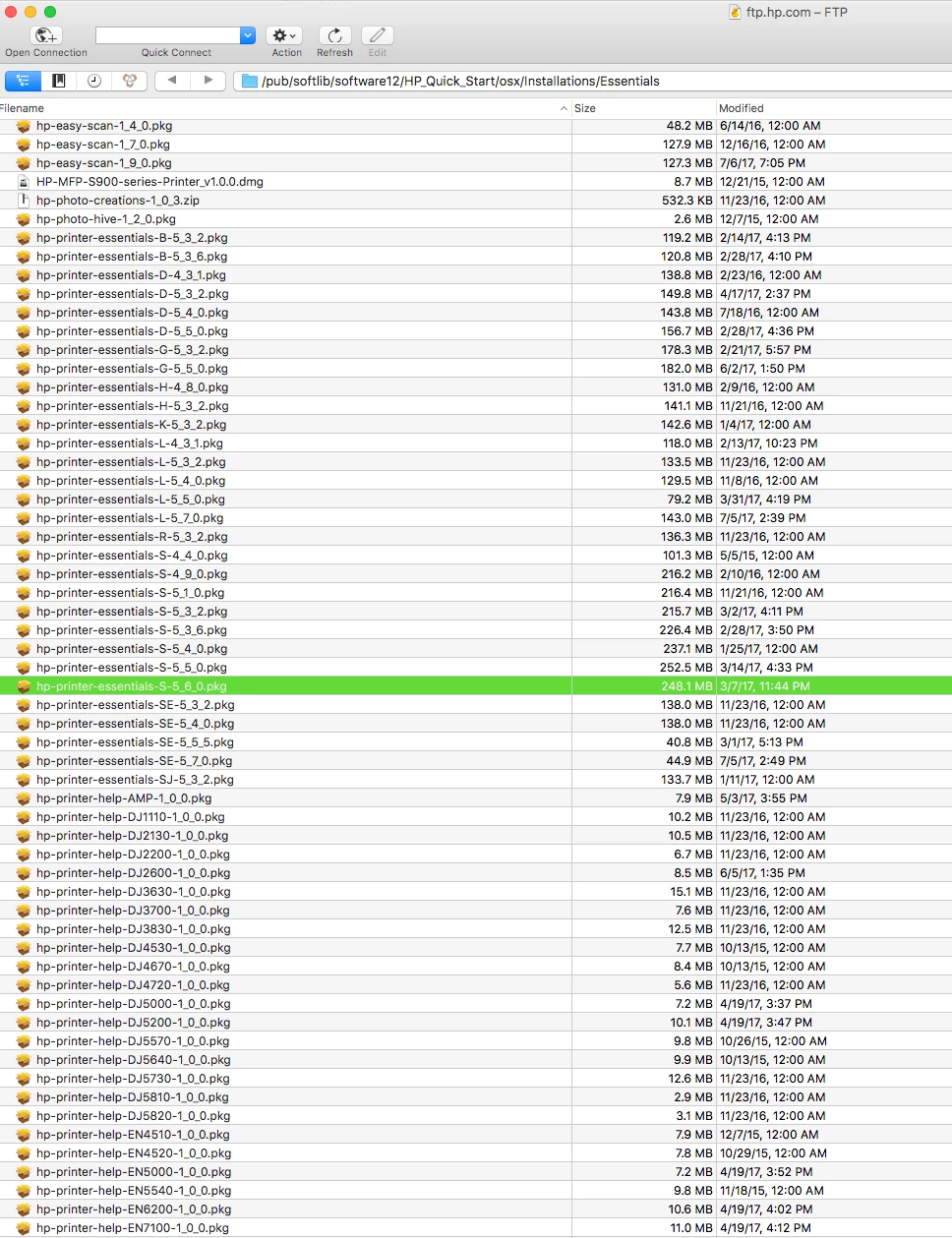
Does anyone know how to decipher HP's cryptic naming convention for their (gazillion) Mac drivers/PPDs?

I see various names and dates, but cant tell what they mean. For example, if I want the latest, most comprehensive package of HP LaserJEt network printers, what package would contain the broadest selection (that the last Apple HP 5.0 package doesnt include)?

What's the difference beween "S" and "SE"?

Examples:
-hp-printer-essentials-S-4_7_0.pkg
-hp-printer-essentials-S-5_3_2.pkg
-hp-printer-essentials-SE-5_7_0.pkg


Forum|alt.badge.img+4
  • Contributor
  • August 18, 2017

I've been engaging in the battle with HP this week to see if I can find out more, and also am working with my Apple reps and a few other resources to see what I can find out.

For the printers that I have, that SE-5_3_2 seems to have bailed me out for now, but thus far, the only thing I've been told repeatedly by HP is that they've stopped supporting Macs at an enterprise level and the only thing to do is to use the easy start tool.

I'll update here further once I know anything more.
-- Steven


Forum|alt.badge.img+8
  • Contributor
  • August 18, 2017

I thought I'd chime in here.

Our primary concern is the package size, since we have a lot of remote schools with very limited bandwidth.

The Apple HP Driver pkg is several hundred MB, and the "Easystart" app pulls down over 100 MB as well.

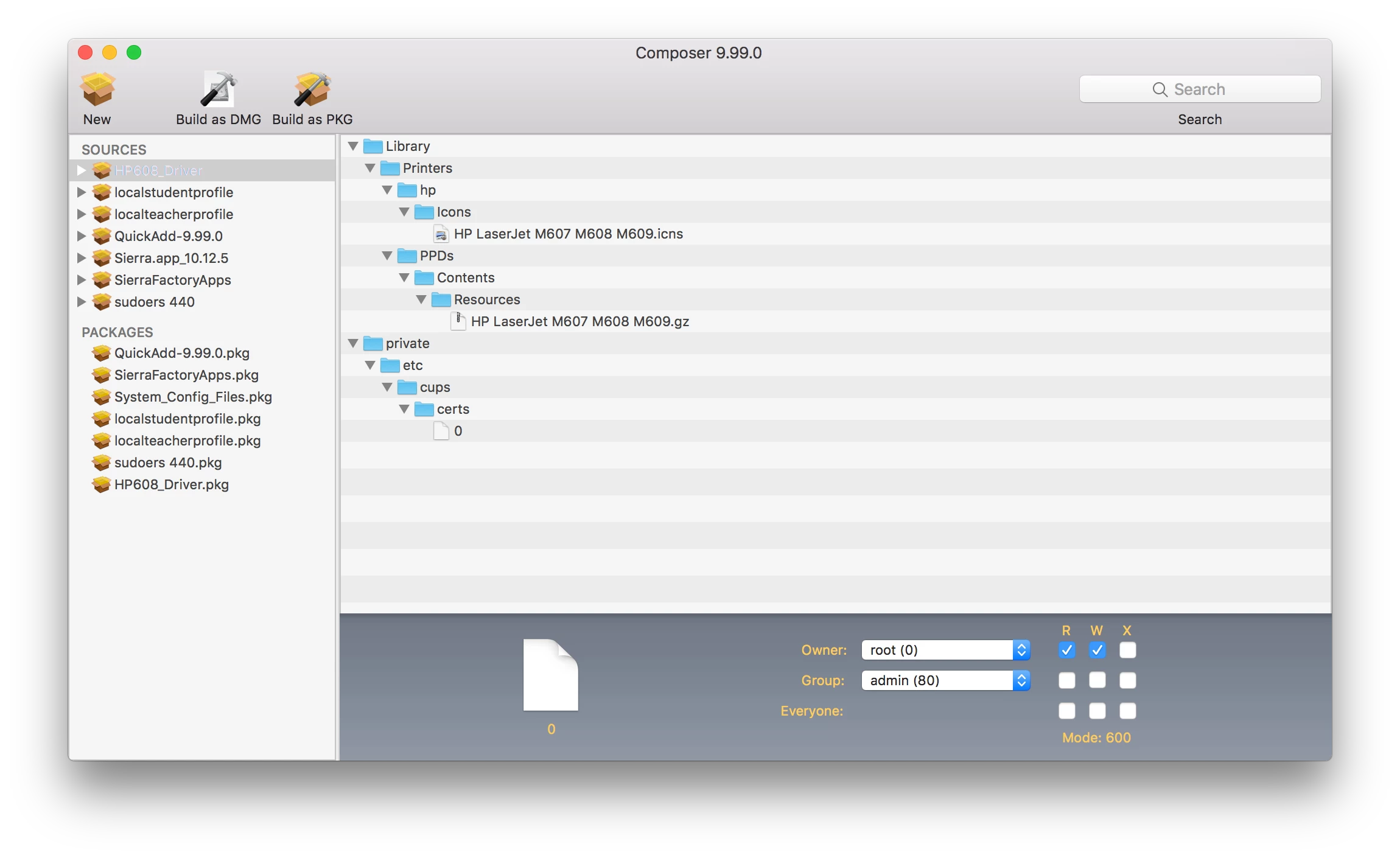
I've started using composer to cut the size down, and I've been pretty successful.

For example, our new printer this year is the "HP Laserjet Enterprise M608". I've managed to cut the EasyStart installation (which I think was 140MB) down to slight less than 1MB (927KB). It only took me about 5 minutes or so (not including the initial download time) and it works like a charm.

I've attached a picture of the final package payload in Composer.


Forum|alt.badge.img+1
  • New Contributor
  • August 26, 2017

@kstrick THANK YOU for that key hint! The exact path on my download was different, as someone pointed out, and you're right that it downloaded to one place then moved to another to actually install. I went into /var/folders and used

find . -iname hp-printer-essentials*

to home in on it. :)


Forum|alt.badge.img+12
  • Contributor
  • September 7, 2017

Another option:
If you do a 'ps -A | grep hp-printer-essentials' while Easy Start is installing, you can determine which pkg it is pulling from the ftp server. You'll need to do it right after the download finishes:

$> ps -A|grep hp-printer-essentials
51515 ?? 0:00.28 /usr/sbin/installer -verboseR -target / -pkg /var/folders/6z/njcg8drx2dl7bsqhz4qq4bnm0000gn/T/com.hp.hp-easy-start/SoftwareComponentInstallations/5180B11B-E879-43F9-9EE5-3C20B808C365/hp-printer-essentials-S-5_3_2.pkg


Forum|alt.badge.img+4

@dstranathan Any luck figuring out the differences in the package names and what they mean? I too am looking for the best, broadest package to install to make up for where the HP package from Apple falls short, since we deploy all sorts of HP models.


Forum|alt.badge.img+13
  • Honored Contributor
  • October 24, 2017

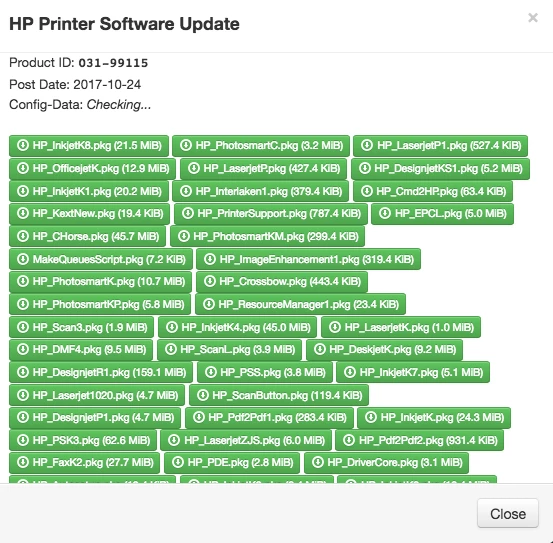
Well it looks like the HP love is back...HP Printer Software Update 5.1 dropped today. I checked one of the inkjetB pkgs with SP and saw a bunch of printers from 2015:


Forum|alt.badge.img+7
  • New Contributor
  • October 26, 2017

Does anyone know if we still need to use the hp_printer_essential pkgs? I've been using the 5.0 update from apple in conjunction with that. Is the 5.1 comprehensive?


Forum|alt.badge.img+6
  • Contributor
  • October 31, 2017

@LukeMason Thanks for that. Have you had any issues after when you've installed the printer? I followed your directory structure and pulled the files for one of my printers but when I went to run a test page it still wanted to download the drivers from HP. I ran composer to verify and it ended up downloading the entire HP Printer Apple Software Update.


Forum|alt.badge.img+7
  • New Contributor
  • January 3, 2018

Hi Folks,

I sadly can not find the PPD file for the HP LJ M452dn in the Apple HP Printer Software Update 5.1. And all the FTP Links for HP are not working anymore :-( Does anybody got an updated link ? I found the M252n driver in the Apple Package does it by any chance work with the M452(sadly can not test as I do not have the M452 office) Or can I edit the ppd to make it work ?

Cheers,

Thomas


apizz
Forum|alt.badge.img+15
  • Honored Contributor
  • January 3, 2018

@tluebker Just tried the HP FTP link I have and it still works for me. Try this:

[ftp://ftp.hp.com/pub/softlib/software12/HP_Quick_Start/osx/Installations/Essentials/](ftp://ftp.hp.com/pub/softlib/software12/HP_Quick_Start/osx/Installations/Essentials/)


Forum|alt.badge.img+7
  • New Contributor
  • January 3, 2018

thanks man :-)


Forum|alt.badge.img+6
  • Contributor
  • January 26, 2018

Okay, let's suppose you run the easy start on a computer running 10.12 and capturing it with composer.

My question: What drivers exactly is it downloading, and for what OS versions?

Would it just be downloading drivers compatible with 10.12, anything from 10.10 and above, or what?

I don't want to install on machines and find out the driver really isn't compatible with a different OS version and it causes kernel panics.

HP's easy start crap is not acceptable in an enterprise environment. I have over 500 Macs, 80+ network printers, and different OS versions. An "easy start" to me is a recipe for chaos