Question

Not able to open Jamf admin console

  • July 18, 2018
  • 5 replies
  • 25 views

Forum|alt.badge.img+3

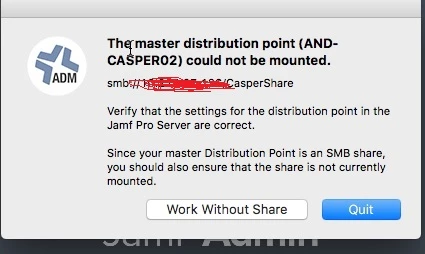
Dear all, I am facing an issue in accessing JAMF admin console with my credential. Same console is working fine for other admin member. i tried to validate the access but no difference in his and mine access. i have attached the error screen shot , please share your expertise to fix this issue.
5 replies

Forum|alt.badge.img+19
  • Contributor
  • July 18, 2018

Can you manually mount the distribution point on that machine using the exact same user/pass set up in the Jamf Pro Server for that DP?


Forum|alt.badge.img+18
  • Honored Contributor
  • July 18, 2018

This has happened to me when the share is already mounted. Check you volumes list and eject it if it is mounted and re-try.


Forum|alt.badge.img+3
  • Author
  • New Contributor
  • July 19, 2018

I don't see any mounted volumes named as CasperShare. Only system drive i can see under mounted volume.


Forum|alt.badge.img+3
  • New Contributor
  • July 19, 2018

Force quit Finder on your Mac or restart it, should resolve.


Forum|alt.badge.img+3
  • Author
  • New Contributor
  • July 19, 2018

Thanks Franrayner, did reboot the MAC but still same. Other user is able to login without any issue.
