Question

Office 2016 Enterprise Requiring Sign in

  • August 10, 2015
  • 20 replies
  • 23 views

Forum|alt.badge.img+4

Office 2016 Enterprise pkg for Mac is requiring a "Sign In" after deployment/imaging through Casper. If I manually install Office 2016 using the same .pkg I'm provided a "Skip Sign In" at first launch. This option is not available if the pkg is deployed using Casper. I was able to script a suppress first run for Word and the application will skip the start screen and launch, but I'm still prompted for purchase and activation in order to continue. Oddly, it is redirecting me to to Office 365 purchase options. I've confirmed that I'm using the Office 2016 Enterprise. Is anyone else experiencing anything similar? Does anyone have any thoughts on possible resolution?

20 replies

Forum|alt.badge.img+16
  • Honored Contributor
  • August 10, 2015

This may help:

https://derflounder.wordpress.com/2015/08/05/creating-an-office-2016-15-12-3-installer/


Forum|alt.badge.img+13
  • Honored Contributor
  • August 10, 2015

Sounds similar to this post by rtrouton.


talkingmoose
Forum|alt.badge.img+36
  • Community Manager
  • August 10, 2015

Installing the VL edition of Office 2016 via any tool that uses the command line installer (ARD, Casper, Terminal, etc.) fails to install the licensing file. Right now, you must either install by double-clicking the installer package and running through the GUI or create another package that deploys the license file after installing via command line.

Microsoft is aware of this issue and similar issues with the installer. Oh, believe me—they're very aware.


Forum|alt.badge.img+9
  • Valued Contributor
  • August 10, 2015

At least they are consistent


Forum|alt.badge.img+13
  • Contributor
  • August 11, 2015

@talkingmoose Yes they are aware...the question is do they care... :(


Forum|alt.badge.img+4
  • Author
  • Contributor
  • August 11, 2015

Thank you! This is very helpful!!


Forum|alt.badge.img+3
  • New Contributor
  • August 11, 2015

Just throwing in my 2¢ worth. I followed the information posted by hkabik.

I pushed out the volume installer from Microsoft for Office 2016 and ran it with the 'Install on boot after imaging' and then I also packaged the license file and similarly included it.

So far the few tests have worked flawlessly, but hopefully MS will fix the volume installer as well.


talkingmoose
Forum|alt.badge.img+36
  • Community Manager
  • August 11, 2015

@joecurrin, that's actually a very good question.

I'll add, "How much do Mac admins care to complain to their Microsoft TAMs about issues like these when they happen?"

For every complaint I see someone put online in a mailing list or forum, I expect an equal and (more importantly) constructive complaint to go directly to Microsoft. If you don't know that feedback avenue for your organization then find it and use it!

That's how we get Microsoft to care.


dpertschi
Forum|alt.badge.img+19
  • Contributor
  • August 11, 2015

+1

For every complaint I see someone put online in a mailing list or forum, I expect an equal and (more importantly) constructive complaint to go directly to vendor-of-choice.

Seems simplistically obvious doesn't it? Kind of like don't stare at the sun or don't walk into traffic. And I'm as guilty as the next guy for not doing this!

Note to self- complain professionally to people who can delegate change.


bpavlov
Forum|alt.badge.img+18
  • Esteemed Contributor
  • August 11, 2015

So just looking at it a bit:

Do a pkgutil --expand /path/to/Office2016installer.pkg /new/path/to/extract/to

Right-click on the path you've extracted the installer to.
Right-click "Office15_all_volume_licensing" and "Show package contents"
Go to the scripts folder and you will see the postinstall script. Open it up in a text editor and you get the following:

#!/bin/sh

logger "Activating Volume License"
volumelicense_exe_path="$2/Microsoft Office Setup Assistant.app/Contents/MacOS/Microsoft Office Setup Assistant"
/usr/bin/sudo -u $USER "$volumelicense_exe_path"

/bin/rm -rf "$2/Microsoft Office Setup Assistant.app"

exit 0

I'm wondering if the problem here is that they are using $USER which I suspect would be empty if no one is logged in....


Forum|alt.badge.img+14
  • Honored Contributor
  • August 11, 2015

An update to Office 15.13.1 is available now. Appears to be a security update, but other changes including licensing fix may be in there.


bpavlov
Forum|alt.badge.img+18
  • Esteemed Contributor
  • August 11, 2015

@ooshnoo Do you have a link to the updates? I can't find the updates on the MS site. My searching skills are lacking...

EDIT: Nevermind. I didn't even bother to run AutoUpdate which usually has the link. It was on their support site and not their download site so I was searching the wrong place anyways. Link for those reading at home. https://support.microsoft.com/en-us/kb/3082420


Forum|alt.badge.img+12
  • Valued Contributor
  • August 11, 2015

@bpavlov It has nothing to do with your search skills. Microsoft's new Downloads section seems to have been designed by trained chimps (or maybe not so trained). . .


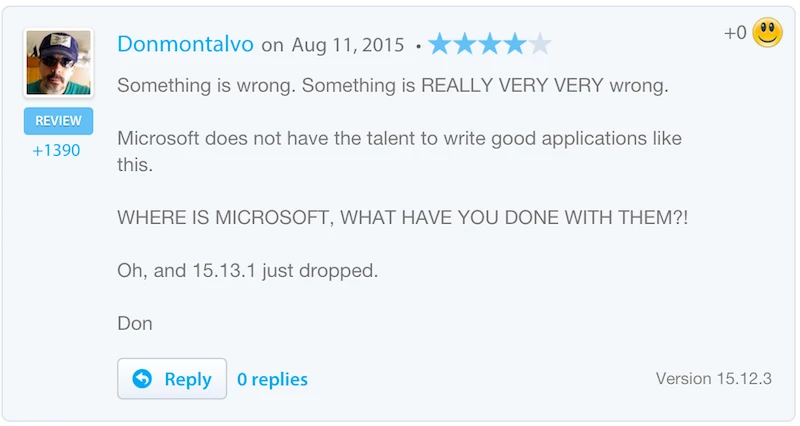
donmontalvo
Forum|alt.badge.img+36
  • Hall of Fame
  • August 12, 2015


Forum|alt.badge.img+16
  • Honored Contributor
  • August 12, 2015

While I agree that the apps are very good, I disagree that it's because of the "talent" it's Xcode baby!!!! : )

Follow Apple rules and guidelines and good stuff happens : )

C


donmontalvo
Forum|alt.badge.img+36
  • Hall of Fame
  • August 12, 2015

Agreed, Microsoft should hire capable people who bother to follow Apple best practices. +1 for public lambasting bringing about necessary change.


Forum|alt.badge.img+16
  • Honored Contributor
  • August 12, 2015

Don, : )

I bet the programers wanted to use Xcode, but management was driving using a shared codebase, older development practices and shared dev tools, trying to keep the costs down.

C


Forum|alt.badge.img+5
  • Contributor
  • October 27, 2015

Hi,

Im sure you guys have found it too. First three window can be suppressed now. I have packaged v15.13.4 placing the preferences in /Lib and it works for me. Tried 15 deployments so far for tests.

However the only prob I face is that randomly I get popup to login to 365, but its not to activate, but just to login. Hope someone finds solution to this. I am done wasting time with MS now :P


Forum|alt.badge.img+6
  • Contributor
  • November 10, 2015

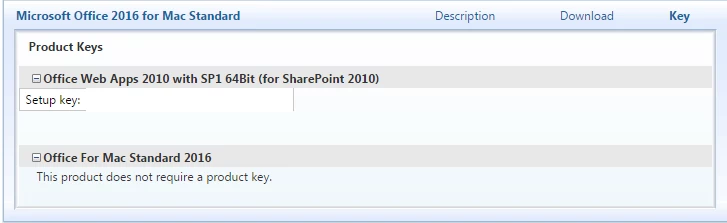
Am I just not seeing the right installer? In my VLSC, this is all I see for the full package. The only other option is to download each individually, and all of those say the same thing- that it doesn't require a key.

We have student licenses to Office 365, but getting that to package correctly for staff isn't going well. Do I need to talk to my microsoft rep to get access to a different installer that uses one MAK key or KMS?

Any help would be appreciated! @cindySingh @donmontalvo Thanks guys!!


bpavlov
Forum|alt.badge.img+18
  • Esteemed Contributor
  • November 10, 2015

@chmeisch If you licensed for Office 365 then the end-user, has to log in. If you are licensed to use a volume key then the serial number is embedded as a pkg within the volume license installer. There are quite a few threads which already break down whats in the installer so I recommend doing a search to learn more. Here's a blog post on it as well: https://derflounder.wordpress.com/2015/08/05/creating-an-office-2016-15-12-3-installer/