Question

Office 2016 Preview block

  • March 5, 2015
  • 51 replies
  • 133 views

Show first post

51 replies

Forum|alt.badge.img+10
  • New Contributor
  • March 6, 2015

It seems to me that if you are giving admin rights to users of the computers you help manage, you've decided they are trustworthy adults.

I'd try sending the users of the computers you help manage a message like "Microsoft has released a preview of Office 2016. We don't recommend that you install it at this time. If you do install it, we can't offer any support for it at this time. We'll be sure to let you know when we are able to support this new version of Office for Mac!"


donmontalvo
Forum|alt.badge.img+36
  • Hall of Fame
  • March 6, 2015

@boettchs][/url wrote:

They claim you can: Can I run this side by side with Office 2011? Yes, you can use the preview builds of Word, Excel, PowerPoint, and Outlook for Mac alongside Office for Mac 2011. And uninstall by: 1. Go to the Go Menu in your Finder Menu. 2. Go to the Applications Folder. 3. Navigate to the Word, Excel, PowerPoint, Outlook, or OneNote app that you want to delete. 4. Drag the relevant app to your trash. 5. Empty the file from your trash. Now, with 2.5GB of files, is that really "uninstalling"? Nah...

Yea, I'd forget the receipts too.

$ sudo pkgutil --forget com.microsoft.yadayada.pkg

Spinning up a VM to grab a snapshot, hoping Microsoft hired competent/capable developers who created true self contained apps. ;)

Don


mm2270
Forum|alt.badge.img+24
  • Legendary Contributor
  • March 6, 2015

For us the only real app of concern is the new Outlook. I don't necessarily care about the others since they don't interact directly with any of our servers. Outlook could present some problems though. We do intend to put out a message along the lines of "we know about it but please don't install it yet, and if you do you're on your own" but of course we'll get some that will ignore the warnings and go through with it anyway. It's just human nature.


donmontalvo
Forum|alt.badge.img+36
  • Hall of Fame
  • March 6, 2015

@mm2270 we use SharePoint so the other apps would be a problem too. My Mac is running Adobe/Microsoft/Oracle free, but I don't mind blowing up a VM for this kind of yuk stuff. :)


Forum|alt.badge.img+16
  • Honored Contributor
  • March 6, 2015

@mm2270 I have not verified this myself as I am currently running the Outlook 2016 app from office365 on my work machine but I saw lots of folks complaining to one of the MS office devs on Twitter that the version of Outlook included with the preview still requires 365 activation and the dev also said that it IS the same build as the latest non-beta version available to 365 members.


donmontalvo
Forum|alt.badge.img+36
  • Hall of Fame
  • March 6, 2015

Kudos to Microsoft for drag-install apps, even though they're put into a PKG (why not a DMG?).

After install:

external image link

After launching the apps:

external image link


scottb
Forum|alt.badge.img+18
  • Valued Contributor
  • March 6, 2015

Well, @donmontalvo, it also allows for installing single apps if that is wanted/needed.
Or even replacing a bad app. I hope they keep the format the same for the release version.


Forum|alt.badge.img+18
  • Valued Contributor
  • March 6, 2015

@donmontalvo I would assume pkg format for the pre and post install scripts to kill things like web browsers, setup the licensing, hide MAU. I need pkg format anyway because I do not always have JAMF to manage all of my environments and it makes it simpler for me if they are all packages.


donmontalvo
Forum|alt.badge.img+36
  • Hall of Fame
  • March 6, 2015

Good points, I guess I expected Microsoft to find a better way to keep their apps updated, like Sparkle:

http://en.wikipedia.org/wiki/Sparkle_(software))

MAU weighs in at 1.5 MB, heck they could have embedded this into each of their huge Office 2016 apps. Who would have thought Word 2016 would be 1.49 GB? Wow!

external image link


Forum|alt.badge.img+10
  • New Contributor
  • March 6, 2015

Don wrote:

"Kudos to Microsoft for drag-install apps, even though they're put into a PKG (why not a DMG?)."

The post-install results tell why -- a drag-n-drop app install would not install the AutoUpdate app, the PrivilegedHelperTool, or the LaunchDaemon.

As for why the apps are so darn huge -- I haven't looked inside the bundles yet, but I expect that each application has a complete copy of what used to be installed as shared files under /Applications/Microsoft Office 2011/Office.

We can't really have it both ways. Vendors of application suites either have to have complex installers to install all the shared files used by the individual components of the suite, or have to duplicate the files many times in order to have "self-contained" applications that can be neatly removed by dragging to the trash.


Forum|alt.badge.img+5
  • Contributor
  • March 6, 2015

@boettchs & @dgreening

You can eliminate the crashing issue but firing up Terminal and entering

defaults delete com.microsoft.Outlook

& then

killall cfprefsd


emily
Forum|alt.badge.img+26
  • Hall of Fame
  • March 6, 2015

@triding nice, worked like a charm. Thank you!


scottb
Forum|alt.badge.img+18
  • Valued Contributor
  • March 6, 2015

@triding - as well - thank you.

As for the installer, this is how it is built:

external image link


emily
Forum|alt.badge.img+26
  • Hall of Fame
  • March 6, 2015

I had one person install this today, aside from myself, and somehow the only app that DOES work is Outlook. None of the other ones load. Sweet.


Forum|alt.badge.img+9
  • Contributor
  • March 6, 2015
Also, no Lync included in this, which I find interesting. Maybe Microsoft is going to stop issuing it and just use Skype?

@emilykausalik
Yep, Lync will be going away and MS will be using "Skype for Business".

http://www.computerworld.com/article/2846201/microsoft-waves-goodbye-to-lync-says-hello-to-skype-for-business.html


Forum|alt.badge.img+11
  • New Contributor
  • March 6, 2015

Blocking this would be so much easier if we were able to block applications based on their signature instead of their path alone. See my new feature request that came from trying to block Office 2016 Preview. https://jamfnation.jamfsoftware.com/featureRequest.html?id=3308

In the end we went with using Restricted Software and blocking the following paths:
/Applications/Microsoft Word.app/Contents/MacOS/Microsoft Word
/Applications/Microsoft Excel.app/Contents/MacOS/Microsoft Excel
/Applications/Microsoft PowerPoint.app/Contents/MacOS/Microsoft PowerPoint

OneNote, is in the same path as the App Store version of OneNote, so we could not block this.

/Applications/Microsoft OneNote.app/Contents/MacOS/Microsoft OneNote


Forum|alt.badge.img+7
  • Contributor
  • March 6, 2015

@Fveja Sorry, this is probably kind of a noob question, but how do you block the paths?


donmontalvo
Forum|alt.badge.img+36
  • Hall of Fame
  • March 6, 2015

@Fveja our colleague @jaharmi told us he would also like to see the ability to block apps.

Can I ask you to post your thoughts on bocking apps in the JSS 10 thread?

JAMF are monitoring that thread:

Will JSS 10 finally bring us easy patch management?
https://jamfnation.jamfsoftware.com/discussion.html?id=10961


scottb
Forum|alt.badge.img+18
  • Valued Contributor
  • March 10, 2015

@mm2270

I used the script you posted above (fixing the "Office 2015" to "Office 2016") and it works very well.
I need to get the "OK" for this, but it seems to do what you set out to do nicely.


  • April 15, 2015

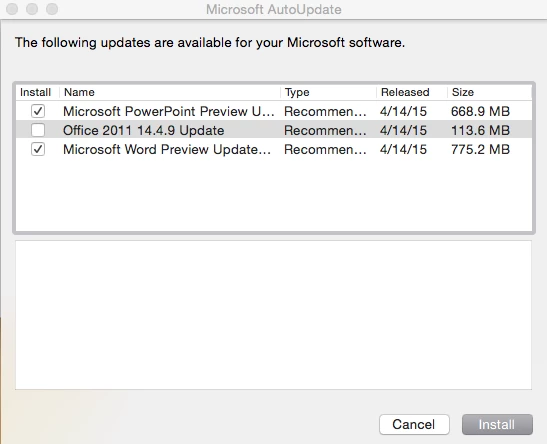
Office 2016 Preview updated to 15.9; individual app updates are available along with a new Microsoft Auto Update (MAU) 3.0.5 in .pkg format.

https://support.microsoft.com/en-us/kb/3048768

FWIW when I was prompted to install the MAU update, I was able to command-click on the proxy icon in the Installer window to locate the downloaded .pkg, and copied that to the desktop - no sign yet of this being downloadable otherwise.

Also, the OfficePreview.pkg has not yet been updated to these new versions.


  • April 15, 2015

Also, in true Microsofty fashion, installing MAU 3.0.5 and checking again does not list any updates from 15.8.1 to 15.9.


ImAMacGuy
Forum|alt.badge.img+23
  • Author
  • Esteemed Contributor
  • April 15, 2015

it offered mine...


emily
Forum|alt.badge.img+26
  • Hall of Fame
  • April 15, 2015

I got the 15.9 to show up after the new MAU installed. Honestly the only thing that's still puzzling to me about all of this is the lack of Skype for Business preview. Come on guys, get it together. The official client is already being pushed this month on the Windows side, but NO preview for Macs? MS is the worst.


  • April 15, 2015

Ah, just needed to launch one of the 2016 apps first, now the 775MB Preview Update shows in MAU.

EDIT: nope, although MAU claimed a Preview Update, which I was hoping would cover all four apps, it only downloaded the Word update.


ImAMacGuy
Forum|alt.badge.img+23
  • Author
  • Esteemed Contributor
  • April 15, 2015

as a side not with the update 3.0.5. if you selectively install updates and install them. you have to exit the updater and go back in to get it to check again. just telling it to check for updates after the install results in the items you selected still being selected, but you can't choose any more or deselect them