Solved

Office 2016 removal script

  • July 19, 2016
  • 33 replies
  • 190 views

Forum|alt.badge.img+8

We've found this script extremely useful for removing Office 2011.

Is there something similar floating around for Office 2016?

Best answer by stuartwilcox

This is what we use and it works really well. There is a section towards the bottom that you should comment out if you plan to preserve Outlook data.

#!/bin/bash


consoleuser=$(ls -l /dev/console | awk '{ print $3 }')

echo "logged in user is" $consoleuser

pkill -f Microsoft


folders=(
"/Applications/Microsoft Excel.app"
"/Applications/Microsoft OneNote.app"
"/Applications/Microsoft Outlook.app"
"/Applications/Microsoft PowerPoint.app"
"/Applications/Microsoft Word.app"
#
"/Users/$consoleuser/Library/Containers/com.microsoft.errorreporting"
"/Users/$consoleuser/Library/Containers/com.microsoft.Excel"
"/Users/$consoleuser/Library/Containers/com.microsoft.netlib.shipassertprocess"
"/Users/$consoleuser/Library/Containers/com.microsoft.Office365ServiceV2"
"/Users/$consoleuser/Library/Containers/com.microsoft.Outlook"
"/Users/$consoleuser/Library/Containers/com.microsoft.Powerpoint"
"/Users/$consoleuser/Library/Containers/com.microsoft.RMS-XPCService"
"/Users/$consoleuser/Library/Containers/com.microsoft.Word"
"/Users/$consoleuser/Library/Containers/com.microsoft.onenote.mac"
#
#
#### WARNING: Outlook data will be removed when you move the three folders listed below.
#### You should back up these folders before you delete them.
"/Users/$consoleuser/Library/Group Containers/UBF8T346G9.ms"
"/Users/$consoleuser/Library/Group Containers/UBF8T346G9.Office"
"/Users/$consoleuser/Library/Group Containers/UBF8T346G9.OfficeOsfWebHost"
)

search="*"


for i in "${folders[@]}"
do
    echo "removing folder ${i}"
    rm -rf "${i}"
done

if [ $? == 0 ]; then
     echo "Success"
else
     echo "Failure"
fi

33 replies

donmontalvo
Forum|alt.badge.img+36
  • Hall of Fame
  • July 19, 2016

Sandboxed, just remove the apps, no?


Forum|alt.badge.img+3
  • New Contributor
  • Answer
  • July 19, 2016

This is what we use and it works really well. There is a section towards the bottom that you should comment out if you plan to preserve Outlook data.

#!/bin/bash


consoleuser=$(ls -l /dev/console | awk '{ print $3 }')

echo "logged in user is" $consoleuser

pkill -f Microsoft


folders=(
"/Applications/Microsoft Excel.app"
"/Applications/Microsoft OneNote.app"
"/Applications/Microsoft Outlook.app"
"/Applications/Microsoft PowerPoint.app"
"/Applications/Microsoft Word.app"
#
"/Users/$consoleuser/Library/Containers/com.microsoft.errorreporting"
"/Users/$consoleuser/Library/Containers/com.microsoft.Excel"
"/Users/$consoleuser/Library/Containers/com.microsoft.netlib.shipassertprocess"
"/Users/$consoleuser/Library/Containers/com.microsoft.Office365ServiceV2"
"/Users/$consoleuser/Library/Containers/com.microsoft.Outlook"
"/Users/$consoleuser/Library/Containers/com.microsoft.Powerpoint"
"/Users/$consoleuser/Library/Containers/com.microsoft.RMS-XPCService"
"/Users/$consoleuser/Library/Containers/com.microsoft.Word"
"/Users/$consoleuser/Library/Containers/com.microsoft.onenote.mac"
#
#
#### WARNING: Outlook data will be removed when you move the three folders listed below.
#### You should back up these folders before you delete them.
"/Users/$consoleuser/Library/Group Containers/UBF8T346G9.ms"
"/Users/$consoleuser/Library/Group Containers/UBF8T346G9.Office"
"/Users/$consoleuser/Library/Group Containers/UBF8T346G9.OfficeOsfWebHost"
)

search="*"


for i in "${folders[@]}"
do
    echo "removing folder ${i}"
    rm -rf "${i}"
done

if [ $? == 0 ]; then
     echo "Success"
else
     echo "Failure"
fi

Forum|alt.badge.img+8
  • Author
  • Valued Contributor
  • July 21, 2016

This is perfect, thanks!


Forum|alt.badge.img+3
  • New Contributor
  • September 18, 2018

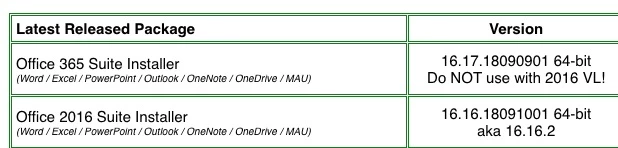
Bl*Y fantastic!! whatever you do don't install the 16.17 updater on the M/soft Office 2016 site. It breaks all the VL licensing WTH! The only way is to tear down the installation(there is no Msoft uninstaller to make things worse) which this script does perfectly via ARD (as root) Reinstall the 16.16.2 from the VL site and reinstall the serializer and all is good again. Not funny when you have over 350 broken MS Office macs!
Beware this 16.17update!!!! https://docs.microsoft.com/en-us/officeupdates/update-history-office-for-mac

Great work and my bacon has been saved by this script, I totally recommend it and is now pride of place in my ARD templates!! Thanks stuartwilcox


Forum|alt.badge.img+22
  • Honored Contributor
  • September 18, 2018

@Mikep62 Think I got bit by this 16.17 issue too, getting lots of complaints about Office copies suddenly needing to be activated! Have you seen this documented anywhere, please share?

This uninstall script has been very helpful today, TY @stuartwilcox


Forum|alt.badge.img+8
  • Contributor
  • September 18, 2018

But if you have a VL you should also get the Microsoft_Office_2016_VL_Serializer_2.0.pkg along with the installer files. Installing the Microsoft_Office_2016_VL_Serializer_2.0.pkg should fix the VL licensing.


Forum|alt.badge.img+7
  • Contributor
  • September 18, 2018

@TomDay Got caught on this as well for any systems we didn't update through MAU

MacAdmins has it very clear on the difference between 16.16.2 and 16.7

Unlike the MS Update history page that didn't make this very clear

Not sure on your environment or if have looked at this yet but would highly recommend leveraging MAU. We are using this script currently for our Office 2016 updates that has eliminated me having to distribute to the majority of our systems the full office installer package


Forum|alt.badge.img+22
  • Honored Contributor
  • September 18, 2018

@sbirdsley Will give a look, right now I push out with patch management


Forum|alt.badge.img+4
  • New Contributor
  • October 4, 2018

Doesn't the Office 365 Installer require some authentication through your Office 365 account to license it?


Forum|alt.badge.img
  • New Contributor
  • April 4, 2019

Is there a way to remove any MS Office dock items? i see this script leaves them in place.


Forum|alt.badge.img+19
  • Contributor
  • April 4, 2019

@Jackfh1 I did not test this but this might work. You'd need dockutil.

#!/bin/bash

userList=$(/usr/bin/dscl . list /Users | grep -v ^_ | grep -v daemon | grep -v r00t | grep -v root | grep -v nobody)

officeApps=(
    Word
    Excel
    Outlook
    PowerPoint
)

for userName in ${userList} ; do
    echo "Removing Office Dock items for $userName..."
    userHome=$(/usr/bin/dscl . read "/Users/$userName" NFSHomeDirectory | awk '{print $2}')
    for app in "${officeApps[@]}" ; do
        /usr/local/bin/dockutil --remove "Microsoft $app" --no-restart "$userHome/Library/Preferences/com.apple.dock.plist"
    done
done

pgrep Dock 2&> /dev/null && killall Dock

exit 0

pete_c
Forum|alt.badge.img+16
  • Honored Contributor
  • July 30, 2019

Slightly tweaked to include Microsoft OneNote and OneDrive which does not include Microsoft in its Dock item label - probably a slightly cleaner / bash-ier way, but this works on 10.13+:

#!/bin/bash

userList=$(/usr/bin/dscl . list /Users | grep -v ^_ | grep -v daemon | grep -v r00t | grep -v root | grep -v nobody | grep -v Guest)

officeApps=(
    "Microsoft Word"
    "Microsoft Excel"
    "Microsoft Outlook"
    "Microsoft OneNote"
    "OneDrive"
    "Microsoft PowerPoint"
)

for userName in ${userList} ; do
    echo "Removing Office Dock items for $userName..."
    userHome=$(/usr/bin/dscl . read "/Users/$userName" NFSHomeDirectory | awk '{print $2}')
    for app in "${officeApps[@]}" ; do
        /usr/local/bin/dockutil --remove "$app" --no-restart "$userHome/Library/Preferences/com.apple.dock.plist"
    done
done

pgrep Dock 2&> /dev/null && killall Dock

exit 0

Forum|alt.badge.img+12
  • Contributor
  • August 20, 2019

Thanks @stuartwilcox I added some other files to the script to completely remove all files present from Install of latest version or Office 2019. ( See below) Tested on High Sierra and Mojave. Also works on Office 2016 previous installs. I have also found that this works great as script in my Office 2019 Install Policy set to run "Before" Install and a Script to remove First Run Setup processes. This way if a user goes to MacApp Store and installs the Office 365 from there. This was causing issues when they then ran our Volume License install with Volume Serializer where Office would only open in trial or read only mode if user selected in the setup for the MacApp Store version. By adding this script it clears all parts of previous installs and then installs our Volume License version downloaded from https://macadmins.software and installs our Volume Serializer package. I then use the Dock Items to add icons to dock. If their were any items in dock from previous installs, they are over-written with the new ones.

#!/bin/bash


consoleuser=$(ls -l /dev/console | awk '{ print $3 }')

echo "logged in user is" $consoleuser

pkill -f Microsoft


folders=(
"/Applications/Microsoft Excel.app"
"/Applications/Microsoft OneNote.app"
"/Applications/Microsoft Outlook.app"
"/Applications/Microsoft PowerPoint.app"
"/Applications/Microsoft Word.app"
"/Library/Application Support/Microsoft/"
#
"/Users/$consoleuser/Library/Application Support/Microsoft AU Daemon"
"/Users/$consoleuser/Library/Application Support/Microsoft AutoUpdate"
"/Users/$consoleuser/Library/Preferences/com.microsoft.autoupdate.fba.debuglogging.plist"
"/Users/$consoleuser/Library/Preferences/com.microsoft.autoupdate.fba.plist"
"/Users/$consoleuser/Library/Preferences/com.microsoft.autoupdate2.plist"
"/Users/$consoleuser/Library/Containers/com.microsoft.errorreporting"
"/Users/$consoleuser/Library/Containers/com.microsoft.Excel"
"/Users/$consoleuser/Library/Containers/com.microsoft.netlib.shipassertprocess"
"/Users/$consoleuser/Library/Containers/com.microsoft.Office365ServiceV2"
"/Users/$consoleuser/Library/Containers/com.microsoft.Outlook"
"/Users/$consoleuser/Library/Containers/com.microsoft.Powerpoint"
"/Users/$consoleuser/Library/Containers/com.microsoft.RMS-XPCService"
"/Users/$consoleuser/Library/Containers/com.microsoft.Word"
"/Users/$consoleuser/Library/Containers/com.microsoft.onenote.mac"
#
#
#### WARNING: Outlook data will be removed when you move the three folders listed below.
#### You should back up these folders before you delete them.
"/Users/$consoleuser/Library/Group Containers/UBF8T346G9.ms"
"/Users/$consoleuser/Library/Group Containers/UBF8T346G9.Office"
"/Users/$consoleuser/Library/Group Containers/UBF8T346G9.OfficeOsfWebHost"
"/Users/$consoleuser/Library/Group Containers/UBF8T346G9.OfficeOneDriveSyncIntegration"
)

search="*"


for i in "${folders[@]}"
do
    echo "removing folder ${i}"
    rm -rf "${i}"
done

Forum|alt.badge.img+7
  • Valued Contributor
  • February 17, 2020

Can anyone please help me understand what search="*" does?


Forum|alt.badge.img+4
  • New Contributor
  • June 19, 2020

new here, I just receive this message when I try to run it via script editor - 'Apple events error: "Expected expression but found unknown token'


sdagley
Forum|alt.badge.img+25
  • Jamf Heroes
  • June 19, 2020

@igarcia These scripts aren't AppleScript, so you can't use Script Editor to work with them.


Forum|alt.badge.img+20
  • Contributor
  • July 15, 2020

@rfreeborn hey does your script remove Office 2016 and 2019, whatever version is installed on the target computer?

also , basically all the macs here don't have 'onenote' 'mau' and 'outlook' installed so will i have to comment out any lines that mention 'onenote' 'mau' and 'outlook'? or will the script run and just not rm -rf the particular file/folder when it reaches that folder in the do loop? or will it jump out of the do loop if the folder is not there to rm -rf ?? thus not completing the uninstall.

maybe a dozen have onenote installed while the other 160 don't have onenote installed. All macs have Excel, PPoint and Word installed. We control the Office updates with policies that install the updates on user logout, so MAU is not installed on basically all macs as well.


dvasquez
Forum|alt.badge.img+16
  • Valued Contributor
  • October 7, 2020

Thanks for the help with this Jamfs!


Forum|alt.badge.img+26
  • Honored Contributor
  • October 7, 2020

Check out the tools available at https://office-reset.com/macadmins/ for removing Office.


Forum|alt.badge.img+12
  • Valued Contributor
  • October 8, 2020

And I’m more than happy to answer any questions you have about Office-Reset :)


Forum|alt.badge.img+20
  • Contributor
  • October 8, 2020

@pbowden what does the complete removal.pkg do actually do, does it remove either office 2016 or 2019 whichever is installed? I only install Excel, Word, Powerpoint using a applychoicechanges.xml file in my Office 2016/2019 installation pkg policy.

this is what the site says

Complete Removal goes one step further by also removing apps, launch agents/daemons, and MAU. It is designed for scenarios where you want to completely remove every trace of Office from a Mac, such as a lab computer where you're performing version and UI behavior testing.


Forum|alt.badge.img+12
  • Valued Contributor
  • October 8, 2020

Hi @tcandela that’s correct. The complete removal package removes all traces of Office 2016, 2019 and 365. It will auto-detect which versions and builds you have installed.

Let me know what your scenario is (ie what are you trying to achieve) and I can advise on your best option.

Thanks! Paul.


Forum|alt.badge.img+20
  • Contributor
  • October 8, 2020

@pbowden im just trying to use it just for uninstall purposes. Im currently using the same script for both 2016 and 2019, but this pkg seems it is more thorough.

Then if necessary would reinstall using my policy.

Upgrade from office 2016 to 2019


Forum|alt.badge.img+12
  • Valued Contributor
  • October 8, 2020

@tcandela yup, the complete removal package is great for uninstall scenarios.

FYI - you don’t need to uninstall 2016 before installing 2019. You can simply install 2019 right over the top of 2016.


Forum|alt.badge.img+20
  • Contributor
  • October 8, 2020

@pbowden if you do the 2019 install over the top of 2016, what happens when the 2019 serializer installs?