Solved

Office 2016 Update Files

  • August 4, 2015
  • 54 replies
  • 314 views

Show first post

54 replies

Forum|alt.badge.img+17
  • Valued Contributor
  • August 11, 2015

I think the multiple updates is more a function of their new subscription model. Some users don't want, need, or buy PowerPoint for example. So why have an updater that includes PowerPoint as well as everything if the end user doesn't have it.

I wish they'd at least post a unified Office updater at least.

Grrr.


Forum|alt.badge.img+14
  • Honored Contributor
  • August 11, 2015

An update to 15.13.1 is available now. Wonder if it fixes the volume license issue.


AVmcclint
Forum|alt.badge.img+21
  • Esteemed Contributor
  • September 8, 2015

Has anyone been able to find the Office 2016 Administrator guide? The only thing I've been able to find is the Office 2011 version: https://www.microsoft.com/en-us/download/details.aspx?id=12737


Forum|alt.badge.img+13
  • Valued Contributor
  • September 8, 2015

You mean this?


AVmcclint
Forum|alt.badge.img+21
  • Esteemed Contributor
  • September 8, 2015

Yeah I saw that but it was only for Outlook. I couldn't find anything that covered any of the other apps in the suite too.


Forum|alt.badge.img+5
  • Contributor
  • September 15, 2015

Hi all. Just made 2016 available in Self Service for our users and sure enough they are already asking for updates (my users are not local admin).
And then I find they are all split up?!?!?!

So I downloaded all the PKG's and put them all into a policy to push out to users.
Is this what you're all doing?
Can't believe the size. Hope this is addressed soon.

MJ


Forum|alt.badge.img+6
  • Contributor
  • October 16, 2015

@mjohnston we're trying to figure this out too. We're just getting started with Casper and Macs in general and we're not sure where to go first. WIth Microsoft moving to a regular update cadence though, we need to get it figured out, as our desire is to not have our users operating with admin rights (though we may have a challenge with developers). Going to post a thread about that shortly.


Forum|alt.badge.img+5
  • Contributor
  • October 16, 2015

@KSchroeder I just added all the individual pages to a policy and pushed it out to a smart group that looks specifically at 2016 users vs 2011 users.
Did the trick but I wish it wasn't so granular.


Forum|alt.badge.img+10
  • Contributor
  • October 20, 2015

Just looking for some confirmation....

There is no longer a page that exists that you can go to and see/download the latest available updates?

We will need to find the latest 'KB Article' like https://support.microsoft.com/en-us/kb/3097264 every time there is an update?

The most recent version is 15.15.0?


kishjayson
Forum|alt.badge.img+7
  • Contributor
  • October 20, 2015

Fortunately Microsoft has been making most of these updates available directly from their Security TechCenter page:

Bookmark This

The latest Security Bulletin to affect Microsoft Office for Mac is MS15-110.


Forum|alt.badge.img+5
  • Contributor
  • October 21, 2015

"What's new" pop-up is kind of a PITA. I've been looking through the interwebz for this, but haven't found much on the subject.... is there a plist value I can just write to to suppress these pop-ups after updating Office?


talkingmoose
Forum|alt.badge.img+36
  • Community Manager
  • October 22, 2015

@ryan.s, yes, you can disable the "what's new" windows. As part of another project, I've posted both plists and configuration profiles to suppress this and the first run windows:

https://github.com/talkingmoose/Outlook-Exchange-Setup-5.0/tree/master/Configuration%20Profiles%20and%20Plists

Other folks have posted similar and may include more to suppress than this, but this is what meets my needs.


RobertHammen
Forum|alt.badge.img+29
  • Esteemed Contributor
  • October 22, 2015

Yes. Been discussed on the microsoft-office slack channel... @eholtam and Tim Sutton figured this out:

https://osxbytes.wordpress.com/2015/09/23/office-2016-mac-admin-resource-links/


Forum|alt.badge.img+2
  • New Contributor
  • October 22, 2015

Take note that so far, as of every Office 2016 update released some, if not all, of the apps have had the "What's New" plist key value increment (OUIWhatsNewLastShownLink), and not always uniformly. This setting will most likely get updated per-app per-release as new features are added. It may not be worth the chase to suppress it every time there is an update. It may actually have useful info!

Also, if you are Office 365 subscribers I don't recommend suppressing the kSubUIAppCompletedFirstRunSetup1507 key otherwise the user will never be prompted to sign into Office 365 to license it.


Forum|alt.badge.img+5
  • Contributor
  • October 24, 2015

@talkingmoose -- I used your link and created an easy script to run after updates have been applied. For those interested:

#!/bin/sh

# Created by Ryan.S, Oct 23rd 2015
# Ref: https://osxbytes.wordpress.com/2015/09/17/not-much-whats-new-with-you/
# Ref: https://github.com/talkingmoose/Outlook-Exchange-Setup-5.0/tree/master/Configuration%20Profiles%20and%20Plists


    # Set Office 2016 What's New as "Completed"
    defaults write /Library/Preferences/com.microsoft.Word OUIWhatsNewLastShownLink -string 624953
    defaults write /Library/Preferences/com.microsoft.Excel OUIWhatsNewLastShownLink -string 624954
    defaults write /Library/Preferences/com.microsoft.PowerPoint OUIWhatsNewLastShownLink -string 624955
    defaults write /Library/Preferences/com.microsoft.Outlook OUIWhatsNewLastShownLink -string 624956

exit 0

talkingmoose
Forum|alt.badge.img+36
  • Community Manager
  • October 24, 2015

Hi, @ryan.s!

I see your script is writing once to the main /Library/Preferences folder instead of writing to each user's sandboxed preferences folder, which is ~/Library/Containers/com.microsoft.application/Data/Library/Preferences.

Have you tested the preferences work from that location?


Forum|alt.badge.img+11
  • Valued Contributor
  • November 6, 2015

@talkingmoose / @ryan.s

I decided to give this a try and in my testing it works just fine as a system wide preference. I also looked at this blog post by Tim Sutton and it looks like he came to the same conclusion for some of the other settings.

Here are other application domains that seem to look for the same preference key (Outlook and OneNote seem to have their own additional “welcome” panes; see Outlook’s FirstRunExperienceCompletedO15, for example): com.microsoft.Outlook com.microsoft.PowerPoint com.microsoft.Excel com.microsoft.Word com.microsoft.onenote.mac

Forum|alt.badge.img+5
  • Contributor
  • July 13, 2016

We have been trying to find a delta update for Microsoft Office 2016 that works for us since moving to 2016. What we've been doing is this -
Simply install the apps manually on our lab machine that has Casper tools, then drag the five Office apps into Composer that will dump the apps straight to Macintosh HD:Applications. We then have a preinstall script in the package that deletes the 5 existing applications before installing the new versions. Because we have separate package for the serialization, this is a pretty simple package that we just reuse in Composer for each new version of the suite. The only problem? This package is nearly 4GB.
All of our packages are cached to users machines then we have a weekly log out policy (Thursday evening) that installs all cached packages and runs Apple Software updates as well as some maintenance routines. It's just something all Mac users account for when logging out on Thursdays before leaving for lunch, or before leaving at the end of the day.

So Office 2016 15.24 come out yesterday (July 12th, 2016) and we thought we would have another go at the update, which is only 1.6GB. We first tried just dumping Microsofts "Update" package directly into Casper Admin. But it errors out when the jss tries to download it to the users systems. Thinking it was because it was another funky package, which we have seen in the past with Microsoft and Adobe install packages, we created a Composer package that installs the Microsoft installer into a Library folder. The Composer package has a preinstall script to delete the old versions of Office first, then the installer dumps the Microsoft update package into the Library folder, and then a post Install script has a command line to use Apple's installer on the Microsoft installer, and then another command line to delete the Microsoft package. Unfortunately Apples installer still doesn't work on Microsoft's package in this manner either (probably for the same reason - which is maybe because Microsoft's installer requires user involvement?). So we're back to our simple 4GB package. It works.

Any other, more efficient methods anyone? I'd love to hear it.


talkingmoose
Forum|alt.badge.img+36
  • Community Manager
  • July 14, 2016

@ronb, I covered this in my presentation with Paul Bowden (from Microsoft) a couple of weeks ago at PSU MacAdmins. (I expect that video should be online within the next couple of weeks.)

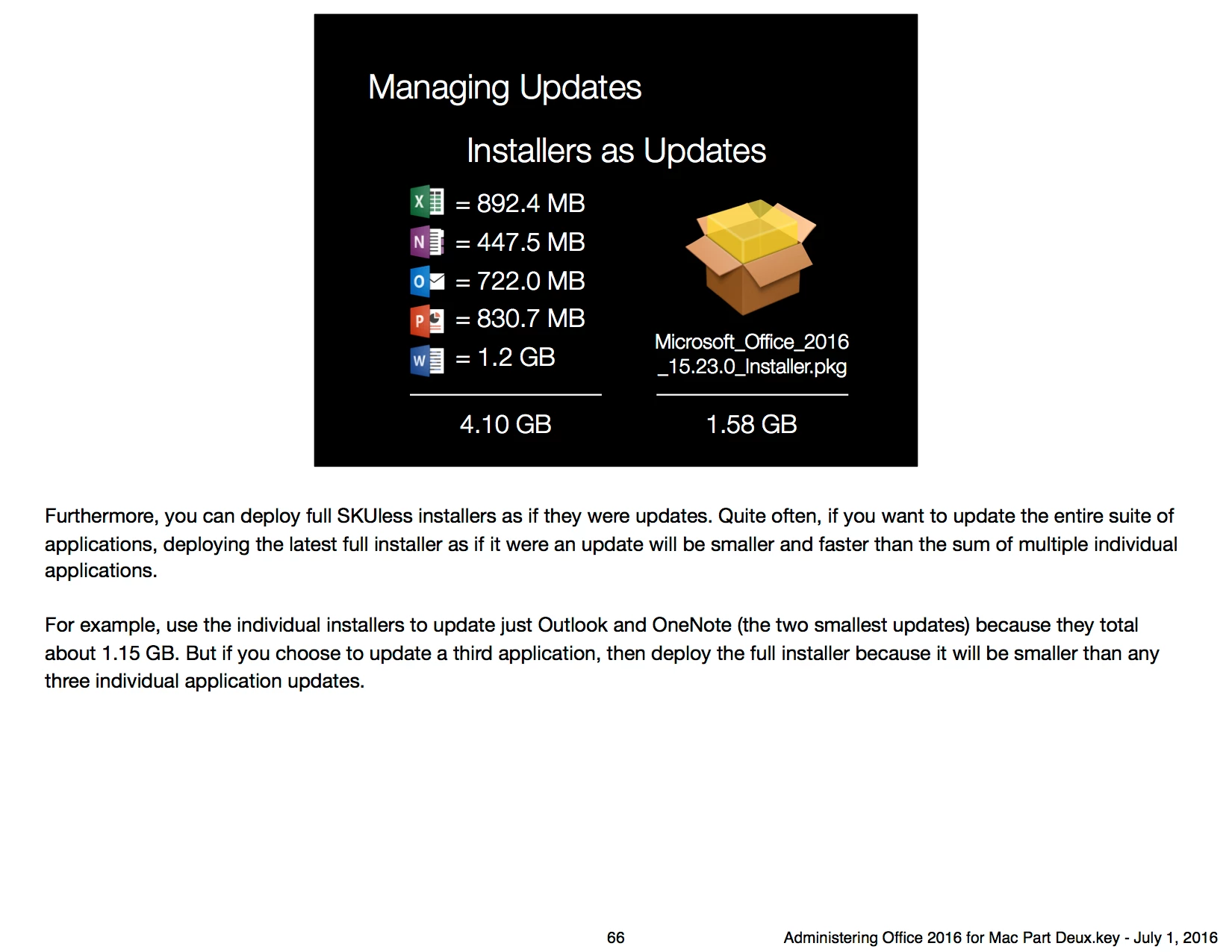
Simply put, if you're updating more than two Office apps, you're better off applying the full 1.5 GB installer as if it were an update. Microsoft supports this method.

With that said, Paul did announce he's working on Microsoft AutoUpdate 4.0, which can run silently. We don't have all the specifics, but MAU already updates using deltas, the total of which are smaller than the 1.5 GB installer. If your environment supports allowing MAU to connect and download updates, then this may be a solution in the near future.


Forum|alt.badge.img+5
  • Contributor
  • July 14, 2016

@talkingmoose, thanks for you response. That definitely coincides with what I've found as far as package sizes. The only problem is, we can't seem to get the "Microsoft" package to either download to the clients from Casper, or run appropriately from a shell command with Apples "Installer" app. Maybe we're just missing something. Any suggestions on that regard?

For MAU 4.0, I gather you are talking about users execute MAU updates themselves? If so, would they run for the users with "Standard" accounts? Would there be a way for Casper to trigger these updates thru MAU?
Or shall I just wait for the video, that explains it all? https://www.youtube.com/user/psumacconf?


dpertschi
Forum|alt.badge.img+19
  • Contributor
  • July 14, 2016

I've taken the approach of simply deploying the entire suite installer each month without issue or concern. I certainly prefer the old 2011 119MB combo updater, but bloated sandboxed apps are all the rage now, cache it for install.

@ronb I'm pulling the O365 installer from http://macadmins.software uploading to Casper as-is and it deploys fine from both AFP and SMB DP file shares. What sort of DP's are you using?

@talkingmoose On the subject of MAU, I follow along with the chatter on the Office Slack channel, but it is easy to miss stuff-- like when you need to focus on production work! In addition to command line MAU, do I understand right that we now have, or will in the near future, the ability to host updates internally and decide what can/cannot be 'published' to MAU?


Forum|alt.badge.img+5
  • Contributor
  • July 14, 2016

dpertschi, I've been using the macadmins.software site to get the installers as well.

We have dp's at our three largest offices - our two remote dp's are a single Mac Mini's with Mac OS 10.11.5. We put large SSD's in them for Casper packages, Apple SUS, and Netbooting. Only at our home office where I'm at do we have two Mac Mini's. We dedicate one for the JSS and the master dp; the other is for Apple SUS and Netbooting. Pretty straight forward, simple setup. We really appreciate the KISS policy.

We have been contemplating getting away from Apple SUS altogether and just use Apple Caching instead. Anyone have any experience going that route?


Forum|alt.badge.img+5
  • Contributor
  • July 14, 2016

Would running the full installer not replace all files that hold the users data such as Outlook email accounts? We you'd have to set them up again?

Maybe I'm wrong and this is kept separate int he User Data folder in Documents? Not entirely sure, but not something I fancy!!


Forum|alt.badge.img+14
  • Contributor
  • July 14, 2016

@betty02 No, re-running the current full installer updates the apps without changing any user data. As Bill mentioned it is a supported/tested update method. I've used it successfully since Office2016 came out with no ill-effects.

@ronb The Office2016 installers have worked without modification for me every time, I don't think people normally have issues with them, this ain't Adobe :) Just download the full suite, drag the pkg to Casper Admin, and deploy. If that isn't working there is something wonky with your config...if you post some errors/logs from the failed installs maybe we can figure it out.


Forum|alt.badge.img+5
  • Contributor
  • July 15, 2016

@Josh.Smith Always good to know you've never had any issues! How does it work for users with Office applications open when it tries to install? Will it fail and then try again after the fail log has been flushed? Or does it quit the app and install the update?