

See my reply to my own post below...I was interested in seeing the difference between the volume license build and the Office 365 build of MS Office 2016. Was referred to Rich's post. Had read it it and was insightful, but wanted to understand Microsoft's logic in creating this weird installer. I think I get it now and posted my findings below. Basically, I figured out how the com.microsoft.office.licensingV2.plist file is generated during installation in the GUI.
- Home
- Community
- Get Support
- General Discussions
- Office 2016 Volume Installer findings
Question
Office 2016 Volume Installer findings
- September 9, 2015
- 166 replies
- 541 views
166 replies
 +11
+11- Contributor
- September 21, 2015
@blackholemac I'm also trying just :
<?xml version="1.0" encoding="UTF-8"?>
<!DOCTYPE plist PUBLIC "-//Apple//DTD PLIST 1.0//EN" "http://www.apple.com/DTDs/PropertyList-1.0.dtd">
<plist version="1.0">
<array>
    <string>com.microsoft.onenote.mac</string>
    <string>com.microsoft.outlook</string>
</array>
   </plist>
But still getting OneNote installing :(
- Author
- Honored Contributor
- September 21, 2015
very strange behavior...I did test it and it worked here.
I only used the following 6 lines though for what it's worth...my text file contained ONLY these lines. Of course I wanted to remove the updater and the volume license file when I did my example.
I also took a moment again to throw open the installer in Pacifist...basically OneNote only shows up in a single package labeled: Microsoft_OneNote_Internal.pkg.
When I did installer -pkg /path/to/officepackage.pkg -target / -showChoicesXML, com.microsoft.onenote.mac was the label for that package.
I will gladly retest, but mine succeeded the other day when did the following 6 lines only in my file...no header, no anything else.
<array>
    <string>com.microsoft.autoupdate</string>
    <string>com.microsoft.licensing.volume</string>
    <string>com.microsoft.onenote.mac</string>
    <string>com.microsoft.outlook</string>
</array>- Contributor
- September 21, 2015
Thanks @blackholemac
I'm using the latest installer downloaded from the https://portal.office.com/ FYI
Will try your exact example, on a newly imaged MAC and report back.
+11- Contributor
- September 21, 2015
I wasn't able to use your exact example, got the malformed error, finally got it working when I removed the <string>com.microsoft.licensing.volume</string>
<array>
    <string>com.microsoft.autoupdate</string>
    <string>com.microsoft.onenote.mac</string>
    <string>com.microsoft.outlook</string>
</array>

OR

<array>
    <string>com.microsoft.onenote.mac</string>
    <string>com.microsoft.outlook</string>
</array>
Still installs OneNote :(
+11- Contributor
- September 21, 2015
Here's the OneNote plist as it appears in our package
<?xml version="1.0" encoding="UTF-8" standalone="no"?>
<!DOCTYPE plist PUBLIC "-//Apple//DTD PLIST 1.0//EN" "http://www.apple.com/DTDs/PropertyList-1.0.dtd">

<plist version="1.0">
    <dict>
        <key>ATSApplicationFontsPath</key>
        <string>Fonts/</string>
        <key>BuildMachineOSBuild</key>
        <string>14E46</string>
        <key>CFBundleDevelopmentRegion</key>
        <string>en</string>
        <key>CFBundleDisplayName</key>
        <string>Microsoft OneNote</string>
        <key>CFBundleDocumentTypes</key>
        <array/>
        <key>CFBundleExecutable</key>
        <string>Microsoft OneNote</string>
        <key>CFBundleGetInfoString</key>
        <string>15.14 (150911), © 2015 Microsoft Corporation. All rights reserved.</string>
        <key>CFBundleHelpBookFolder</key>
        <string>OneNote.help</string>
        <key>CFBundleHelpBookName</key>
        <string>com.microsoft.onenote.mac.help</string>
        <key>CFBundleIconFile</key>
        <string>OneNote</string>
        <key>CFBundleIdentifier</key>
        <string>com.microsoft.onenote.mac</string>
        <key>CFBundleInfoDictionaryVersion</key>
        <string>6.0</string>
        <key>CFBundleName</key>
        <string>OneNote</string>
        <key>CFBundlePackageType</key>
        <string>APPL</string>
        <key>CFBundleShortVersionString</key>
        <string>15.14</string>
        <key>CFBundleSignature</key>
        <string>ONMC</string>
        <key>CFBundleSupportedPlatforms</key>
        <array>
            <string>MacOSX</string>
        </array>
        <key>CFBundleURLTypes</key>
        <array>
            <dict>
                <key>CFBundleURLName</key>
                <string>com.microsoft.onenote.mac</string>
                <key>CFBundleURLSchemes</key>
                <array>
                    <string>onenote</string>
                    <string>onenote-cmd</string>
                </array>
            </dict>
        </array>
        <key>CFBundleVersion</key>
        <string>15.14</string>
        <key>DTCompiler</key>
        <string>com.apple.compilers.llvm.clang.1_0</string>
        <key>DTPlatformBuild</key>
        <string>7A218</string>
        <key>DTPlatformVersion</key>
        <string>GM</string>
        <key>DTSDKBuild</key>
        <string>15A278</string>
        <key>DTSDKName</key>
        <string>macosx10.11</string>
        <key>DTXcode</key>
        <string>0700</string>
        <key>DTXcodeBuild</key>
        <string>7A218</string>
        <key>LSApplicationCategoryType</key>
        <string>public.app-category.productivity</string>
        <key>LSHasLocalizedDisplayName</key>
        <true/>
        <key>LSMinimumSystemVersion</key>
        <string>10.10</string>
        <key>LSRequiresNativeExecution</key>
        <true/>
        <key>MicrosoftBuildNumber</key>
        <string>150911</string>
        <key>MicrosoftExtendedBuildNumber</key>
        <string>15.14/150911</string>
        <key>MicrosoftSetupFeatures</key>
        <integer>1</integer>
        <key>MSOfeedbackAppID</key>
        <string>229</string>
        <key>NSAppTransportSecurity</key>
        <dict>
            <key>NSAllowsArbitraryLoads</key>
            <true/>
        </dict>
        <key>NSHumanReadableCopyright</key>
        <string>© 2015 Microsoft Corporation. All rights reserved.</string>
        <key>NSMainNibFile</key>
        <string>OneNoteApp_mac</string>
        <key>NSPrincipalClass</key>
        <string>MSOApplication</string>
        <key>NSSupportsAutomaticGraphicsSwitching</key>
        <true/>
        <key>UTExportedTypeDeclarations</key>
        <array/>
    </dict>
</plist>
 +35
+35- Hall of Fame
- September 23, 2015
FWIW, I've heard from some people over in the MacAdmins Slack that the next revision of the VL installer should resolve the installer issues for the VL edition.
 +14
+14- Contributor
- September 23, 2015
I am not sure if this is "the one," but I can verify the VL installer I got yesterday is a different version than the one released initially (it was sightly larger in size)
 +4
+4- New Contributor
- September 29, 2015
So, does OneNote still require a login to Office365 in that installer? We're cool over here with using it with our on-prem SharePoint, but forcing a login to Office365 is a deal breaker.

 +21
+21- Esteemed Contributor
- September 30, 2015
Looks like an Office365 account or a Microsoft account is still required:
https://support.office.com/en-ie/article/Sign-in-to-OneNote-for-Mac-with-an-eligible-Office-365-subscription-55e2d4d2-867f-4383-bc55-0977706dd8d1
 +10
+10- New Contributor
- September 30, 2015
you can disable the first tun dialog boxes for one note which allows you to use locally without needing to sign in to office 365
http://macops.ca/disabling-first-run-dialogs-in-office-2016-for-mac/
 +6
+6- Contributor
- November 10, 2015
Should I assume that we do not yet have access to the VL installer? The only full 2016 Mac Office package I see in our VLSC is the attached. It requires an office 365 login. I reached out to our microsoft rep, but haven't heard back yet. 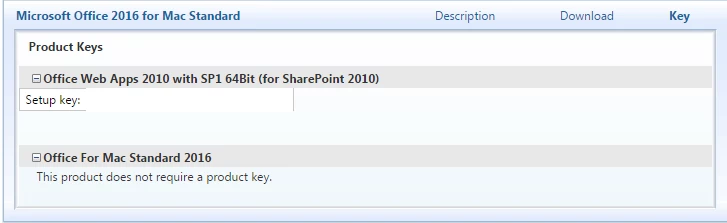
+3- New Contributor
- November 11, 2015
@chmeisch that is the VL installer, i have the same downloads in my VLSC
 +9
+9- Contributor
- November 13, 2015
How to implement Choices.xml in to my JSS Policy?
This has been a very enlightening thread and I have been able to install the Full Office 2016 Volume License with "my" Choices.xml file locally via CLI and it works perfectly. What I do not know and am looking forward to learning, is how to implement the Choices.xml file into my current JSS policy. The policy is configured with the "MS Office 2016 v15.14 Volume License.pkg" installer set to priority 10 and the " MS Office 2016 v15.14 License File.pkg" (packaged with composer) set to priority 11. They run in the correct order and I get a fully installed, licensed Office suite. However, I do want to suppress One note, AutoUpdate and the License volume with my Choices file. Can anyone expand on this and help me learn the proper way to do this? Many Thanks in advance for your help!
- Author
- Honored Contributor
- November 13, 2015
That was the fun part...I got mine working, but I had to get uh..."creative"...lets go with that.
What I did was build a new .pkg containing Microsoft_Office_2016_Volume_Installer.pkg, the choices.xml and the com.microsoft.office.licensingV2.plist. I had the PKG file I created drop those three files to /private/var/tmp. As part of my pkg, I wrote a postinstall script contained below:
#!/bin/sh

# This command installs the actual Microsoft Office Installer package with my choices.xml file applied from /private/var/tmp.
installer -pkg /private/var/tmp/Microsoft_Office_2016_Volume_Installer.pkg -target / -applyChoiceChangesXML /private/var/tmp/choices.xml

# This command removes the Microsoft-supplied installer from /private/var/tmp
rm -R -f /private/var/tmp/Microsoft_Office_2016_Volume_Installer.pkg

# This command removes the choices.xml file from /private/var/tmp
rm -R -f /private/var/tmp/choices.xml

# This command moves (not copies) the licensing file from /private/var/tmp to it's correct location
mv -f /private/var/tmp/com.microsoft.office.licensingV2.plist /Library/Preferences/com.microsoft.office.licensingV2.plist

#This command properly sets ownership on that file
chown root:wheel /Library/Preferences/com.microsoft.office.licensingV2.plist

exit 0
It's kinda kludgy but it works and has been used here on whole labs already.
+5- Contributor
- November 20, 2015
When you first open an office 2016 app and click save the default save location is "Online Locations" and there is a button for "On my Mac" which then stays as the default once its chosen. Has anyone found out where this setting is saved or how to make it the default for users when they first open the applications. From my testing with Composer snapshots and other experiments it is not saved in any user level location and they changing of the setting does not appear to update or add any file on the file system.
EDIT: Answer https://jamfnation.jamfsoftware.com/discussion.html?id=17045
+9- Valued Contributor
- November 21, 2015
I'm not sure what we're trying to fix here. I think I missed the beginning of this conversation which apparently is in another thread.
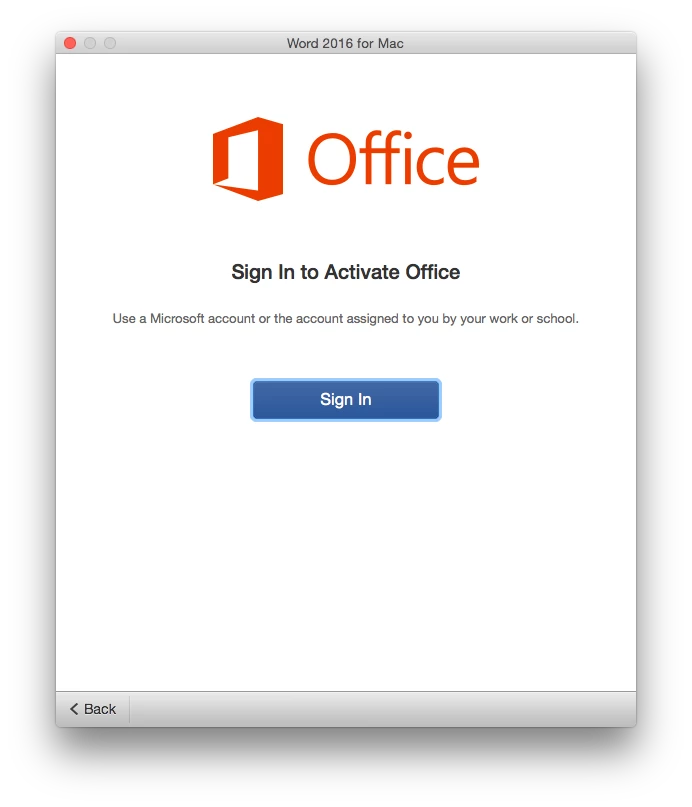
I just downloaded the Volume Installer from my company's VLSC, and ran it on a test imaging configuration. After reboot, I logged into a local test account I created during imaging. I launched Word, and I got the following window. Is this what we're trying to get rid of?
+14- Contributor
- November 21, 2015
You'll have to manually install Office 2016, then capture the licence file (Composer or Packages). Once you have it, you'll have to deploy it separately. It's an issue with the VL installer.
Licence file located at:
/Library/Preferences/com.microsoft.office.licensingV2.plist
+9- Valued Contributor
- November 21, 2015
@Abdiaziz That doesn't really answer my question. Is keeping that window from popping up what this thread is about?

 +36
+36- Hall of Fame
- November 21, 2015
Out client has Office 2016 Volume License (not 365) and we have been following @timsutton and @rtrouton guidelines quite successfully, in our case deploying this file separately, along with suppression:
/Library/Preferences/com.microsoft.office.licensingV2.plist--https://donmontalvo.com
+14- Contributor
- November 21, 2015
Kinda, there's multiple things being talked about in this post.This post is mostly about the issues with the 2016 installer.
To get rid of the window you're seeing, you'll have to do what my last post talked about.
+9- Valued Contributor
- November 21, 2015
OK, from what I can gather reading all the disparate posts, I have to create that file by running one of the apps and "licensing" it? Then create a DMG in Composer to go along with the installation when I have to deploy to many computers. Is this correct?
I also don't want to deploy the AutoUpdater because we handle updates for our users, and I don't want them to get any prompts saying there's an update available. So, is this what the "choices.xml" discussion is about?
+36- Hall of Fame
- November 22, 2015
Yes I remember reading about that license file being distributed to 365 users being unsupported but we have a proper Volume License so it works for us.
--https://donmontalvo.com
+9- Valued Contributor
- November 22, 2015
@donmontalvo Huh? I'm talking about the same thing you said previously. Deploying that
/Library/Preferences/com.microsoft.office.licensingV2.plistThis is extremely confusing. I just want to know how to actually get it in the first place. I have a Volume License. So, from what I understand, I have to:
- Run one of the Office apps first
- Sign in with a Microsoft account it's asking for (I suppose it'd be our VLSC account)
- Capture the com.microsoft.office.licensingV2.plist with Composer
- Create a choices.xml to block the AutoUpdater and that Licensing.pkg from installing.
- Deploy the com.microsoft.office.licensingV2.plist as a separate package with the installer on subsequent computers
Is this the sequence?
Enter your E-mail address. We'll send you an e-mail with instructions to reset your password.
Scanning file for viruses.
Sorry, we're still checking this file's contents to make sure it's safe to download. Please try again in a few minutes.
OKThis file cannot be downloaded
Sorry, our virus scanner detected that this file isn't safe to download.
OK