Question

One Drive for Business Client is here!!

  • December 18, 2015
  • 59 replies
  • 354 views

Show first post

59 replies

dstranathan
Forum|alt.badge.img+19
  • Valued Contributor
  • April 26, 2016

Does anyone know if OneDrive for Mac works with on-premises (local) storage and SharePoint?


bpavlov
Forum|alt.badge.img+18
  • Esteemed Contributor
  • May 17, 2016

Just a heads up. A member of the OneDrive team has joined the #microsoft-office channel on Slack.
http://macadmins.org


Forum|alt.badge.img+9
  • Valued Contributor
  • May 26, 2016

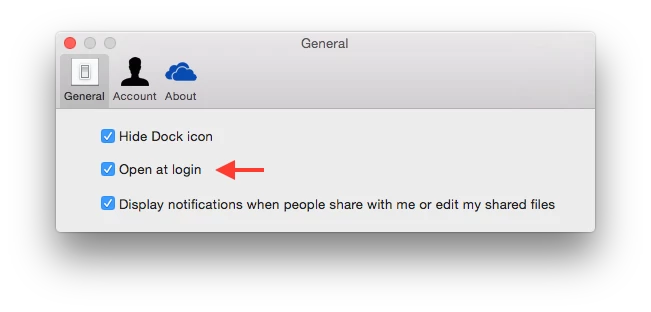
@Josh.Smith On your menubar, click the OneDrive applet, and go to Preferences:

However, I do like your idea of just creating a LaunchAgent that goes in /Library.

As everyone else, I haven't found a way of skipping the folder location screen.


Forum|alt.badge.img+12
  • Contributor
  • July 14, 2016

@Josh.Smith you mind sharing the full script? I want to automate adding one drive to sidebar once i deploy one drive


Forum|alt.badge.img+14
  • Contributor
  • July 14, 2016

@wmateo Sure, that's actually the full script (minus some some comments/versioning/logging, I added the comments back below), then I run it with a LaunchAgent so it runs as the user. There probably should be logic in the script to check for existing conditions....but that wasn't really necessary the way we were using it at the time so I never developed it further.

Script:

#!/bin/sh
loggedInUser=`python -c 'from SystemConfiguration import SCDynamicStoreCopyConsoleUser; import sys; username = (SCDynamicStoreCopyConsoleUser(None, None, None) or [None])[0]; username = [username,""][username in [u"loginwindow", None, u""]]; sys.stdout.write(username + "
");'`

#enables Finder Extension for current user
pluginkit -e use -i com.microsoft.OneDrive-mac.FinderSync

#adds OneDrive to end of current user's Finder SideBar
/PathToMySides/mysides add OneDrive file:///Users/$loggedInUser/YourOneDriveDirectoryName

#Delete the LaunchAgent for this User so it doesn't run at every login
rm ~/Library/LaunchAgents/com.company.OneDriveFinderPreferences.plist

LaunchAgent:

<?xml version="1.0" encoding="UTF-8"?>
<!DOCTYPE plist PUBLIC "-//Apple//DTD PLIST 1.0//EN" "http://www.apple.com/DTDs/PropertyList-1.0.dtd">
<plist version="1.0">
<dict>
    <key>Label</key>
    <string>com.company.OneDriveFinderPreferences</string>
    <key>Program</key>
    <string>/pathToScript/OneDriveFinderPreferences.sh</string>
    <key>RunAtLoad</key>
    <true/>
</dict>
</plist>

Forum|alt.badge.img+12
  • Contributor
  • July 14, 2016

@Josh.Smith Thank You, how is this working for you? Fully Automated? script adds OneDrive folder to the Finder Sidebar?


Forum|alt.badge.img+14
  • Contributor
  • July 14, 2016

Yes fully automated, adds OneDrive to sidebar at next user login. I ran it as part of a self service policy that installed OneDrive. The user has to log out and back in to get the launch agent to run....I think I did it that way because we had a reboot in the policy anyway. You could probably modify it to run directly for one user instead of taking the LaunchAgent approach if desired.


Forum|alt.badge.img+12
  • Contributor
  • July 14, 2016

@Josh.Smith This was very helpful. Thank You!!!!


KyleEricson
Forum|alt.badge.img+17
  • Valued Contributor
  • April 11, 2018

I just want a script to enable the Finder Extension for the current user. Does this need to go into the Launch Agent?