Question

Package could not be verified - Sophos Central

  • November 14, 2017
  • 5 replies
  • 43 views

Forum|alt.badge.img+3

Hello,

I'm stumped with an issue I'm having with a package I'm creating with Composer.

I'm creating a Sophos Central package which drops the installation files into /private/tmp, then runs a postinstall shell script which creates some plists, then calls the installer within the Sophos app.

The package runs independently but as soon as it's uploaded to Casper and run via Remote it fails with the error "Package could not be verified".

A while back I managed to create a Sophos Central installation package (created in exactly the same way as the above), which works when deployed via remote/policies, but any subsequent package (and any edits to the original package) fail.

Anyone have any sage advice?

Many thanks,
Emma

5 replies

Forum|alt.badge.img+13
  • Honored Contributor
  • November 14, 2017

@emmav how are you signing the packages?


Forum|alt.badge.img+3
  • Author
  • New Contributor
  • November 14, 2017

Hi Nix4Life,

How do I go about signing the package in Composer?

Many thanks,
Emma


Forum|alt.badge.img+13
  • Honored Contributor
  • November 15, 2017

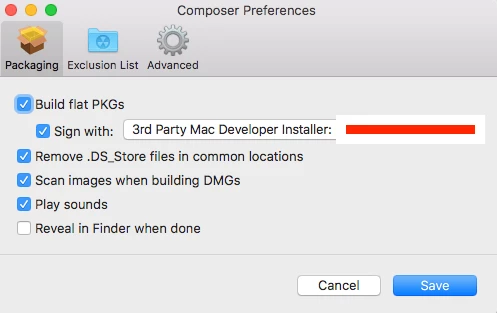
@emmav apologies for the late reply got busy, then JUG. You will need a developer account with Apple. Once that's setup and you have the cert downloaded to your build computer,Open Composer, choose Preferences, then tick the box for Sign With and navigate to your cert.

Apple Developer can be individual or company
Creating a Developer Certificate
Creating Signing IDs


Forum|alt.badge.img+3
  • Author
  • New Contributor
  • November 15, 2017

Hi Nix4Life

Aha! That's perfect, thanks so much!

I'll give it a go and let you know if it did the trick.

Cheers,
Emma


Forum|alt.badge.img+3
  • Author
  • New Contributor
  • November 21, 2017

@Nix4Life Just wanted to thank you for your quick response. What you suggested resolved the issue. Thank you!