Question

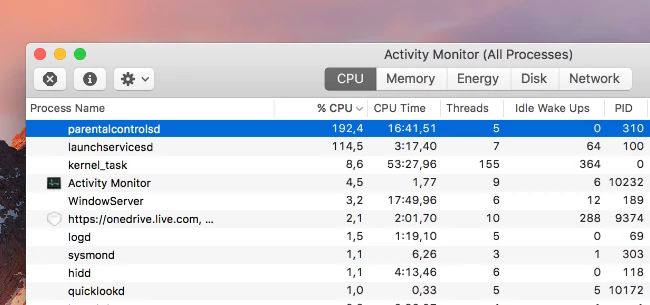
parentalcontrolsd CPU/RAM Usage

  • April 22, 2016
  • 63 replies
  • 272 views

Show first post

63 replies

Forum|alt.badge.img+1
  • New Contributor
  • May 4, 2017

Does anyone have any successful experience running the command below in Sierra 10.12.4 with SIPs enabled? I used to run said command successfully prior to 10.12.4 but it no longer works. I also have end users where parentalcontrolsd is running the CPU hot even with Parental Controls disabled, including the Guest account.

launchctl unload -w /System/Library/LaunchDaemons/com.apple.familycontrols.plist


Forum|alt.badge.img+9
  • Contributor
  • May 4, 2017

This is jank, but it will work (until the next reboot).

#!/bin/bash
pkill -STOP parentalcontrolsd

Forum|alt.badge.img+1
  • New Contributor
  • May 4, 2017

@ owen.pragel

I'll give it a shot and will post back results.


Forum|alt.badge.img
  • New Contributor
  • May 11, 2017

Hi, I'am running on macOS 10.12.4 and still have issue with parentalcontrolsd.


Forum|alt.badge.img+8
  • Contributor
  • May 12, 2017

I'm seeing this as well. Have an open case with Apple and will be submitting some logs/information today. Running 10.12.4, no AD.


Forum|alt.badge.img+1
  • New Contributor
  • May 15, 2017

Unfortunately, I'm still experiencing issues with parentalcontrolsd running hot. Again this is on 10.12.4, no AD and I've used the following scripts with no success.

Script 1 (this worked before 10.12.4):

launchctl unload -w /System/Library/LaunchDaemons/com.apple.familycontrols.plist

Script 2 (no success):

!/bin/bash

pkill -STOP parentalcontrolsd

@tanderson Please let me know if you receive any updates with your Apple ticket.


Forum|alt.badge.img+8
  • New Contributor
  • May 16, 2017

I am experiencing this as well. Just noticed it today on my machine. I am bound to AD on 10.12.4. Thinking about upgrading to 10.12.5 to see if it gets fixed.


Forum|alt.badge.img+8
  • Contributor
  • May 16, 2017

Upgraded to 10.12.5 last night and while it's way too soon to say for sure I haven't seen the issue yet today. We'll see.


Forum|alt.badge.img+9
  • Contributor
  • May 17, 2017

@ocapetillo Even after running

sudo pkill -STOP parentalcontrolsd

you are seeing high CPU usage from the process? Halting the process won't persist through reboots, so if you want to use that technique you'll have to do the needful to ensure it runs when appropriate.

Never said it was pretty. This issue is clearly the result of a bug in macOS from what I understand - see ActivityTracker appDidLaunchOrBecomeFront.


Forum|alt.badge.img+1
  • New Contributor
  • May 17, 2017

@owen.pragel

I'm running "sudo pkill -STOP parentalcontrolsd" as a script that triggers at Jamf inventory check-in, user login, start up & network state change via a Jamf policy. That way even after a reboot, the script / policy triggers again. However my end users are still reporting that parentalcontrolsd is still running CPU resources high. I'll need to reconfirm this myself as I just pushed this policy / script two days ago.

I used to be able to run "launchctl unload -w /System/Library/LaunchDaemons/com.apple.familycontrols.plist" as a script prior to 10.12.4, using the same Jamf parameters mentioned above, and it worked flawlessly. Unfortunately this script stopped working when upgrading to 10.12.4 and I believe this is a result of SIP.

I have NOT tried disabling SIP and launching any of the above scripts but it might be my next step if I can't figure it out with it enabled.


Forum|alt.badge.img+8
  • Contributor
  • May 21, 2017

Just to follow up on my post from 5/17/17. The issue still exists in 10.12.5. It took several days but the high CPU usage has returned.


Forum|alt.badge.img+8
  • New Contributor
  • June 19, 2017

Going to chime in and say this is till happening on my machine as well with 10.12.5. Anyone found a viable fix?


Forum|alt.badge.img+4
  • Contributor
  • June 20, 2017

We have a few 10.12.5 systems with this problem and an open case with Apple Care. Does anyone have a method to reproduce the problem consistently?


Forum|alt.badge.img+5
  • Contributor
  • June 29, 2017

Just piping in to get updates on this thread. Have a user with the same issue.


Forum|alt.badge.img+11
  • Valued Contributor
  • July 11, 2017

I've heard of this issue but not experienced it myself. I've asked the users to create a sysdiagnose and reported it to Apple (Radar #33231868). Maybe it's a duplicate, maybe not, lets see!


Forum|alt.badge.img+6
  • New Contributor
  • July 20, 2017

I have one reported user (our Dean, because of course it would be the Dean) with this issue, a MBP 2016 bound to AD. For good measure, I've wiped the drive and installed 10.12.6 – here's hoping?


Forum|alt.badge.img+4
  • Contributor
  • July 25, 2017

Just a follow up, a fellow JAMF admin posted in MacAdmins.slack.com that gathering app usage information was handled by parentalcontrolsd. In our case, we were collecting plug-in information enabled in Computer Inventory Collection. I've turned off that configuration and users with this problem have seen a great deal of improvement. parentalcontrolsd still runs on their system but no longer consumes high CPU resources. As with others our Macs were also AD bound. So this may not address all issues listed here.


Forum|alt.badge.img+11
  • Valued Contributor
  • July 25, 2017

@Gonzalez, that is interesting! Have you reported this to Jamf Support maybe? Maybe they can investigate and file a Product Issue.

I've got feedback from Apple as well. The reported that the bug is a duplicate of #31942767 of therefor closed the case.

We've created the following script that will solved the issue (temporarily):

#!/usr/bin/env bash

# Reset Parental Controls
#
#
# Temp fix for macOS with high CPU on parentalcontrolsd

# Delete Settings
rm -fr "/Library/Application Support/Apple/ParentalControls"

# Kill proces
pkill -9 parentalcontrolsd

Forum|alt.badge.img+11
  • Valued Contributor
  • July 26, 2017

Our temporarily fix will not solve the issue. We now have unchecked "Collect Plug-ins" from Computer Inventory Collection to see if this might solve the issue.


Forum|alt.badge.img+4
  • Contributor
  • July 26, 2017

@martin Yes, I have an open case with Jamf. And I still have an open case with Enterprise AppleCare hoping to get some final resolution once Jamf comes back with an appropriate response. Others have suggested not collecting any of the software usage stats. If you collect anything in the Software configuration panel from the Computer Inventory Collection, you may need to disable.


Forum|alt.badge.img+11
  • Valued Contributor
  • July 27, 2017

Hi @Gonzalez,

We have seen this in two environments. One has "Collect Application Usage Information" turned on and the other has it turned off. So it seems that this option doesn't make a difference.

  • Martin

Forum|alt.badge.img+1
  • New Contributor
  • August 2, 2017

Also seeing this on 10.12.6.


Forum|alt.badge.img+7
  • Contributor
  • August 10, 2017

@jamescchh Seeing this on 10.2.5 .. updating to 10.12.6 later today to see what happens. I can watch the memory usage go up over time. It will max out at 15 or so gb out of 16


Forum|alt.badge.img+11
  • Valued Contributor
  • August 11, 2017

@jamescchh, @bizzaredm,

Could you let us know if you have "Collect Application Usage Information" and/or "Collect Plug-ins" turn on?

Thanks!


Forum|alt.badge.img+3
  • New Contributor
  • August 21, 2017

Having this issue in 10.12.6. 39.5GB of memory being used by parentalcontrolsd. Wondered why my laptop was being whiny. Killing the process seems to have provided temporary relief.