Question

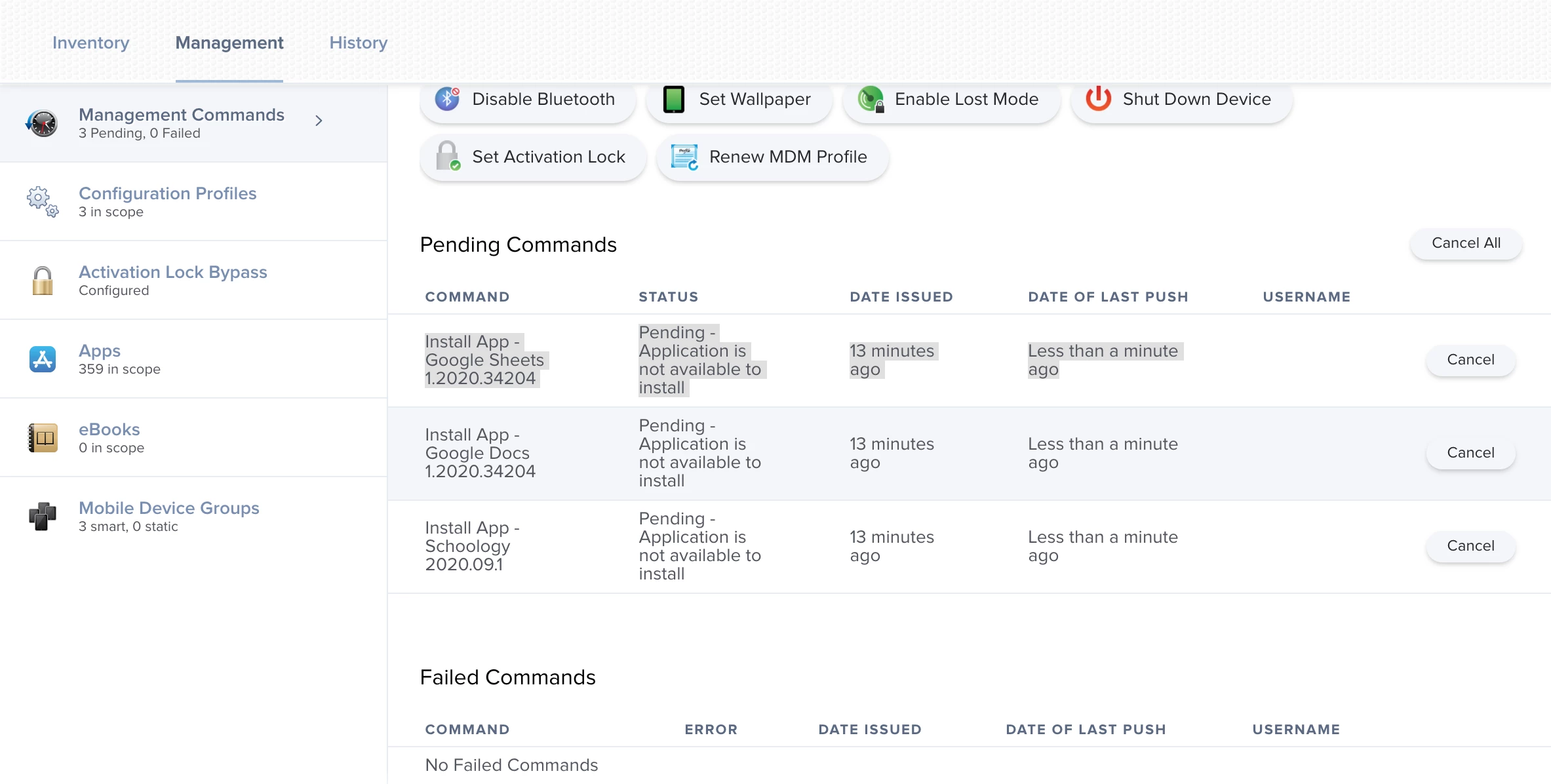
Pending - Application is not available to install

  • September 6, 2020
  • 92 replies
  • 528 views

Show first post

92 replies

Forum|alt.badge.img+12
  • Honored Contributor
  • September 18, 2020

This is now working for us after sending our jamf support the ticket number above with the database fix.

Doesn't look like the PI is listed on their known issues list yet. Would be nice to have some information on what caused this.


atomczynski11
Forum|alt.badge.img+18
  • Jamf Heroes
  • September 18, 2020

This is exciting to hear!

Today I'm seeing no license was found for
I have logged in to ASM as admin and accepted the new TOS yesterday.

Adam


Forum|alt.badge.img
  • New Contributor
  • September 18, 2020

I have experienced this in the past, usually around the same time of the year, deployment time of course.

Support corrects it by restarting the VPP License Monitor, my instance is cloud hosted so they do it from their end. I'm not sure what the process be for on premises servers.


Forum|alt.badge.img+22
  • Employee
  • September 18, 2020

Hello all, Thanks for sharing all this info and contributing to the hive mind that makes Jamf Nation wonderful.

I want to apologize that many of you are being impacted by these VPP issues and that its taken this long to find a solution. We are working on getting a full fledged solution for this problem that will not require database modifications to you in an upcoming release.

Until that time, I want to strongly encourage that if you are impacted by this or anything else, please contact support and work with them on the solution, especially if the workflows involve database modifications.


Forum|alt.badge.img+5
  • Contributor
  • September 21, 2020

Jamf says we are not affected by the database issue, so that workaround is no use. I added two additional free apps this morning in VPP, and so far they show in scope with no attempts at installation, no errors, nothing. Support has taken to asking the same questions over and over expecting a different answer???


Forum|alt.badge.img+6
  • Contributor
  • September 21, 2020

Patiently waiting while holding the door against teachers and students...hold door...HODOR!


DrStrangeTech
Forum|alt.badge.img+3
  • New Contributor
  • September 22, 2020

So in a cloud JAMF environment how do you get to run commands? My entire distribution is now crippled with this problem.


Forum|alt.badge.img+12
  • Valued Contributor
  • September 22, 2020

@DrStr4ng3 I'd imagine support should be able to do that for you.


Forum|alt.badge.img+4
  • New Contributor
  • September 24, 2020

Going to add this to the "me too" pile.

Anyone else getting this error while still going through the rest? I cant get through this problem without manually installing the app as the refresh isn't 100% guaranteed.


Forum|alt.badge.img+7
  • Contributor
  • September 28, 2020

Our issue resolved after running the vpp command against sql. It's been fine since and we are on 10.18. Logs are clean. We have our test server on 10.24.2. So far so good. Only issue I saw upgrading, was that I had to upload our DEP tokens again on both instances of our test environments. Logs were constant with "DeviceEnrollmmentProgramException[responseCode=403, responseBody='token_rejectedForbidden', message='An error occurred during oath token refresh']. As soon as I uploaded the DEP token again, the log errors went away and so did the red triangle in the console.


Forum|alt.badge.img+2
  • New Contributor
  • November 25, 2020

We attempted the following and it worked for us:

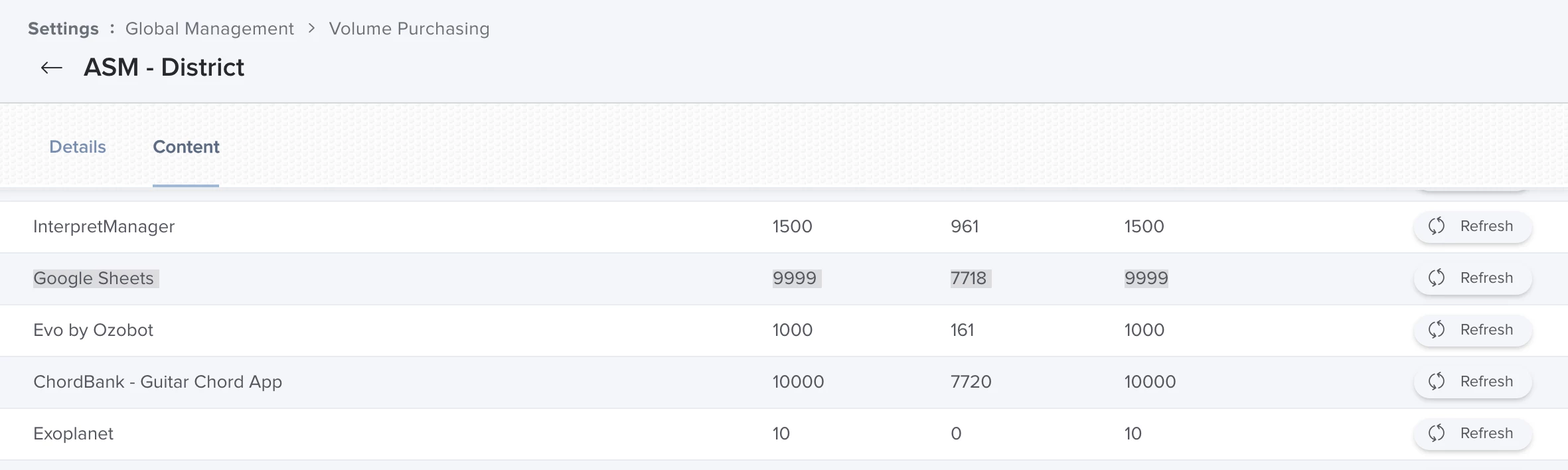
On Jamf Pro, navigate to Settings > Global Management > Volume Purchasing

Select the relevant account used for the problematic app.
Navigate to the "Content" tab
Ensure you are on "iOS App" column and click "Refresh" on one of the apps. does not have to be specifically the problematic app. This may take 5 minutes to reflect.

Check the management log on the problematic mobile device object.


Forum|alt.badge.img+11
  • Contributor
  • February 10, 2021

On ipads, we have had success for some, by deleting self service, checking in and sending a blank push, then self service reinstalls for us, then pending apps all come down. I know we shouldn't have to do this but I wonder if there is a binary in the back end like on Mac OS devices, that won't let self service communicate properly, or if self service doesn't update....


Forum|alt.badge.img+6
  • Contributor
  • February 25, 2021

Bumping this thread. This is happening to us for some apps. Jamf confirms it is an ASM issue.


Forum|alt.badge.img+3
  • New Contributor
  • February 26, 2021

Just to add, we are seeing a similar issue again this morning, but it's not the same as the original issue which we also saw back in September. This time, refreshing the app in the VPP settings doesn't fix the problem, but it appears that only a handful of apps aren't working. Also the logs show Error number 9628 and that the License is not eligible for device assignment.


Forum|alt.badge.img+5
  • Contributor
  • February 26, 2021

I'm having deja vu...terrible terrible deja vu. We're seeing this again in our environment too. Opened a ticket.


Forum|alt.badge.img+26
  • Esteemed Contributor
  • February 26, 2021

Seeing same for the last hour or so, three different schools so far
“Pending - All licenses are in use or the license in not assigned yet”
One was a newly acquired app from ASM, some are apps trying to update their versions, some are on newly activated iPads being set up and some apps will not download. Not all apps are stuck, and some are starting to go but other apps are queuing up and getting the error. On phone with Apple now to report.


Forum|alt.badge.img+26
  • Esteemed Contributor
  • February 26, 2021

My Apps are starting to flow, Apple had no news and recommended refreshing the VPP token (s).
I did that on one, but looked like issue had started to resolve prior to me doing it.