Question

PPPC for CyberArk

  • December 28, 2018
  • 12 replies
  • 66 views

Forum|alt.badge.img+3

Hi all,

I'm testing out Mojave 10.14.2 in our corp environment.
Jamf Pro: 10.8.0

I've tried the PPPC utility to created the config profile for it.
I even created a config profile to white list its kernel extension.
I then deployed the profile and the CyberArkEPM but when I deployed it to the client, it still prompt for user interaction approval.
Need your suggestions.

Thanks in advance.

12 replies

Forum|alt.badge.img+10
  • Valued Contributor
  • December 28, 2018

Our security vendor had instructions with the correct information needed for Kernel Ext Approval such as "Display Name", "Team ID", and the "Bundle ID" -- was pretty straight forward using JAMF's "Approved Kernel Extension" Payload.

As far as the PPPC -- can you provide screenshots with the error you're getting for approval and then a screenshot of the PPPC config ?

Thanks


rqomsiya
Forum|alt.badge.img+12
  • Honored Contributor
  • December 28, 2018

@Chuey Can you share the Display Name, Team ID and Bundle ID?

Thanks,
R


Forum|alt.badge.img+10
  • Valued Contributor
  • January 2, 2019

@rqomsiya I do not have that information for CyberArk .. I would reach out to their support and they should be able to give you this information very easily.


Forum|alt.badge.img+3
  • Author
  • New Contributor
  • January 7, 2019


I found out the Team ID, but error still persist.

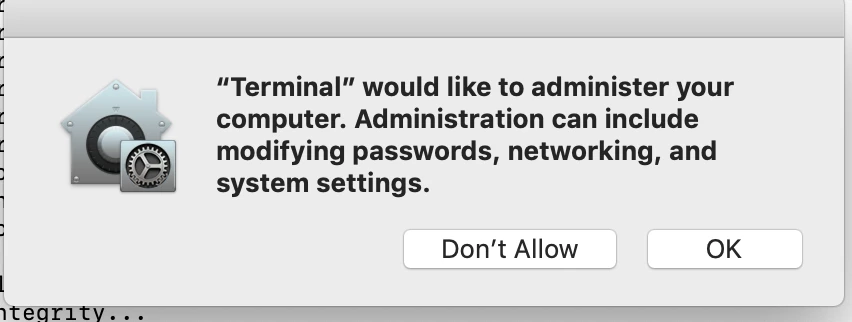
This is message that I received during the installation.


Forum|alt.badge.img+10
  • Valued Contributor
  • January 7, 2019

@thuan Seems like you'd have to use the PPPC Utility to whitelist terminal I suppose.


Forum|alt.badge.img+3
  • Author
  • New Contributor
  • January 8, 2019

hello Chuey,

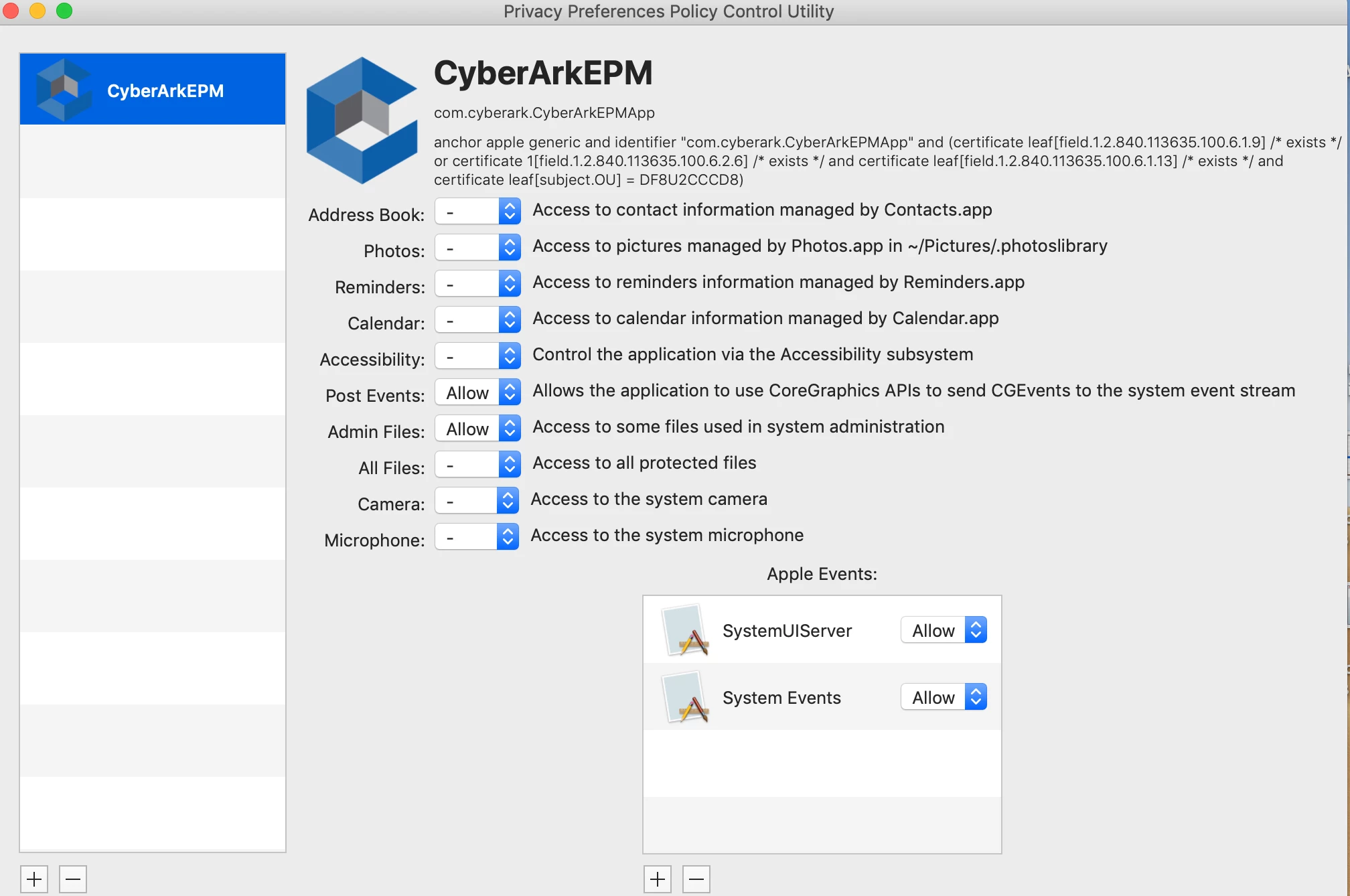
I did that and also white list a few other options, but no luck.


Forum|alt.badge.img+10
  • Valued Contributor
  • January 8, 2019

@thuan I would need to see the PPPC Configuration (screenshots) of how you're building the config profile. Then all you should have to do is go to your JAMF Pro, Config Profiles, Upload, Select, Scope, Done.


Forum|alt.badge.img+3
  • Author
  • New Contributor
  • January 8, 2019


Forum|alt.badge.img+8
  • Contributor
  • August 1, 2019

@thuan where did you find the app to place into the PPPC?


Forum|alt.badge.img
  • New Contributor
  • February 26, 2020

@fneidhardt -- didn't see a response from thuan, but I found the PPPC app here -- https://github.com/jamf/PPPC-Utility

(I'm 6 months late to the game, but the answer will be here for anyone else if you'd already found it.)

edit wait, you were looking for the actual location of the CyberArk application to add to the PPPC not where to get the PPPC (sorry, been a long day). Would love a response from him on that....I only see agent info in /Library/Application Support/CyberArk/ and /Library/Security/SecurityAgentPlugins/CyberArkEPMSecurityAgentPlugin but neither of these seem to be the same. ¯_(ツ)_/¯


summoner2100
Forum|alt.badge.img+7
  • Contributor
  • February 27, 2020

Any package where you need the bundleID and Team ID. Open the package on your machine and click the padlock in the top right. Id's are there.


summoner2100
Forum|alt.badge.img+7
  • Contributor
  • February 27, 2020

To figure out what it needs to allow. Install on a test machine, and manually approve the system preference option. When it shows in the list, right click and it should give you an option to locate in finder. Drag that into PPPC utility. You should be done.