Question

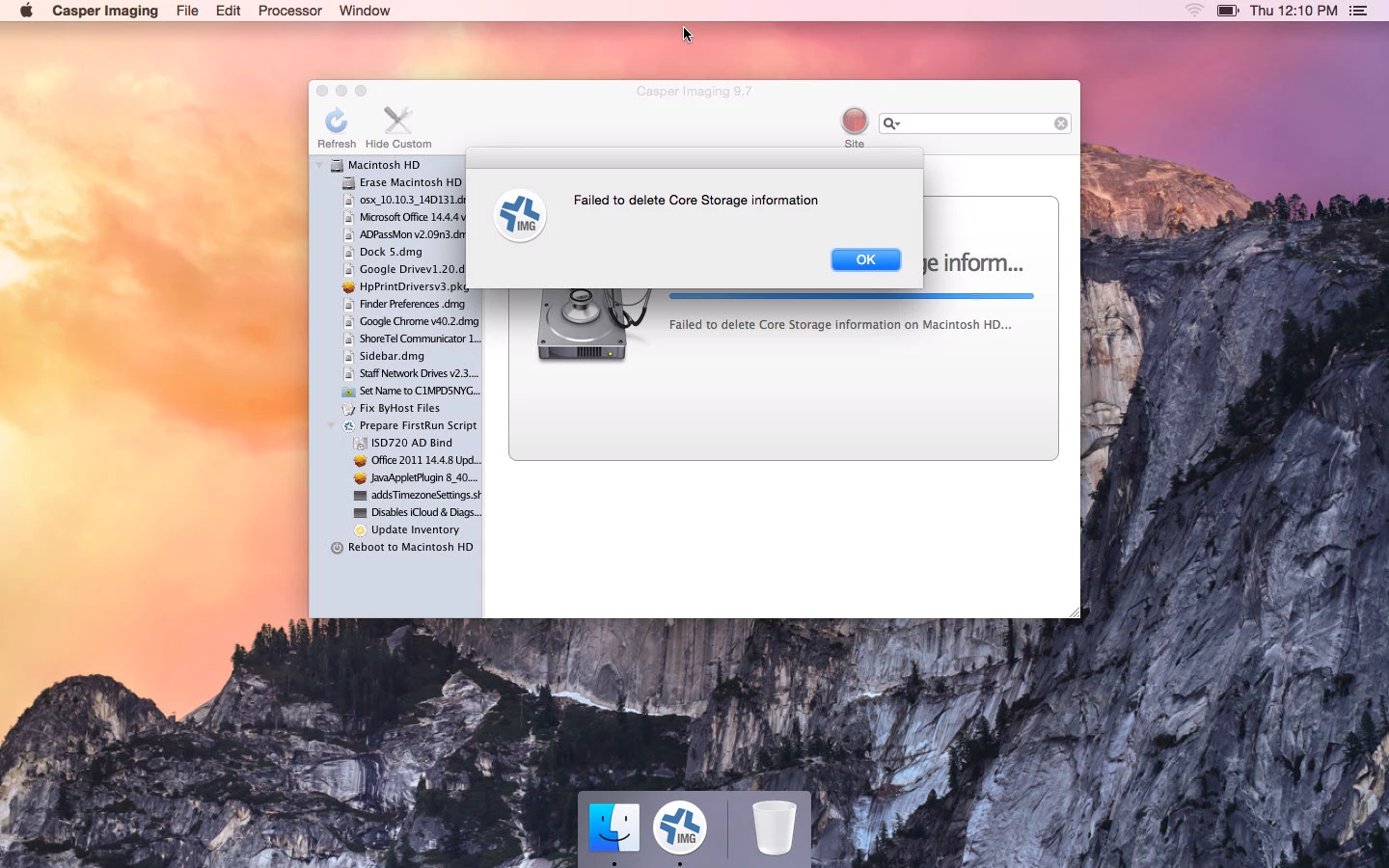
"Failed to delete Core Storage information" during 10.10 imaging

  • March 31, 2015
  • 50 replies
  • 184 views

Forum|alt.badge.img+12

This is on Casper Imaging 9.65.

After creating a config with a base 10.10.2 DMG (but I also used a custom one made from AutoDMG), a user PKG, and a directory binding, I receive this error (screenshot attached) when attempting to image.

This seems to happen on all my images now.

Interestingly enough, this has been happening on devices that already had 10.10. When I attempt to image devices that have 10.9 or below, it seems they can't mount the volume (attached this message as well).

Is there something wrong with my NetBoot set? Very surprised how this has all fallen apart.

50 replies

bentoms
Forum|alt.badge.img+35
  • Hall of Fame
  • March 31, 2015

@btaitt sorry but can't see the images.


Forum|alt.badge.img+12
  • Contributor
  • March 31, 2015

Were you seeing similar behaviour before upgrading your netboot to Casper Imaging 9.65?


Forum|alt.badge.img+12
  • Author
  • Contributor
  • April 1, 2015

@bentoms Odd, don't know why my pictures didn't attach. I'll try again. @Matt.Sim This is new behavior since upgrading to 9.65, yes.

Edit: What a day. Forget it, I'll just host these on imgur:

Imaging to 10.10 drive
Imaging to 10.9 drive


bentoms
Forum|alt.badge.img+35
  • Hall of Fame
  • April 1, 2015

@btaitt Odd. This was one of the fixes in 9.65.

They aren't Fusion or FV2 enabled drives?


Forum|alt.badge.img+12
  • Author
  • Contributor
  • April 1, 2015

@bentoms That's what I thought; I saw a bug similar to Core Storage issues but that was supposed to be fixed. They're not Fusion drives for sure, just 2011 and 2012 MacBook Airs.


Forum|alt.badge.img+12
  • Author
  • Contributor
  • April 1, 2015

@bentoms Sounds like 9.7 was released and I saw this in the release notes, perhaps it's related?

"D-008217 Fixed an issue that prevented Casper Imaging from creating multiple partitions when imaging a drive that has core storage enabled."


bentoms
Forum|alt.badge.img+35
  • Hall of Fame
  • April 1, 2015

@btaitt Can't hurt to try!


Forum|alt.badge.img+12
  • Author
  • Contributor
  • April 6, 2015

Ok, so an update:

  • I updated to 9.65, which resolved some issues but other messages came up.
  • Going to this link from the University of Utah that I found here on JAMF Nation allowed me to fix the other messages and now I'm imaging. Yay!

I don't know why everything was working on previous releases until 9.65 then back on 9.7 but I'll take it.


Forum|alt.badge.img+17
  • Valued Contributor
  • April 9, 2015

I am having this issue as well. I am running 10.10.3 Netboot casper imaging 9.7

"Failed to delete Core Storage information"


chlaird
Forum|alt.badge.img+7
  • Contributor
  • April 16, 2015

@bwiessne are you using a modified rc.netboot?


Forum|alt.badge.img+16
  • Valued Contributor
  • April 16, 2015

Not identicle but related, we are using a script for Deploy Studio to remove existing partitions.
It works perfectly but for whatever reason if there are existing Core Storage volumes it will fail about 10% of the time. Generally you just try again and it works the second time round fine.


Forum|alt.badge.img+9
  • Contributor
  • April 16, 2015

@btaitt Interesting enough, I had issues like this before. If you run a "repair" on the disk before, it would work. In my netboot image, I have created a app that on startup asks if its a "new mac"(meaning having 10.10) on it, if it does, it runs a repair on the disk, then I can proceed to imaging.

Give that a shot and see if that helps.


Forum|alt.badge.img
  • New Contributor
  • April 22, 2015

Just wanted to add that we had the same issue and resolved it by using the modified rc.netboot.


bentoms
Forum|alt.badge.img+35
  • Hall of Fame
  • May 3, 2015

@jasonkramer how were you creating your NBI?


Forum|alt.badge.img+18
  • Valued Contributor
  • May 5, 2015

We are seeing this consistently right now on a large 10.10.3 deployment we are working on. @bentoms The Netboot Image we have is 10.10.3 and was created with AutoCasperNBI 1.2. The source OS Image was created with AutoDMG. @chlaird Yes we had the rc.netboot option checked.
We are running Casper 9.72. We recently updated from 9.63 and so far so good. Before we were actually running Casper Imaging 9.65 with the 9.63 JSS as it seemed to do a better job with 10.10.3 but overall 9.72 does seem to be better. The odd thing to all of this is that if we netboot a bunch of machines and start them they will give that "Failed To Delete Core Storage" error. But if we try to do this a second time it works fine. So something gets done in that first pass that allows it all to run on the second try. So we are still working, but it would be nice if this just worked on the first try. I'm not sure if it's a Netboot Image issue or a Casper Imaging issue. Just to add these machines are new MacBook Pro's out of the box. The factory OS on them is 10.10.1. They have never been booted before.


bentoms
Forum|alt.badge.img+35
  • Hall of Fame
  • May 5, 2015

@rcorbin have you logged a call with support? Would be interesting to see their response.


Forum|alt.badge.img+18
  • Valued Contributor
  • May 5, 2015

Ok @bentoms I will do that right now.


Forum|alt.badge.img+9
  • Contributor
  • May 5, 2015

@rcorbin did you try running a "repair" on the disk before hand and i stated above. We ran into this issue before and this solves the problem. It's only for 10.10 machines.


Forum|alt.badge.img+8
  • Valued Contributor
  • May 14, 2015

Running a repair on the disk before imaging worked for me as well.


Forum|alt.badge.img+17
  • Honored Contributor
  • July 16, 2015

Saw this "Failed to delete Core Storage information" for the first time today. Casper imaging 9.65 imaging new 13 (non retina) macbook pros. Strange only some machines in the order though. Using AutocasperNBI with modified netboot.rc file. Having techs try disk repair.


bentoms
Forum|alt.badge.img+35
  • Hall of Fame
  • July 16, 2015

@CasperSally :( I have had success with Casper Imaging 9.65 myself, as per this post.

Can you try Casper Imaging 9.72?


Forum|alt.badge.img+1
  • New Contributor
  • July 22, 2015

I'm also seeing "failed to delete Core Storage information" in Casper Imaging 9.72 in a netboot set created with AutoCasperNBI using a 10.10.4 image from AutoDMG. I'm not seeing this in netboot sets created with Casper NetInstall Image Creator.


Forum|alt.badge.img+1
  • New Contributor
  • July 22, 2015

We are also having exactly same problem in Casper 9.72, from a 10.10.4 image with new iMac's

At present we have had to use workaround due to the time frame of getting them out, format the drive....it fails, try again it formats succesfully and then the image process works fine, not ideal but got us through for now, need to obviously find a suitable fix once this deployment is completed.


bpavlov
Forum|alt.badge.img+18
  • Esteemed Contributor
  • July 22, 2015

I just saw this today. However if I unmount and remount the partition and then try to run Casper Imaging again it seems to work fine. I ran into this in a brand new out of the box Mac for what its worth.


Forum|alt.badge.img+1
  • New Contributor
  • July 29, 2015

We have been having this issue since today, -on a new macbook pro retina -image is 10.10.4
-made with autocasper nbi

-another image with winclone

tried repairing,remounting the drive to no succes. Any new ideas?