Question

Rapid 7 Mac Insight Agent

  • July 31, 2019
  • 54 replies
  • 608 views

kjenkins
Forum|alt.badge.img+2

Has anyone found an easy way to deploy the Rapid7 Mac Insight Agent using Jamf

54 replies

Forum|alt.badge.img+2
  • New Contributor
  • July 31, 2019

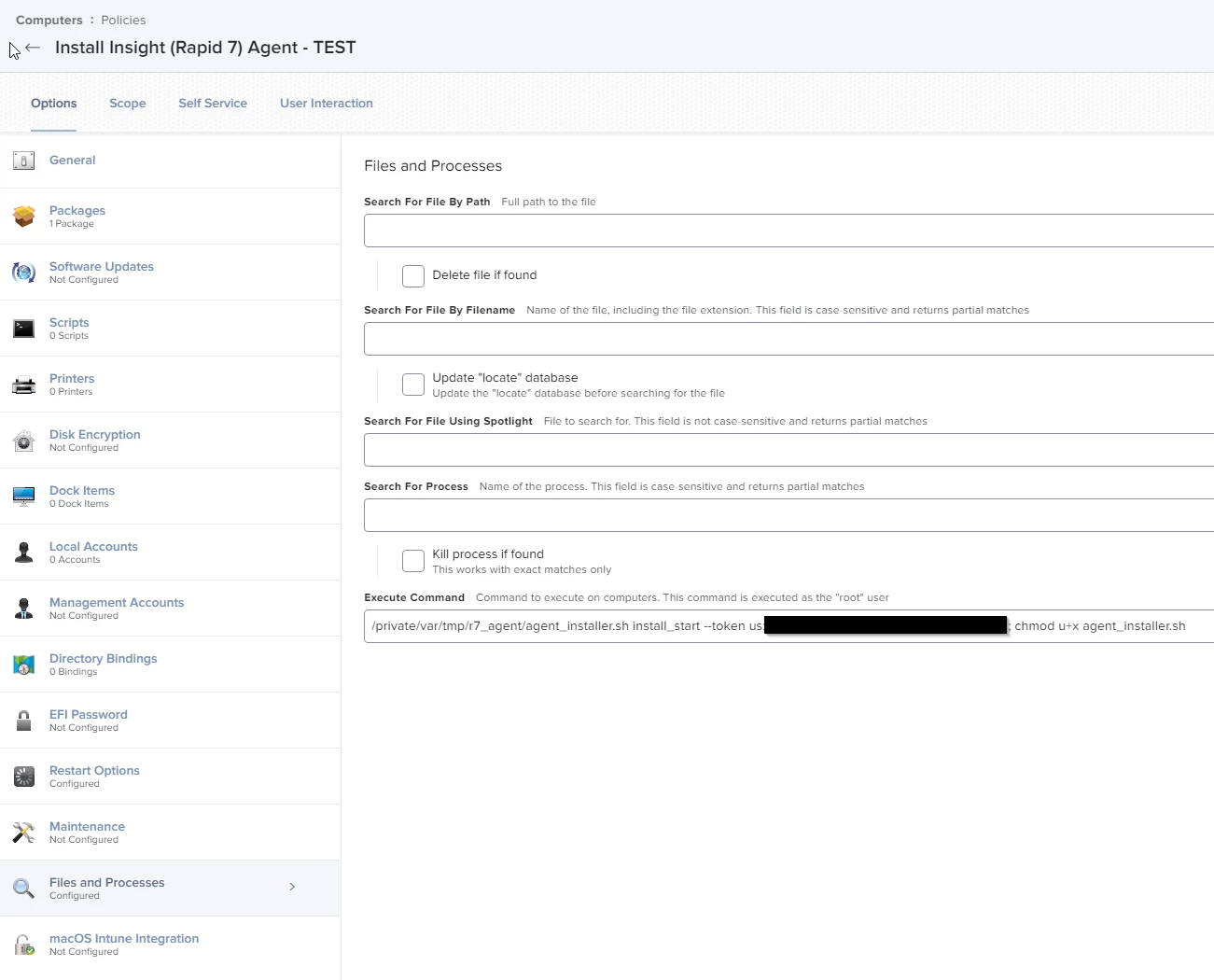
I used Composer to put the agent_installer.sh file onto our Macs in the /private/tmp/ directory. I had an issue with the permissions on the script so I have a post install script file in the composer package to change the permissions on the script file chmod u+x. In the Jamf policy I have Files and Processes setup to execute the command along with installing the package made in composer. sh /private/tmp/agent_installer.sh install_start --token <your token>
I got the agent_installer.sh and the token from my InfoSec team. Rapid 7 would be able to give you that information as well I'm sure. replace <your token> with the token setup for your company.


kjenkins
Forum|alt.badge.img+2
  • Author
  • New Contributor
  • August 1, 2019

Thanks for the help.

KJ


Forum|alt.badge.img+1
  • New Contributor
  • September 17, 2019

Thank you, this helped alot. I decided to just create the package in composer, then have a script run after the pkg was pushed to change permissions and execute the agent_installer.sh


Forum|alt.badge.img+3
  • New Contributor
  • January 8, 2020

Hello,

Has anyone found a way to uninstall the Rapid7 Agent via script?


Forum|alt.badge.img+4
  • New Contributor
  • January 8, 2020

@cnoboa I have had success using basically the same install package I built in composer and just changed my pre-install script to do the command: sudo ./agent_installer.sh uninstall
And that seems to work. So you should be able to do the same with a script that points to the location of the agent_installer.sh script with the uninstall command.


Forum|alt.badge.img+2
  • New Contributor
  • February 14, 2020

I'm having this same issue, I'm relatively new to composer and osx so I'm looking on how I can achieve this. How do you use composer to package the agent_installer.sh and have it moved to /private/tmp


Forum|alt.badge.img+1
  • New Contributor
  • February 26, 2020

@soms First create the folder in your location. For example /private/tmp/Rapid7. Put all your files into your folder. Open Composer, and drag the folder from finder into composer. Then you can create a package. In Jamf, set it to install in your policy and it will just install the files to the path you set up. I set a script to run afterwards to install the agent with the token. Make sure you chmod u+x in the script like @coryhowell2 said.


markopolo
Forum|alt.badge.img+9
  • Contributor
  • May 7, 2020
I set a script to run afterwards to install the agent with the token. Make sure you chmod u+x in the script like @coryhowell2 said.

Where exactly do I put the "chmod u+x"? Do I run as separate command after the installer like this?


Forum|alt.badge.img+3
  • New Contributor
  • May 11, 2020

@mcantwell I think coryhowell2 meant that you need to create a script in the settings for the chmod, and then back to the policy, from the left side bar (fourth from the top) choose the script you just made and choose the priority to 'after'. Now the script will run after everything else.

I am currently doing this exact same thing, and I was wondering that if I have a package with the agent_installer, and then I have the install command in the 'Files and Processes', doesn't that mean that the package (with the agent_installer.sh) will run before the executable command in the 'Files and Processes' which should activate the agent_installer?


Forum|alt.badge.img+7
  • New Contributor
  • November 2, 2020

so here's is my conundrum: When I deploy my policy I am using a .pkg with dropping the agent_installer.sh in the correct folder, plus the uninstall command. Then I am running the actual install from a command in "Files and Processes" using the following command: sudo ./agent_installer.sh install_start --token xxxxxxxxxxxxxxxxxx. But when automagically deployed it doesn't recognize the command, however if I flush the log and then go into terminal and do a sudo jamf policy manually the policy works beautifully. Am I missing something?


dwynn
Forum|alt.badge.img+5
  • Contributor
  • April 16, 2021

@soms Can you share the script you use to install the package? I have the installer in private/tmp/Rapid7. Now I just need the chmod + token script.


Forum|alt.badge.img+1
  • New Contributor
  • April 27, 2021

@dwynn

This is what I use, and works with no issue. Put your Rapid7 token in and you should be good. I have the script set to run after the package is pushed.

!/bin/bash

cd /private/tmp/Rapid7

chmod u+x agent_installer.sh

sudo sh ./agent_installer.sh install_start --token=us:"token given to you"


dwynn
Forum|alt.badge.img+5
  • Contributor
  • April 29, 2021

@PCSysops We have over 30 operating companies in our Jamf instance. Each one will need to put the company attribute into the install command like so:

insight_installer.sh install_start --token us:xxxxxxxxxx --attributes "CompanyAttribute Agent"

So what I did was in composer create the InsightVM package with "chmod u+x /private/tmp/InsightVM/insight_installer.sh" in a post install script.

Then create in the policy in Jamf Pro. Configure "Files and Proccess" and add /private/tmp/InsightVM/insight_installer.sh install_start --token us:xxxxxxxx --attributes "CompanyAttribute Agent" into Execute Command.

I hope this helps anybody else coming across this issue.


Forum|alt.badge.img+5
  • Contributor
  • June 2, 2021

I am very new to doing this type of packaging. Can someone give me the steps they used in Composer to create the package that has the folder it is in and such. I am being asked to roll this out to our company. In the near future.

Thanks


Forum|alt.badge.img+3
  • New Contributor
  • October 22, 2021

Could anyone tell me how to verify the agent was installed correctly? Thanks!


Forum|alt.badge.img+5
  • Contributor
  • October 22, 2021

I had my infosec team verify from the rapid7 console.


dwynn
Forum|alt.badge.img+5
  • Contributor
  • October 22, 2021

Could anyone tell me how to verify the agent was installed correctly? Thanks!


You can run the command: ps aux | grep ir_agent


https://docs.rapid7.com/insight-agent/agent-controls/


dmcnicholas1
Forum|alt.badge.img+1
  • New Contributor
  • April 29, 2022

Hello, I was able to get the file copied to the /private/tmp folder and run the command. According to my security team the device is still not reporting in. Does the ir_agent need to be granted full disk access?


dwynn
Forum|alt.badge.img+5
  • Contributor
  • November 30, 2022

Hello, I was able to get the file copied to the /private/tmp folder and run the command. According to my security team the device is still not reporting in. Does the ir_agent need to be granted full disk access?


What do the Policy Logs details say for that machine?


dmcnicholas1
Forum|alt.badge.img+1
  • New Contributor
  • November 30, 2022

Actually, the issue was with the dashboard. Seems it took 48 hours to start reporting in. Now all of my devices are reporting with no issues. 


Forum|alt.badge.img+4
  • Contributor
  • February 23, 2023

Hello,
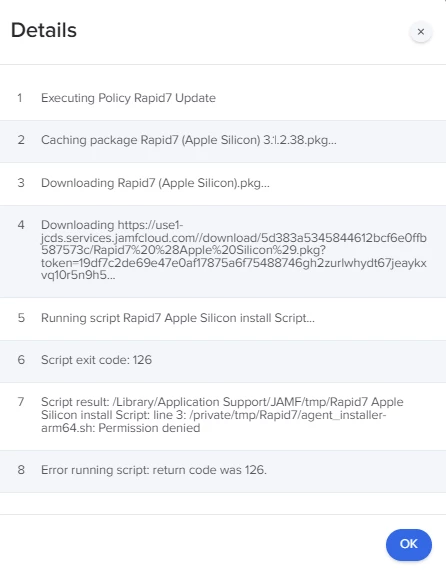
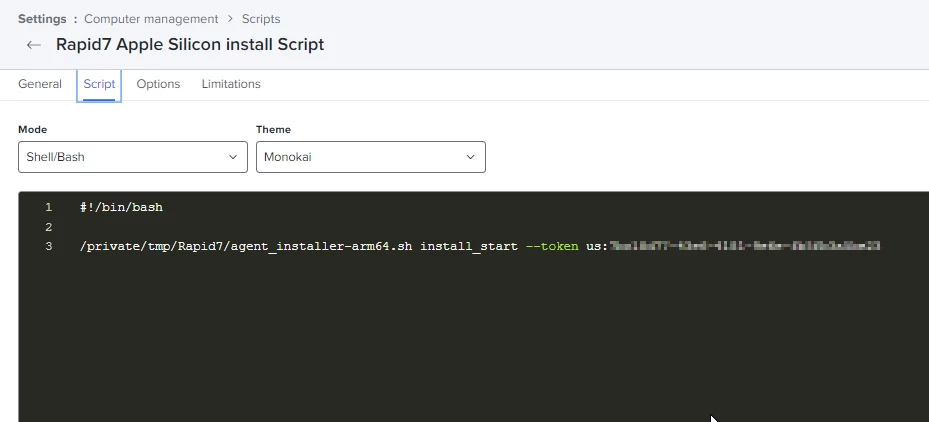
We have about 40% of our devices not getting the Rapid7 portion of our enrollment for whatever reason.  These devices are about 30% intel, 70% carbon chipsets.  I have dinked around with a handful of scripts but the screenshot I uploaded is the original script that has successfully worked on a little over half of our devices.  I went in and edited to some of the information above as in including the chmod and sudo portions mentioned by PCSysops but logs returned 'Failed' results as well, although they didn't return a permissions issue, they returned a "File not found" error instead.

Does this look familiar to anyone?  Any advice is greatly appreciated.

Kerry


Forum|alt.badge.img+2
  • New Contributor
  • March 7, 2023

Hello,
We have about 40% of our devices not getting the Rapid7 portion of our enrollment for whatever reason.  These devices are about 30% intel, 70% carbon chipsets.  I have dinked around with a handful of scripts but the screenshot I uploaded is the original script that has successfully worked on a little over half of our devices.  I went in and edited to some of the information above as in including the chmod and sudo portions mentioned by PCSysops but logs returned 'Failed' results as well, although they didn't return a permissions issue, they returned a "File not found" error instead.

Does this look familiar to anyone?  Any advice is greatly appreciated.

Kerry


Be sure to change permissions in the install script.

Ex.

#!/bin/bash

chmod u+x /private/tmp/Rapid7/agent_installer-arm64.sh

/private/tmp/Rapid7/agent_installer-arm64.sh install_start --token us:Your Token Goes Here

rm -rf /private/tmp/Rapid7

exit 0


JevermannNG
Forum|alt.badge.img+8
  • Valued Contributor
  • April 4, 2023

Just wondering if I can use the following folder for the Rapid7 installation files because I want to keep them for the case of a re-installation:

/usr/local/bin/


JevermannNG
Forum|alt.badge.img+8
  • Valued Contributor
  • April 4, 2023

Hello,
We have about 40% of our devices not getting the Rapid7 portion of our enrollment for whatever reason.  These devices are about 30% intel, 70% carbon chipsets.  I have dinked around with a handful of scripts but the screenshot I uploaded is the original script that has successfully worked on a little over half of our devices.  I went in and edited to some of the information above as in including the chmod and sudo portions mentioned by PCSysops but logs returned 'Failed' results as well, although they didn't return a permissions issue, they returned a "File not found" error instead.

Does this look familiar to anyone?  Any advice is greatly appreciated.

Kerry


Hey @kprimm 

Did you run the chmod command prior the script executing?


JevermannNG
Forum|alt.badge.img+8
  • Valued Contributor
  • April 4, 2023

Could anyone tell me how to verify the agent was installed correctly? Thanks!


Hey @DJRizzo 

not sure if the question is still open but we use the following EA to collect the Rapid7 Status:


#!/bin/bash if [ -e /opt/rapid7/ir_agent/ir_agent ]; then versionCheck=$(/opt/rapid7/ir_agent/components/insight_agent/insight_agent --version | awk '/Semantic/ {print $3}') sleep 2 lastExecuted=$(date -r $(cat /opt/rapid7/ir_agent/components/insight_agent/common/config/agent.jobs.tem_realtime.json | awk '/remote_execution_last_collection_time/ {print$2}' | sed s/,//g)) sleep 2 echo "<result>Version: $versionCheck Date: $lastExecuted</result>" else echo "<result>Agent Not Installed</result>" fi