Question

RCE 0-day exploit found in log4j

  • December 10, 2021
  • 42 replies
  • 260 views

Forum|alt.badge.img+3

hello together!
A zero day exploit has been found which affects the latest version of jamf.
https://www.lunasec.io/docs/blog/log4j-zero-day/

This exploit affects the java logger log4j, which is used by Jamf. If you are hosting an onpremise version, take a look at the JSSAccess.log to check for anomalies.

42 replies

Forum|alt.badge.img+4
  • New Contributor
  • December 10, 2021

Thanks for sharing it @Elies, any idea how can I upgrade log4j to the latest version? 


Forum|alt.badge.img+3
  • Author
  • New Contributor
  • December 10, 2021

Start your server with log4j2.formatMsgNoLookups set to true, or update to log4j-2.15.0-rc1 or later.


Forum|alt.badge.img+3
  • Author
  • New Contributor
  • December 10, 2021

Here is the cve for completeness:
CVE-2021-44228


Forum|alt.badge.img+7
  • Contributor
  • December 10, 2021

Thanks for sharing.
Does it help to restrict the access to computer only and to disable the login on the JSS page? 


Forum|alt.badge.img+3
  • Author
  • New Contributor
  • December 10, 2021

No. Currently only workaround is to start your server with log4j2.formatMsgNoLookups set to true, or update to log4j-2.15.0-rc1 or later. If you want to be updated you can check this blog post for possible mitigations:
https://www.lunasec.io/docs/blog/log4j-zero-day/


Forum|alt.badge.img+3
  • Author
  • New Contributor
  • December 10, 2021

Specific for Jamf Pro:
Edit this file: 

webapps/ROOT/WEB-INF/classes/log4j2.component.properties


and add 

log4j2.formatMsgNoLookups: true

restart your jamf instance.


Forum|alt.badge.img+6
  • Contributor
  • December 10, 2021

So you can either set that in log4j2.component.properties, or in the Tomcat Java Arguments, right?


Forum|alt.badge.img+9
  • Contributor
  • December 10, 2021

Specific for Jamf Pro:
Edit this file: 

webapps/ROOT/WEB-INF/classes/log4j2.component.properties


and add 

log4j2.formatMsgNoLookups: true

restart your jamf instance.


Thank you Elies. Every place I was looking was just saying set formatMsgNoLookup to true. Not very helpful if you do not knot the filename or proper format. This saved a lot of time.


Forum|alt.badge.img+3
  • New Contributor
  • December 10, 2021

I added the following as a second line. Does anyone know how to update to the recent version? 

log4j2.formatMsgNoLookups: true


Forum|alt.badge.img+3
  • New Contributor
  • December 10, 2021

Any indication whether this affects Jamf Infrastructure Manager?


Forum|alt.badge.img+9
  • Valued Contributor
  • December 10, 2021

Any indication whether this affects Jamf Infrastructure Manager?


ooohhhh.....I wanna know this as well....!  I have JIM's in my environment.  


Forum|alt.badge.img+2
  • New Contributor
  • December 10, 2021

I applied the mitigation and I have been checking the JSSAccess.log I don't see anything out of the ordinary.


All seems ok? What would I be looking for? Running a few scans on the server just to make sure all is ok.


I went through this with Exchange in March and didn't like it at all! 😞


seabash
Forum|alt.badge.img+7
  • New Contributor
  • December 10, 2021

Our friend @bentoms shared this link in MacAdmins #security in which Jamf CISO posted about Third-Party Security Issue. I cross-posted in comments, in case official Jamf response differs at all from this.

Thanks, @Elies !


michaelprice
Forum|alt.badge.img+9
  • Contributor
  • December 10, 2021

Specific for Jamf Pro:
Edit this file: 

webapps/ROOT/WEB-INF/classes/log4j2.component.properties


and add 

log4j2.formatMsgNoLookups: true

restart your jamf instance.


Not seeing the log4j2.component.properties file on either of our nodes.  We only have log4j2-default.xml and log4j2.xml.  Performed a find for *.properties files in ROOT and didn't find it.


Forum|alt.badge.img
  • New Contributor
  • December 10, 2021

Any indication whether this affects Jamf Infrastructure Manager?


Sure looks like it from what I can see.


Forum|alt.badge.img+5
  • Contributor
  • December 10, 2021

I added the extra line to log4j2.component.properties on an on-prem Jamf Pro 10.32 server and then restarted Tomcat.  It took a long time to begin responding to http requests, but it did eventually come back up.  Is there a way to test that this successfully mitigated the CVE?


Forum|alt.badge.img+10
  • Valued Contributor
  • December 10, 2021

If you are running Windows server and IIS you can also check your IIS logs for lines that contain 'jndi'.  They will be located in a directory similar to this: C:\\inetpub\\logs\\LogFiles\\W3SVC1\\

Also, the default path to the JSSAccess.log on Windows Server is C:\\program files\\jss\\logs\\JSSAccess.log


Forum|alt.badge.img+17
  • Valued Contributor
  • December 10, 2021

@Elies is that workaround for all versions of Jamf Pro?


Forum|alt.badge.img
  • New Contributor
  • December 11, 2021

For anyone who comes back to this thread, official word is out:

https://docs.jamf.com/technical-articles/Mitigating_the_Apache_Log4j_2_Vulnerability.html


donmontalvo
Forum|alt.badge.img+36
  • Hall of Fame
  • December 11, 2021

Jamf just released 10.34.1 to remediate the zero-day vulnerability.


Forum|alt.badge.img+17
  • Valued Contributor
  • December 11, 2021

Thanks @donmontalvo. As @Eric_Wacker pointed out with the link, Jamf Support passed the mitigation steps out to use for those whom don't want to take the jump right away..


donmontalvo
Forum|alt.badge.img+36
  • Hall of Fame
  • December 11, 2021

Thanks @donmontalvo. As @Eric_Wacker pointed out with the link, Jamf Support passed the mitigation steps out to use for those whom don't want to take the jump right away..


Yep, same effort for us, we chose the dot update since it was released so quickly. Plus it’s raining here.


Forum|alt.badge.img+2
  • New Contributor
  • December 11, 2021

If you are running Windows server and IIS you can also check your IIS logs for lines that contain 'jndi'.  They will be located in a directory similar to this: C:\\inetpub\\logs\\LogFiles\\W3SVC1\\

Also, the default path to the JSSAccess.log on Windows Server is C:\\program files\\jss\\logs\\JSSAccess.log


I’m looking through the JSSAccess.log I really don’t see anything out of the ordinary what am I looking for?


Forum|alt.badge.img+3
  • Author
  • New Contributor
  • December 13, 2021

I have applied the patch from Jamf and can confirm that JNDI code from the log is no longer triggered.
log4j2.formatMsgNoLookups: true is no longer necessary if you are on 10.34.1.

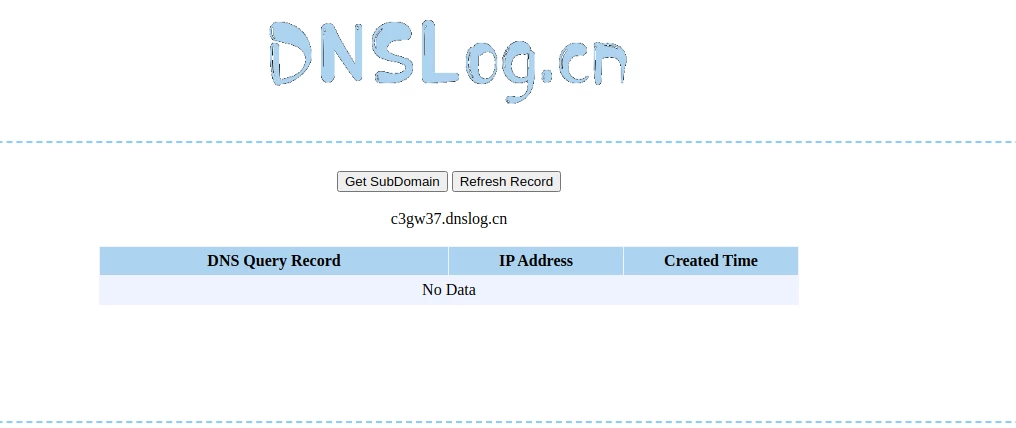
If you want to test it yourself, generate a domain at http://www.dnslog.cn/ and build a jndi command with the domain and try to log in to your jss with the jndi string. If you are still vulnerable, your dns records should be visible on the page where you generated the domain.


Forum|alt.badge.img+6
  • Contributor
  • December 13, 2021

I have applied the patch from Jamf and can confirm that JNDI code from the log is no longer triggered.
log4j2.formatMsgNoLookups: true is no longer necessary if you are on 10.34.1.

If you want to test it yourself, generate a domain at http://www.dnslog.cn/ and build a jndi command with the domain and try to log in to your jss with the jndi string. If you are still vulnerable, your dns records should be visible on the page where you generated the domain.


We have just confirmed our on-premise server is compromised, found a malicious jamf.ps file, not sure if the best course of action is to restore from backup and update server or to simply remove jamf.ps file and update server?