Solved

Remove login Keychain logout hook

  • March 10, 2016
  • 11 replies
  • 8 views

Forum|alt.badge.img+8

Would anyone have any idea on how to script a logout hook to remove the entire login keychain of the user logged in?

Best answer by davidacland

@m.higgins that would be:

#!/bin/bash

user=$(ls -la /dev/console | cut -d " " -f 4)
rm -rf /Users/$user/Library/Keychains/*

exit 0


11 replies

dpertschi
Forum|alt.badge.img+19
  • Contributor
  • March 10, 2016
#!/bin/bash

user=$(ls -la /dev/console | cut -d " " -f 4)
rm -rf /Users/$user/Library/Keychains/login.keychain

exit 0

Ran as a policy triggered by Logout.


Forum|alt.badge.img+13
  • Honored Contributor
  • March 10, 2016

You could also try Alan Siu's Offset here
which is an offshoot of Outset


Forum|alt.badge.img+8
  • Author
  • Contributor
  • March 11, 2016

Thanks @dpertschi but this hasn't rectified my problem.

We have our managed clients bound to Active Directory, as soon as a user changes their AD password it flags up issues with the login keychain. I was hoping removing it on logout would rectify it but it doesn't


Forum|alt.badge.img+8
  • Author
  • Contributor
  • March 11, 2016

Would there be a way to remove everything in the users keychain folder?


bentoms
Forum|alt.badge.img+35
  • Hall of Fame
  • March 11, 2016

@m.higgins Have you tried ADPassMon?


davidacland
Forum|alt.badge.img+18
  • Valued Contributor
  • Answer
  • March 11, 2016

@m.higgins that would be:

#!/bin/bash

user=$(ls -la /dev/console | cut -d " " -f 4)
rm -rf /Users/$user/Library/Keychains/*

exit 0

apizz
Forum|alt.badge.img+15
  • Honored Contributor
  • March 11, 2016

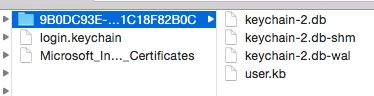
what @davidacland said. You need delete more than just the login.keychain from the user's Keychains folder. There's a folder as well which is unique to the user.

We're looking to deploy ADPassMon in the near future to (hopefully) streamline the process a bit because we too use AD.


Forum|alt.badge.img+17
  • Valued Contributor
  • March 11, 2016

My version, which backs up the old one in case a need for it arises:

#!/bin/bash
#
# Deletes the user keychain folder.

backup_name="keychain_backup_`/bin/date +"%Y_%m_%d_%H%M"`.gz";
target_user=$3;
folder_path="$(/usr/bin/id -P $target_user | /usr/bin/cut -d: -f9)/Keychains/";
/usr/bin/ditto -ck "$folder_path" "$folder_path../$backup_name";
/bin/rm -rf "$folder_path";
/usr/bin/su $target_user -c "/bin/mkdir -p "$folder_path"";

Forum|alt.badge.img+8
  • Author
  • Contributor
  • March 15, 2016

Excellent responses one and all

Fixed the problem perfectly


Forum|alt.badge.img+4
  • Contributor
  • December 15, 2016

Hello,

Quick question. To make this work, would I need to create a script out of the code above, then place it in the scripts part of the policy that I've created (after uploading it to the JSS of course)?

Thanks!


Forum|alt.badge.img+12
  • Valued Contributor
  • December 15, 2016

It's been a big help for my lab macs...thanks!