Question

Report to see who has installed today’s fix for the root vulnerability?

  • November 29, 2017
  • 51 replies
  • 227 views

john_sherrod
Forum|alt.badge.img+17

What’s the best way to do this. Apple pushed out the fix just now. How can I tell which of my Macs has installed it?

51 replies

Forum|alt.badge.img+7
  • Contributor
  • November 29, 2017

Assuming that your Macs have submitted inventory, you can look for High Sierra build 17B1002.

Source: https://support.apple.com/en-us/HT208315


john_sherrod
Forum|alt.badge.img+17
  • Author
  • Valued Contributor
  • November 29, 2017

Thanks!


Forum|alt.badge.img+7

@irobinso Thanks for that information. Fortunately, none of our macs are running that build yet.

Does anybody know how to disable the App Store so that my users don't accidentally install this update?


mm2270
Forum|alt.badge.img+24
  • Legendary Contributor
  • November 29, 2017

@isterling.goaaa Say what?? Why would you not want to have this update installed? It fixes a major security issue in 10.13.x that allows trivial access to the root account. Not understanding. :-/


Forum|alt.badge.img+8
  • Contributor
  • November 29, 2017

Just make the High Sierra installer restricted software if your clients are not @ 10.13.x yet. Don't disable the App Store.


Forum|alt.badge.img+8
  • Contributor
  • November 29, 2017

@mm2270 I think @isterling.goaaa meant none of his clients are running High Sierra yet, or at least that's how I interpreted it.


Forum|alt.badge.img+12
  • Valued Contributor
  • November 29, 2017

I have 23 computers running the exploitable version. Im just waiting for Apple to publish the PKG file so i can push it via a policy.


Forum|alt.badge.img+7

Maybe I misunderstood... It's build 17B1002 that is affected, yes? If so, why would I want to install a security update that opens a great big hole on my systems? Currently, none of us running 17B48 in my office (there are four of us out of 120 deployed machines running High Sierra) seem to be affected by this issue ... or at least we're unable to replicate it.


Forum|alt.badge.img+7
  • Contributor
  • November 29, 2017

@isterling.goaaa , 17B1002 fixes an issue that is present in all High Sierra versions before it, it doesn't introduce the issue.


mm2270
Forum|alt.badge.img+24
  • Legendary Contributor
  • November 29, 2017

See the post here for the downloadable package.

It shows up in the App Store on a 10.13.1 system, but it shows up rather strangely in the softwareupdate command line.


Forum|alt.badge.img+7

@irobinso ok, thanks for the clarification. I'll grab it and push it out.


Forum|alt.badge.img+3
  • New Contributor
  • November 29, 2017

Forum|alt.badge.img+12
  • Valued Contributor
  • November 29, 2017

@geekyink wrong OS... published back on Oct 31 2017


Forum|alt.badge.img+3
  • New Contributor
  • November 29, 2017

@DylanMurphy There goes Apple naming updater .pkg's the same again.... https://support.apple.com/en-us/HT208315


Forum|alt.badge.img+12
  • Valued Contributor
  • November 29, 2017

@geekyink yeah, i downloaded that package and pushed it to my test computer. When it failed it realized that it was the wrong package because it complained about needing OS 10.12. Very annoying!


Forum|alt.badge.img+9
  • Valued Contributor
  • November 29, 2017

And..... for once the Security Update DOESN'T REQUIRE A REBOOT!!!!! Yay!


cashman
Forum|alt.badge.img+5
  • New Contributor
  • November 29, 2017

@geekyink & @DylanMurphy - Does anyone have the .pkg file to push or have another work around then?


Forum|alt.badge.img+12
  • Valued Contributor
  • November 29, 2017

@cashman.tech Not yet. i'm still waiting for the Apple official version. i found this but i'm not sure how much i trust it. https://twitter.com/_inside/status/935910171888508929


Forum|alt.badge.img+7

I downloaded the 10.13.1 Supplimental update in dmg format and was unable to install it locally onto my machine either by policy or just simply running the package. Any suggestions?


mm2270
Forum|alt.badge.img+24
  • Legendary Contributor
  • November 29, 2017

@cashman.tech Use this link
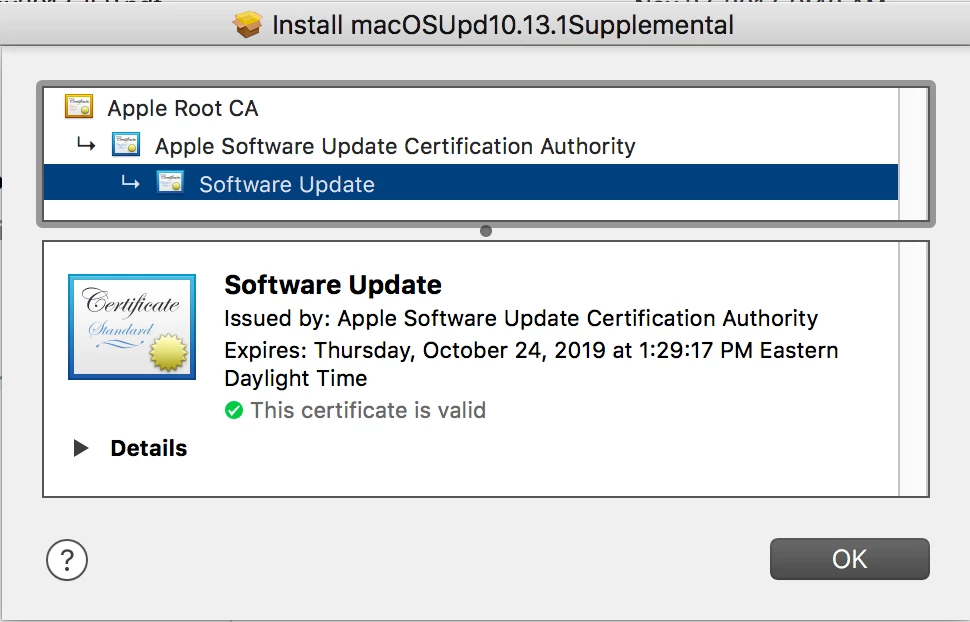
It's a direct download from Apple's swcdn, not from an article on their site, but it's the real thing, as the certificate verifies it's from Apple

The best thing would be for Apple to publish it as a standalone download from a posting on their support site. I don't see one out there yet, but hopefully they will do that soon.


Forum|alt.badge.img+12
  • Valued Contributor
  • November 29, 2017

@mm2270 Awesome!! how did you see the certificate?


Forum|alt.badge.img+7

I found the DMG of the supplemental update here, but the .pkg file within didn't want to run on my mac.


mm2270
Forum|alt.badge.img+24
  • Legendary Contributor
  • November 29, 2017

@DylanMurphy When you get the pkg install, double click it to open it in Installer.app. Before clicking any buttons, there's a lock icon in the upper right hand corner of the Installer window. Click that to see the certificate chain.


Forum|alt.badge.img+12
  • Valued Contributor
  • November 29, 2017

@mm2270 perfect thanks! @isterling.goaaa im getting the same error when trying to push via JSS


emily
Forum|alt.badge.img+26
  • Hall of Fame
  • November 29, 2017

FWIW, it looks like the the receipt for the update is com.apple.pkg.update.os.10.13.1Supplemental.17B1002.

For those looking for reporting around it being installed, you can use that receipt for a smart group. Probably need to give machines time to check in for inventory to get a real idea, though.