Question

Reporting last user ID and last time logged on

  • April 23, 2015
  • 11 replies
  • 187 views

Forum|alt.badge.img+6

I can see in Casper where it will report the last user to log into the computer but does anyone know of a way to have Casper also report the Date-Time that the user logged in. I have the extension attribute "Last User" turned on. But I also need to know what time they logged in also.

Thanks.

11 replies

davidacland
Forum|alt.badge.img+18
  • Valued Contributor
  • April 23, 2015

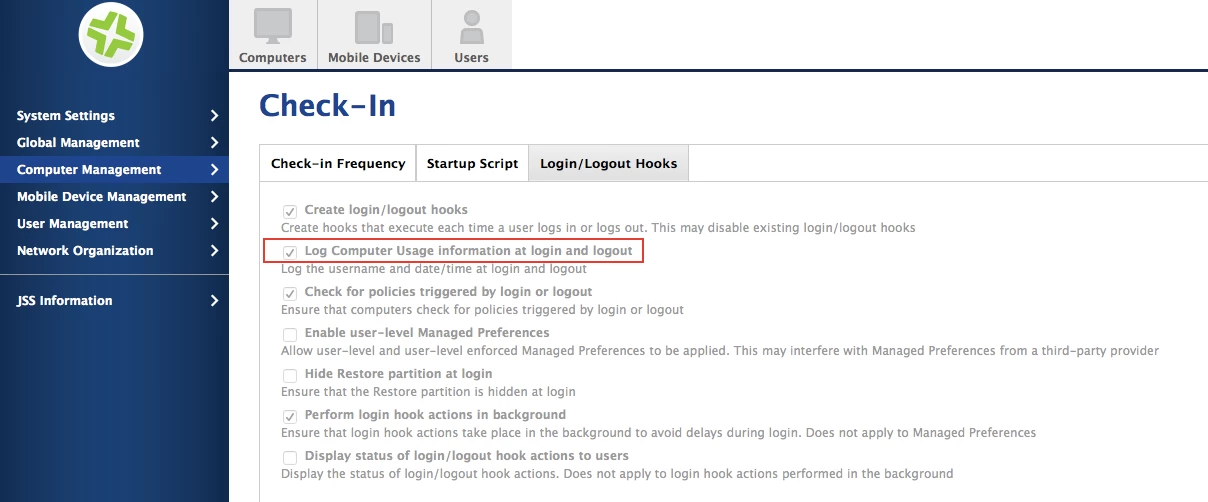
That info can be logged automatically in the JSS settings. At some of our edu sites we extract the data on a monthly basis and calculate usage stats to spot where Macs aren't being used.


Forum|alt.badge.img+16
  • Valued Contributor
  • April 23, 2015

You could make a custom EA that returned the results of

last -1 -t console

It would only return it during an inventory update of course


Forum|alt.badge.img+6
  • Author
  • Contributor
  • April 24, 2015

Ok, I have found that setting and I apparently already had that turned on. But I am not seeing the last login time information in the Computer Inventory reports that I am exporting from Casper. I must be missing something. I have looked at the computer inventory display settings and I don't see where I can enable the option to display the last login time.

Any help would be greatly appreciated.
Thanks


davidacland
Forum|alt.badge.img+18
  • Valued Contributor
  • April 24, 2015

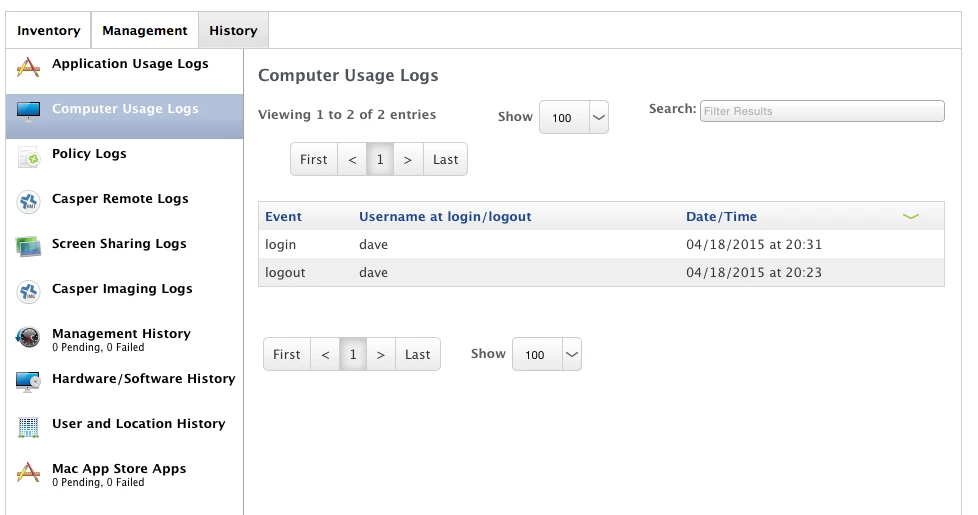
It should be visible in the computer usage section of the history tab in a computer record. Are you seeing anything like this:


donmontalvo
Forum|alt.badge.img+36
  • Hall of Fame
  • April 24, 2015

It would be great to pull a report for the last N days without having to resort to screenshots. The info is in the database, guessing someone with crafty scripting skills might be able to (or already has) find a way to pull a report on login/logout names/dates/times a group of computers. Off to submit a Feature Request.


Forum|alt.badge.img+6
  • Author
  • Contributor
  • April 24, 2015

Ok, so I found the last user login date and time information in the computer usage logs but like the previous poster said. Having to take a screen shot of the info does not work very well when I need to generate reports of this info. I was hoping it would be a part of the computer inventory tab where I can export the info along with the rest of the inventory.

Is this possible???


davidacland
Forum|alt.badge.img+18
  • Valued Contributor
  • April 24, 2015

Hi,

There's nothing available in the REST API but if you read the table "usage_logs" with select * from usage_logs you'll see a couple of columns; computer_id, date_entered_epoch, action, person. From this you can determine the date & time and the computer it is referring to.

Could be scripted to export from the mysql server into a more useful format.

Word of warning though, don't write anything back into the Mysql DB and be very careful with your commands. Ideally, try this out on a test system to avoid trashing your live JSS!


Forum|alt.badge.img+6
  • Author
  • Contributor
  • May 12, 2015

I am still looking for a viable solution to getting the login date-time of the last user to login. Since the information is there in the computer usage logs. Is there any way to export from the JSS the computer usage logs. Then I could try to combine this information with the inventory reports I have to send out.


davidacland
Forum|alt.badge.img+18
  • Valued Contributor
  • May 12, 2015

Not as far as I know in the GUI or via the API. It will either have to be a scripted export from mysql or the way you're doing it at the moment.

Looking at the feature requests, it seems this is what others have had to do.

All the necessary information is stored in the single mysql table so it is possible.


Forum|alt.badge.img
  • New Contributor
  • June 24, 2015

Does it log historical data as well? I am in a situation where i need the last TWO logged in users (need to compare to see if they are the same user). We are still in process of deploying, and I can't turn on login hooks yet until some additional tests are run (and a test environment comes up)


davidacland
Forum|alt.badge.img+18
  • Valued Contributor
  • June 24, 2015

It does keep a log of all users have logged in. It keeps it for the lifespan of the log (depending on your log flushing settings).