Question

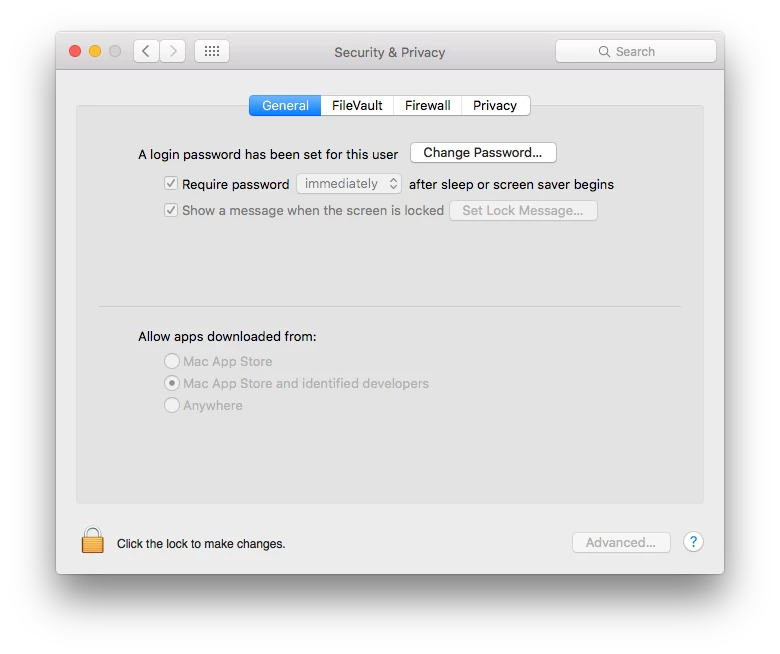
Require Password after sleep or screen saver begins.

  • March 12, 2014
  • 72 replies
  • 319 views

Forum|alt.badge.img+2

I have a Configuration Profile setup the require password after sleep or screen saver. I have it scoped to only my computer and one other. On my computer the box is greyed out and checked, but when I start screen saver it does not require the password to unlock, it jut reopens. On the second system the check box is empty but the selection is greyed out. My system is running 10.9.2
Second System is running 10.8.5

Any Ideas?

72 replies

Forum|alt.badge.img+7
  • Contributor
  • March 12, 2014

I'm having the same issue! Looking forward to a fix


bentoms
Forum|alt.badge.img+35
  • Hall of Fame
  • March 12, 2014

Both, try MCX instead. Works for us.

I can post screen shots of what we've set tomorrow.


bentoms
Forum|alt.badge.img+35
  • Hall of Fame
  • March 12, 2014

Both, try MCX instead. Works for us.

I can post screen shots of what we've set tomorrow.


Forum|alt.badge.img+2
  • Author
  • New Contributor
  • March 12, 2014

Bentoms, that would be much appreciated.


Forum|alt.badge.img+12
  • Valued Contributor
  • March 13, 2014

try removing the loginwindow payload and use a passcode payload in stead.

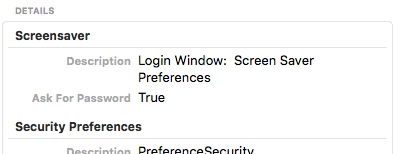
There appears to be a "askForPassword = false" hard coded into the login window MDM payload for some reason. On your client, check System Information --> "Profiles" and look for the askForPassword key under your LoginWindow MDM payload --> "com.apple.screensaver". I bet it's false on systems that do not prompt for a password. This setting conflicts with the effective permissions shown under System Information --> "Managed Client". If you use MCX ("Custom" MDM payload) to manage com.apple.screensaver AND a loginwindow MDM payload, it will look and act correct the first login or two, then the effective permissions for askForPasword will switch to false without warning. At least that's been my experience. "askForPassword = false" also seems to override "forcePIN = true" in cases where a loginwindow payload and a passcode payload are applied at the same time.

This issue has been recently escalated to both JAMF and Apple.

hope this helps


Forum|alt.badge.img+10
  • Valued Contributor
  • March 13, 2014

I've had such inconsistency pushing this setting that I'm now just filling existing users and the user template with an appropriately configured com.apple.screensaver.plist.


Forum|alt.badge.img+18
  • Esteemed Contributor
  • March 13, 2014

Funny part is I DONT have this configured, but do have other configuration profiles managing Login screen and Energy Saver settings and we randomly see machines (on 10.8) asking for a password when waking from sleep (even though the energy saver settings I'm pushing are set not to let the machine sleep).
Really frustrating,
Gabe Shackney
Princeton Public Schools


Forum|alt.badge.img+4
  • Contributor
  • March 18, 2014

Has anyone else noticed this? I started noticing inconsistent result on laptops that would occasionally not ask for password, but I am having this issue consistently with all my Mac minis.


Forum|alt.badge.img+4
  • Contributor
  • September 11, 2014

I'm just wondering if there are any updates on this issue? We are currently facing this problem in our 10.9.2 SOE. We deploy all of our client settings with configuration profiles. The "Login Window" payload holds a number of settings that are required in our SOE. To eliminate the deployment of this payload just to resolve the screen lock password problem is simply not practical for us. Our JSS is 9.25.

Cheers, Ron.


Forum|alt.badge.img+5
  • Contributor
  • April 17, 2015

having same issue with 10.10.3 macbook airs

I have: "Require password after sleep or screen saver begins" enabled in my security and Privacy config profile. But it has no affect

should be asking for password after these keyboard shortcuts:
shift+control+power or alt+command+power

jss v9.52


RobertHammen
Forum|alt.badge.img+29
  • Esteemed Contributor
  • April 17, 2015

Here's how I'm doing it: Script/LaunchAgent combination. This way, the script is run as the user when they log in, and it also sets default values, in case the users have changed things).

Script (named setscreensaveroptions.sh, located in /Library/Scripts with chmod +x permissions):

#!/bin/sh

#turn it on
defaults write com.apple.screensaver askForPassword -bool true
#set the delay in seconds, 0 = immediate
defaults write com.apple.screensaver askForPasswordDelay 0
#set the screen saver delay in seconds, 900 = 15 minutes
defaults -currentHost write com.apple.screensaver idleTime 900

LaunchAgent (named com.company.setscreensaveroptions.plist, located in /Library/LaunchAgents owned by root:wheel with POSIX 644 permissions):

<?xml version="1.0" encoding="UTF-8"?>
<!DOCTYPE plist PUBLIC "-//Apple//DTD PLIST 1.0//EN" "http://www.apple.com/DTDs/PropertyList-1.0.dtd">
<plist version="1.0">
<dict>
  <key>Label</key>
  <string>com.company.setscreensaveroptions</string>
  <key>ProgramArguments</key>
  <array>
    <string>/Library/Scripts/setscreensaveroptions.sh</string>
  </array>
 <key>KeepAlive</key>
<dict>
    <key>SuccessfulExit</key>
    <false/>
</dict>
</dict>
</plist>

Forum|alt.badge.img+5
  • Contributor
  • April 17, 2015

still seems to work with 10.9.5 though...


bentoms
Forum|alt.badge.img+35
  • Hall of Fame
  • April 17, 2015

@TreeMan IIRC, JSS 9.6+ offer 10.10.x support.


Forum|alt.badge.img+5
  • Contributor
  • April 17, 2015

Thanks Robert! I'll try that.


Forum|alt.badge.img+5
  • Contributor
  • April 17, 2015

And thank you bentoms!


Forum|alt.badge.img+16
  • Valued Contributor
  • April 19, 2015

On 10.10.3 the setting works but it defaults to 5 minutes after screensaver has activated.
We got around it by importing the immediate option as a custom entry for a configuration profile, seems to work without any issues.


Forum|alt.badge.img+12
  • Contributor
  • April 21, 2015

@Look Can you tell me what settings you changed to the screensaver.plist file for the custom entry?


Forum|alt.badge.img+12
  • Contributor
  • April 21, 2015

The check box for "require password after sleep or screen saver begins" doesn't appear to make a different in Casper. Running on mac version 10.10.3.


Forum|alt.badge.img+16
  • Valued Contributor
  • April 21, 2015

Pretty sure all I did was edit my ~/Library/Preferences/com.apple.screensaver.plist file and then import it in as a custom configuration after editing the askForPasswordDelay key to 5.

<?xml version="1.0" encoding="UTF-8"?>
<!DOCTYPE plist PUBLIC "-//Apple//DTD PLIST 1.0//EN" "http://www.apple.com/DTDs/PropertyList-1.0.dtd">
<plist version="1.0">
<dict>
    <key>askForPassword</key>
    <integer>1</integer>
    <key>askForPasswordDelay</key>
    <string>5</string>
    <key>tokenRemovalAction</key>
    <integer>0</integer>
</dict>
</plist>

What shows in Casper is

Preference Domain: 
com.apple.screensaver
Property List File:
{tokenRemovalAction=0, askForPassword=1, askForPasswordDelay=5}

Forum|alt.badge.img+16
  • Valued Contributor
  • April 21, 2015

Set at Computer Level


Forum|alt.badge.img+12
  • Contributor
  • April 21, 2015

What kind of editor are you using to edit plists? Thanks.


Forum|alt.badge.img+12
  • Contributor
  • April 21, 2015

nevermind, i downloaded textwrangler. Thanks!


Forum|alt.badge.img+16
  • Valued Contributor
  • April 22, 2015

@brandobot TextWrangler user from forever here :)


Forum|alt.badge.img+5
  • Contributor
  • April 22, 2015

@Look Thanks! that did the trick for me!


Forum|alt.badge.img+8
  • Valued Contributor
  • January 14, 2016

I'm having this issue after upgrading to ElCapitan.

All of the settings look correct, even edited the plist to the same settings as the Config Profile.

Screen will not lock. Anyone know if this is an Apple of JAMF bug?