Solved

Restart Computer After X Days of Uptime

  • March 31, 2022
  • 34 replies
  • 357 views

Forum|alt.badge.img+3

I am trying to find a way to create a policy that will restart a computer after it's been up for X number of days. I don't want it to force a reboot instantly though. I want the user to have the option to postpone it 2 or 3 times until it forces. Has anyone had any luck with this? 

Best answer by john_sherrod

We did something similar, though ours just requested that the user restart. Basically I created a smart group called "Report - Uptime Is Greater Than 21 Days" where the criteria is "Days Since Last Restart" is more than 21 days. I then created a policy scoped to that group that just uses the "User Interaction" tab of the policy to send a message that shows up as a notification on their screen encouraging them to restart. We've seen great success in keeping the number of users who haven't restarted in more than 21 days down since then.

34 replies

john_sherrod
Forum|alt.badge.img+17
  • Valued Contributor
  • Answer
  • March 31, 2022

We did something similar, though ours just requested that the user restart. Basically I created a smart group called "Report - Uptime Is Greater Than 21 Days" where the criteria is "Days Since Last Restart" is more than 21 days. I then created a policy scoped to that group that just uses the "User Interaction" tab of the policy to send a message that shows up as a notification on their screen encouraging them to restart. We've seen great success in keeping the number of users who haven't restarted in more than 21 days down since then.



Forum|alt.badge.img+3
  • Author
  • New Contributor
  • March 31, 2022

We did something similar, though ours just requested that the user restart. Basically I created a smart group called "Report - Uptime Is Greater Than 21 Days" where the criteria is "Days Since Last Restart" is more than 21 days. I then created a policy scoped to that group that just uses the "User Interaction" tab of the policy to send a message that shows up as a notification on their screen encouraging them to restart. We've seen great success in keeping the number of users who haven't restarted in more than 21 days down since then.


I think that sounds great! How did you use that criteria for the smart group? I don't see anything that references reboot or or last restart. Is that a custom extension attribute? 


scottb
Forum|alt.badge.img+18
  • Valued Contributor
  • March 31, 2022

I think that sounds great! How did you use that criteria for the smart group? I don't see anything that references reboot or or last restart. Is that a custom extension attribute? 


Here's a time since last reboot XATTR that I use...

#!/bin/bash ## last system reboot btt=`sysctl kern.boottime | awk -F'} ' '{print $NF}' | awk '{print $NF,$2,$3,$4}'` echo "<result>$btt</result>"

john_sherrod
Forum|alt.badge.img+17
  • Valued Contributor
  • March 31, 2022

I think that sounds great! How did you use that criteria for the smart group? I don't see anything that references reboot or or last restart. Is that a custom extension attribute? 


Good question! Yes, here's the extension attribute I came up with:

#!/bin/sh uptime=$( uptime ) dayCount=$( uptime | awk -F "(up | days)" '{ print $2 }' | sed 's/[ day].*//' ) if [[ $uptime == *"day"* ]]; then echo "<result>$dayCount</result>" else echo "<result>0</result>" fi exit 0


scottb
Forum|alt.badge.img+18
  • Valued Contributor
  • March 31, 2022

Good question! Yes, here's the extension attribute I came up with:

#!/bin/sh uptime=$( uptime ) dayCount=$( uptime | awk -F "(up | days)" '{ print $2 }' | sed 's/[ day].*//' ) if [[ $uptime == *"day"* ]]; then echo "<result>$dayCount</result>" else echo "<result>0</result>" fi exit 0


^ that's better! 👍


john_sherrod
Forum|alt.badge.img+17
  • Valued Contributor
  • March 31, 2022

^ that's better! 👍


That one took some trial and error for sure. 😂


scottb
Forum|alt.badge.img+18
  • Valued Contributor
  • March 31, 2022

That one took some trial and error for sure. 😂


Since I can't reboot anyone's Mac, I made one to just show date of last reboot, but for this situation, yours is much more useful.


Forum|alt.badge.img+3
  • Author
  • New Contributor
  • March 31, 2022

Since I can't reboot anyone's Mac, I made one to just show date of last reboot, but for this situation, yours is much more useful.


This is exactly what I wanted! Thank you so much for your help. I will created that policy and see if it helps. 


john_sherrod
Forum|alt.badge.img+17
  • Valued Contributor
  • March 31, 2022

This is exactly what I wanted! Thank you so much for your help. I will created that policy and see if it helps. 


Awesome! Very happy I could be of service!


Forum|alt.badge.img+15

Hey all! I've used this EA in the past, it will format the last reboot time in a way that you can set the Data Type on the EA to 'Date (YYYY-MM-DD hh:mm:ss)'. Then with your Smart Computer Group, you'll be able to use 'more than x days ago' operator. Here is the script:

#!/bin/bash # Get boottime in epoch time, convert to Jamf Pro formatted time and make an extension attribute # # Updated: 2.23.2022 @ Robjschroeder # bootTime=$(sysctl kern.boottime | awk '{print $5}' | tr -d ,) formattedTime=$(date -jf %s $bootTime "+%F %T") echo "<result>${formattedTime}</result>" exit 0

Forum|alt.badge.img+5
  • Contributor
  • July 27, 2022

We did something similar, though ours just requested that the user restart. Basically I created a smart group called "Report - Uptime Is Greater Than 21 Days" where the criteria is "Days Since Last Restart" is more than 21 days. I then created a policy scoped to that group that just uses the "User Interaction" tab of the policy to send a message that shows up as a notification on their screen encouraging them to restart. We've seen great success in keeping the number of users who haven't restarted in more than 21 days down since then.


Thanks for sharing this. I'm working on implementing this myself, but I'm not quite clear on where the "...criteria is "Days Since Last Restart" is more than 21 days"

How does this look in the criteria section? Specifically the operator and value specified.

Thank you!


john_sherrod
Forum|alt.badge.img+17
  • Valued Contributor
  • July 27, 2022

Thanks for sharing this. I'm working on implementing this myself, but I'm not quite clear on where the "...criteria is "Days Since Last Restart" is more than 21 days"

How does this look in the criteria section? Specifically the operator and value specified.

Thank you!


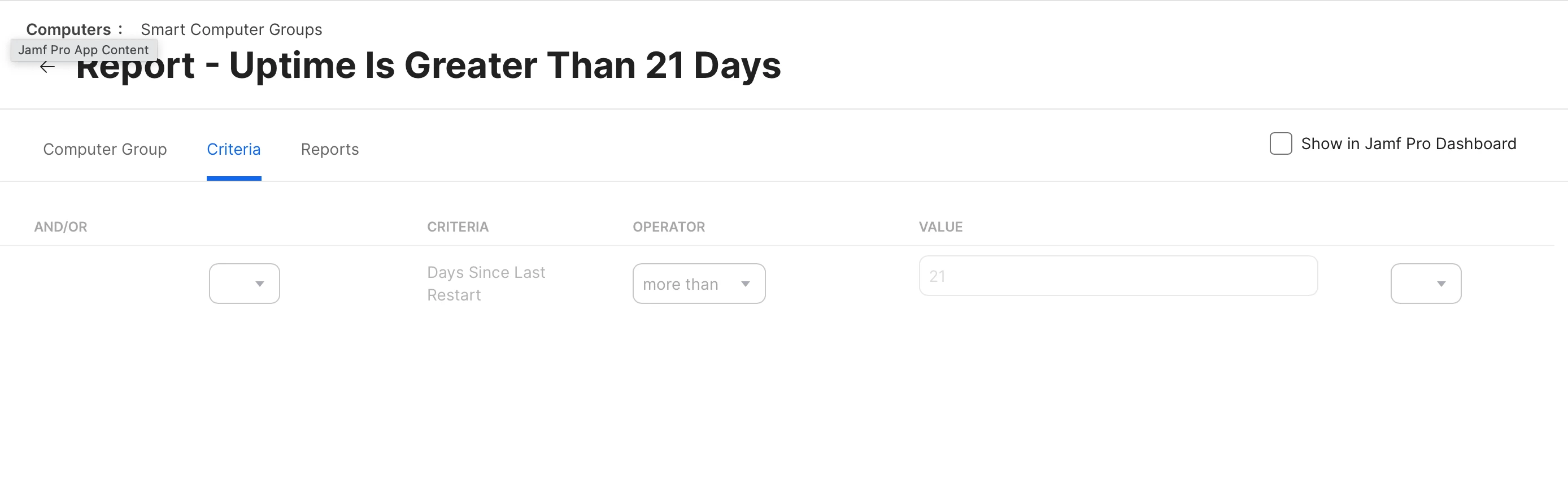
Good question! "Days Since Last Restart" is the name of my extension attribute, so I can add it by choosing "Show Advanced Criteria" when adding criteria to my smart group. My extension attribute Data Type is set to integer, which gives me the "More Than" operator in the smart group, and I typed in "21" in the Value field.


Forum|alt.badge.img+5
  • Contributor
  • July 27, 2022

Good question! "Days Since Last Restart" is the name of my extension attribute, so I can add it by choosing "Show Advanced Criteria" when adding criteria to my smart group. My extension attribute Data Type is set to integer, which gives me the "More Than" operator in the smart group, and I typed in "21" in the Value field.


Ah ha, of course, I had selected text instead of integer, that would be the problem. Thank you!


john_sherrod
Forum|alt.badge.img+17
  • Valued Contributor
  • July 27, 2022

Ah ha, of course, I had selected text instead of integer, that would be the problem. Thank you!


You're very welcome!


rcole
Forum|alt.badge.img+7
  • New Contributor
  • May 27, 2023

Good question! Yes, here's the extension attribute I came up with:

#!/bin/sh uptime=$( uptime ) dayCount=$( uptime | awk -F "(up | days)" '{ print $2 }' | sed 's/[ day].*//' ) if [[ $uptime == *"day"* ]]; then echo "<result>$dayCount</result>" else echo "<result>0</result>" fi exit 0


Thank you for this!


Forum|alt.badge.img+3
  • New Contributor
  • September 20, 2023

Hey all! I've used this EA in the past, it will format the last reboot time in a way that you can set the Data Type on the EA to 'Date (YYYY-MM-DD hh:mm:ss)'. Then with your Smart Computer Group, you'll be able to use 'more than x days ago' operator. Here is the script:

#!/bin/bash # Get boottime in epoch time, convert to Jamf Pro formatted time and make an extension attribute # # Updated: 2.23.2022 @ Robjschroeder # bootTime=$(sysctl kern.boottime | awk '{print $5}' | tr -d ,) formattedTime=$(date -jf %s $bootTime "+%F %T") echo "<result>${formattedTime}</result>" exit 0

I am pretty new to this, and I added the EA and then i create the smart computer group, when i view the results is there a way to add the uptime filed in the results to make sure the data is correct? I currently have last Check-in showing.


Forum|alt.badge.img+3
  • New Contributor
  • September 21, 2023

I am pretty new to this, and I added the EA and then i create the smart computer group, when i view the results is there a way to add the uptime filed in the results to make sure the data is correct? I currently have last Check-in showing.


Got it working, I was impatient and expected immediate reports,.


Forum|alt.badge.img+1
  • New Contributor
  • October 9, 2023

The script and settings work but really not practical at all. During the first half of the day, it only detected 5 Mac's. With this rate it would take a whole week to extract a report.


Forum|alt.badge.img+15

The script and settings work but really not practical at all. During the first half of the day, it only detected 5 Mac's. With this rate it would take a whole week to extract a report.


That's the joy of using an EA, your computers need to submit inventory to get the data


Forum|alt.badge.img+10
  • Valued Contributor
  • October 20, 2023

I have the script running and now I can see last restarts.


How do I create something to where if a user hasn't restarted in x amounts of days they need to reboot/shut down laptop warning? 


john_sherrod
Forum|alt.badge.img+17
  • Valued Contributor
  • October 20, 2023

I have the script running and now I can see last restarts.


How do I create something to where if a user hasn't restarted in x amounts of days they need to reboot/shut down laptop warning? 


I created a policy called "Time To Restart."

Its trigger is recurring checkin, and its frequency is once per day.

It's scoped to my "Report - Uptime Is Greater Than 21 Days" smart group.

All the policy does is leverage the User Interaction tab to display the following message as a notification:

"Your Mac hasn't been restarted in more than 21 days. Restarting your Mac at least once a week helps keep it running optimally. - IT"

I wanted to keep the wording short so it all fit within the small notification banner.


Forum|alt.badge.img+10
  • Valued Contributor
  • October 20, 2023

I created a policy called "Time To Restart."

Its trigger is recurring checkin, and its frequency is once per day.

It's scoped to my "Report - Uptime Is Greater Than 21 Days" smart group.

All the policy does is leverage the User Interaction tab to display the following message as a notification:

"Your Mac hasn't been restarted in more than 21 days. Restarting your Mac at least once a week helps keep it running optimally. - IT"

I wanted to keep the wording short so it all fit within the small notification banner.


I can't get the smart group to see anything, I'm missing some settings or config. 


john_sherrod
Forum|alt.badge.img+17
  • Valued Contributor
  • October 20, 2023

I can't get the smart group to see anything, I'm missing some settings or config. 


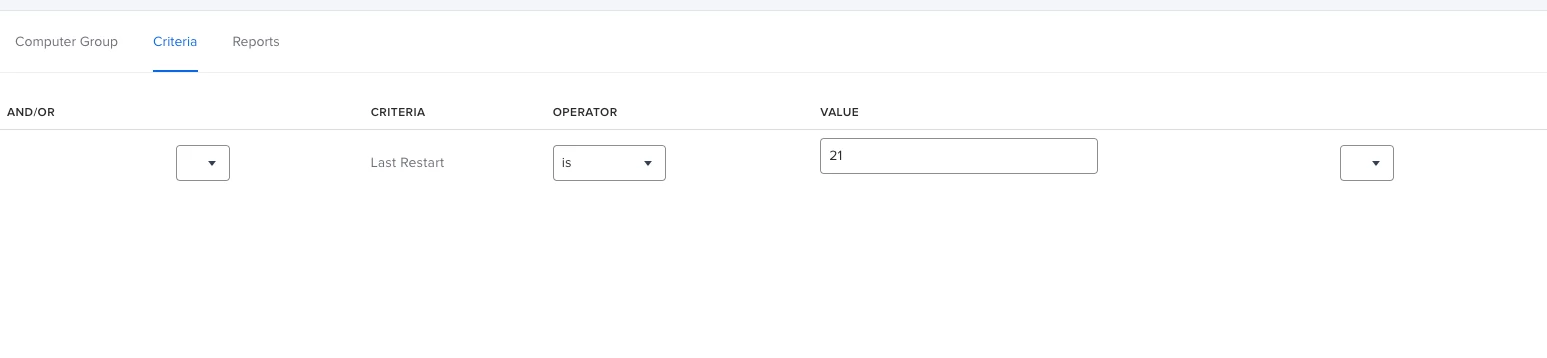
Here's what my smart group criteria looks like. I've got my operator set to "more than."


Forum|alt.badge.img+10
  • Valued Contributor
  • October 20, 2023

Here's what my smart group criteria looks like. I've got my operator set to "more than."


Thank you I appreciate it! Can I bug you for one more thing? What does your script look like? 


Thanks. 


john_sherrod
Forum|alt.badge.img+17
  • Valued Contributor
  • October 20, 2023

Thank you I appreciate it! Can I bug you for one more thing? What does your script look like? 


Thanks. 


Sure! Here's mine:

#!/bin/sh

uptime=$( uptime )
dayCount=$( uptime | awk -F "(up | days)" '{ print $2 }' | sed 's/[ day].*//' )

if [[ $uptime == *"day"* ]]; then
    echo "<result>$dayCount</result>"
    
else echo "<result>0</result>"
    
fi
    
exit 0