Question

Restore functionality in Disk Utility greyed out (macOS HighSierra)

  • November 16, 2017
  • 3 replies
  • 14 views

Forum|alt.badge.img+5

I am trying to image a system with macOS High Sierra from a AutoDMG'ed file. I created the DMG while on my macOS HS (10.13.1). But while in Disk Utility, in Target Disk Mode to the system to be imaged the restore button is greyed out. The destination Volume was formatted to APFS. What would be the best alternative?

Creating the DMG from a 10.12 system is not allowed as AutoDMG returns a mismatch OS error.

Thank you.

3 replies

Forum|alt.badge.img+13
  • Honored Contributor
  • November 16, 2017

@dpinai It could be the way you prepped your .dmg. here is the Support Doc on using TDM. I am currently NOT rolling out High Sierra, so I cannot confirm this


Forum|alt.badge.img+5
  • Author
  • New Contributor
  • November 16, 2017

@Nix4Life Thanks for that update, turns out it is clearly listed that TDM is not supported in HS based on that doc...

"Installing macOS High Sierra on a Mac that is connected by Target Disk Mode isn't a supported installation method."

Any other alternatives to installing the base OS quickly? DEP is not in place quite yet here...


Forum|alt.badge.img+16
  • Valued Contributor
  • November 16, 2017

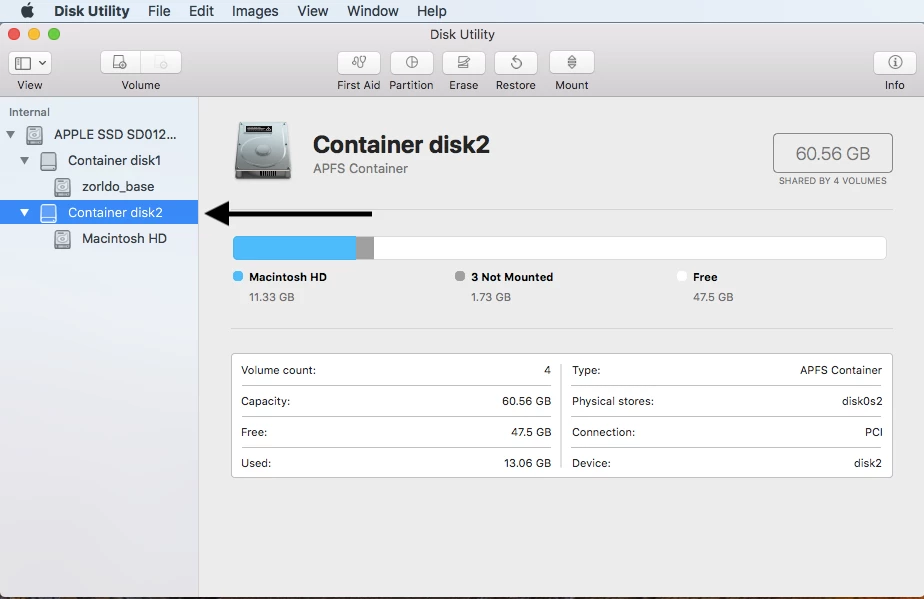
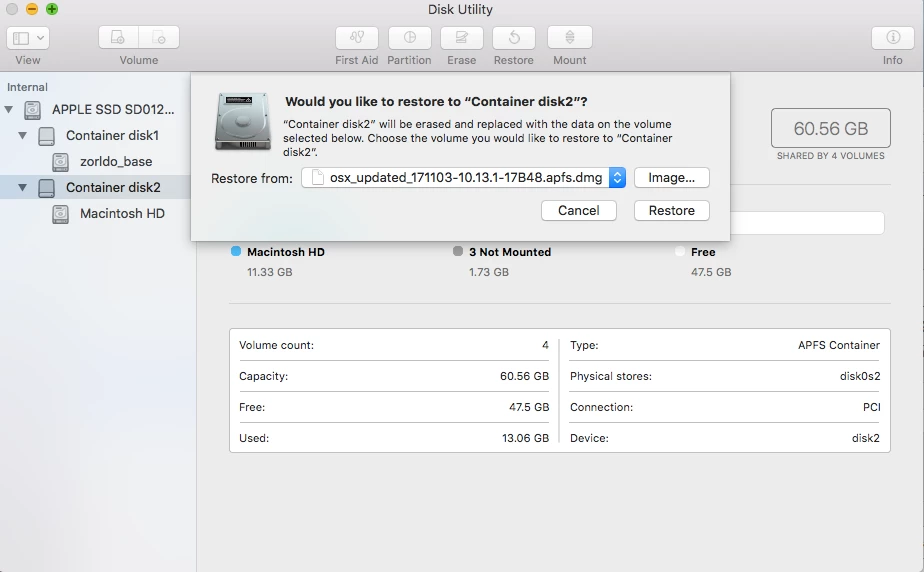
You have to restore the APFS image to the APFS container, not the volume.


Bear in mind the client will need a firmware update supplied by the High Sierra installer to understand how to boot from APFS. After the firmware is up to date you can restore an APFS image to an APFS container and have it bootable.