Question

Restrict Mac OSX 10.13.5

  • June 6, 2018
  • 7 replies
  • 32 views

Forum|alt.badge.img+3

Hello,

Has anyone built a software restriction in Jamf to prevent 10.13.5? When I went to download it I don't see it as a "Install MacOS HighSierra" in my downloads folder so I'm not sure what to block. I want to block this so I can test before users get the new OS. Any ideas what the .app is or what else I can build to restrict this? Thanks in advance.

Best,

Jason

7 replies

Forum|alt.badge.img+18
  • Honored Contributor
  • June 6, 2018

In terms of the .app installer, you have to restrict the High Sierra installer in general: restricted software task for "Install macOS High Sierra*" which kills the process.

In terms of Software Update (App Store), it would be a SUS binary command: "softwareupdate --ignore macOSInstallerNotification_GM" to ignore the OS upgrade nag (with download) for Macs on a down version of the OS, and then "softwareupdate --ignore macOS High Sierra 10.13.5 Update" and "softwareupdate --ignore macOS High Sierra 10.13.5 Combo Update" to ignore the specific updates via Jamf deployed script.

When you are ready to release, do a "softwareupdate reset--ignored" coupled with "softwareupdate --ignore macOSInstallerNotification_GM", as you really don't ever want Apple downloading 6+gb .app installers automatically, nor nagging users to upgrade.


Forum|alt.badge.img+3
  • Author
  • New Contributor
  • June 6, 2018

Thank you @dgreening !


donmontalvo
Forum|alt.badge.img+36
  • Hall of Fame
  • June 6, 2018

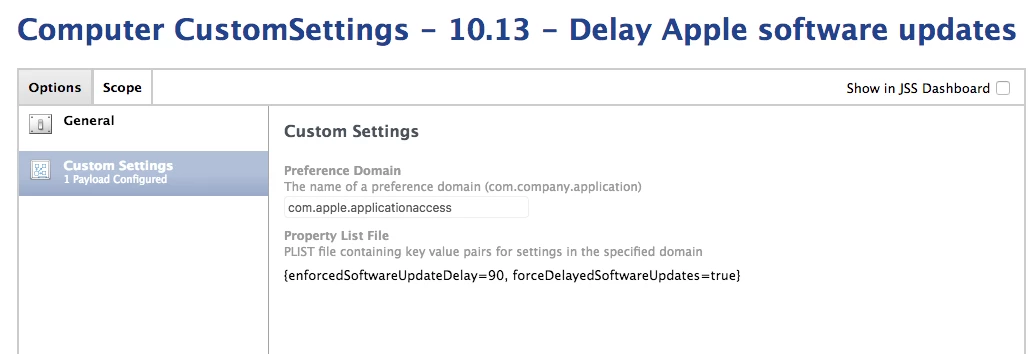
Might want to sprinkle a dash of "delay" on it...

For details on the keys used, look for forceDelayedSoftwareUpdates and enforcedSoftwareUpdateDelay on Apple's Configuration Profile Reference page (the first only applies to 10.13.4 or later, the second applies to 10.13 or later):

Guides and Sample Code | Configuration Profile Reference

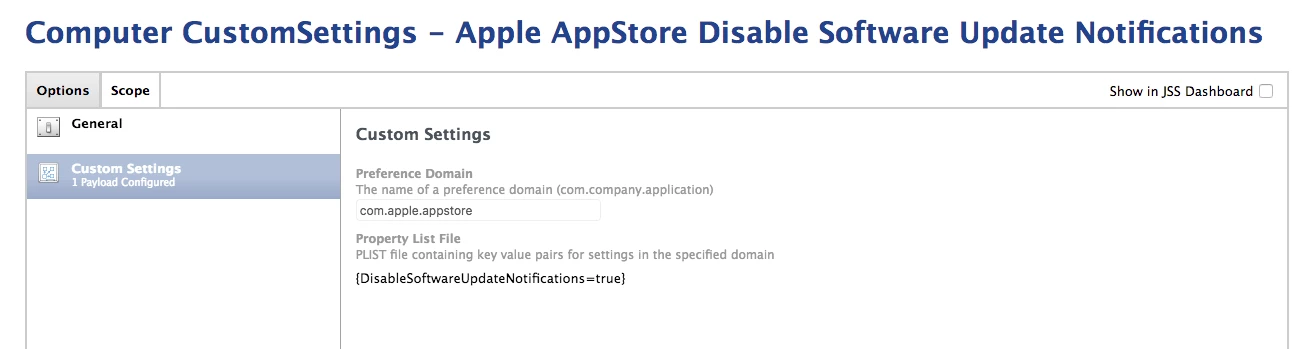
Might also want to disable SUS notifications (DisableSoftwareUpdateNotifications) too:

Which is also described:

Guides and Sample Code | Configuration Profile Reference


Forum|alt.badge.img+3
  • Author
  • New Contributor
  • June 6, 2018

Thanks so much @donmontalvo. Quick follow up, how/where would I create that plist? Just write it out in Terminal and then bring it into Composer? I've never done this before, so I'm not sure. I know how to create the Custom Profile within JAMF but not sure how to create that .plist. Appreciate the feedback.


mm2270
Forum|alt.badge.img+24
  • Legendary Contributor
  • June 6, 2018

@jcosma Create a new plist with just the entries you want in it. The name of the plist (domain) must match the target domain it's applying to, so be sure to use the same name.

defaults write ~/Desktop/com.apple.applicationaccess.plist forceDelayedSoftwareUpdates -bool true
defaults write ~/Desktop/com.apple.applicationaccess.plist enforcedSoftwareUpdateDelay -int 90

Then convert the new plist file

plutil -convert xml1 ~/Desktop/com.apple.applicationaccess.plist

Then upload it into the Custom Payload section of a new Config Profile.

Do the same thing for the SUS notification entry

defaults write ~/Desktop/com.apple.appstore.plist

Follow the steps from above to convert it and upload to a Config Profile.


donmontalvo
Forum|alt.badge.img+36
  • Hall of Fame
  • June 7, 2018

@mm2270 excellent breakout.


Forum|alt.badge.img+1
  • New Contributor
  • September 25, 2019

@donmontalvo how to verify the above once after configuration profile installed to Mac. how would be the behaviour.

Thanks