

Hi there, I'm in root cert prison. I don't know how this happened, but something went awry in the past month and our newly imaged clients root certs are out of whack. Should I seek help from our TAM or are there any cert pros out there?
Scenario 1: Newly Imaged Client Build
1. I build a OS X 10.11.1 dmg using AutoDMG and upload to jss via Casper Admin.app.
2. I create and deploy a Configuration to a client via Casper Imaging using an nbi made with AutoCasperNBI (10.10.5)
3. Once image is complete, I login using our management account. Self Service.app installs and it gets policies from the jss.
4. Apps signed by developer id's are not installing because of expiring cert. however the certs are not expiring.
Log> Verifying package integrity...
Installing JavaAppletPlugin.pkg...
Installation failed. The installer reported: installer: Package name is JavaAppletPlugin
installer: Certificate used to sign package is not trusted. Use -allowUntrusted to override.
5. When I run the JavaAppletPlugin.pkg installer manually I receive the following when viewing the signed cert.
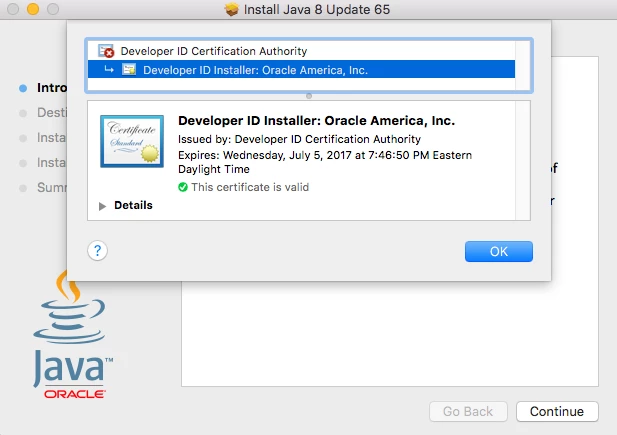
Scenario 2: (Internet Recovery Build)
1. I run internet recovery and use disk utility to format drive and install the shipped operating system
2. I take note that the file JavaAppletPlugin.pkg is validated and runs as expected.
3. I enroll into Casper via https enrollment.
4. Signed JavaAppletPlugin.pkg continues to work and run as expected. Root cert is validated and all is good.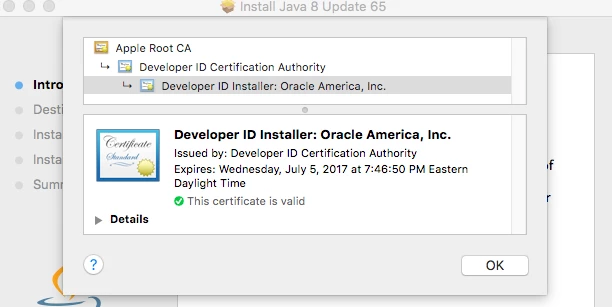
Here are things I've done to be proactive.
1. Renewed MDM push cert
2. Generated a new certificate from the JSS's built-in CA and restarted TomCat
3. Removed p12 Developer ID Installer cert and rebooted, re-uploaded the p12 Developer ID Installer cert and rebooted
Any help or advise is so very appreciated as I'm at my wits end

