Question

RUM Policy

  • July 21, 2016
  • 6 replies
  • 34 views

Forum|alt.badge.img+3

I know this is probably silly, but I'm pulling my hair out over it....

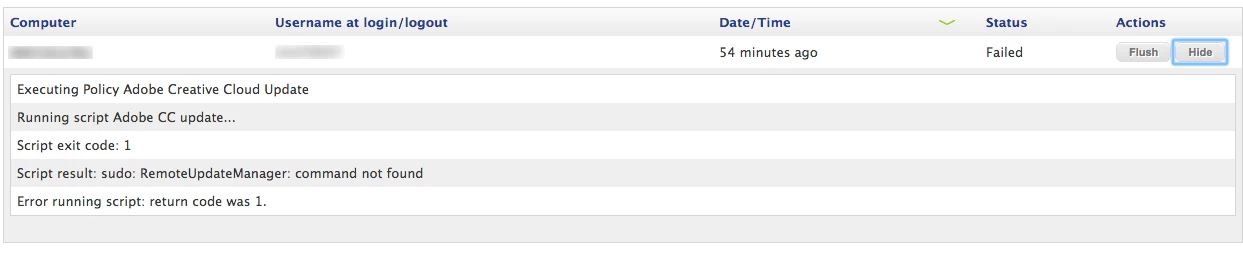
I can run RemoteUpdateManager through Casper Remote and on my devices, but whenever I deploy it through policy or in Self Service it shows this error.

"sudo: RemoteUpdateManager: command not found"

Anyone have any ideas what could cause this? I know the target has an Adobe product installed and can run RUM from terminal.

Thanks in advance.

6 replies

Forum|alt.badge.img+7
  • Contributor
  • July 21, 2016

What does the script say? I'm assuming it just says 'RemoteUpdateManager' rather than the full path to RUM?

I would do the full path (and do).


roiegat
Forum|alt.badge.img+16
  • Valued Contributor
  • July 21, 2016

I find that in scripts, it's best to have the whole path as well.


Forum|alt.badge.img+15

Here's the script I'm using:

#!/bin/sh
/usr/local/bin/RemoteUpdateManager $4 --action=$5
exit 0

Then just pass the arguments over, that way I can re-use the script for multiple policies depending on need.


Forum|alt.badge.img+10
  • Contributor
  • July 21, 2016

Can you confirm that RemoteUpdateManager is in the /usr/local/bin/ folder?

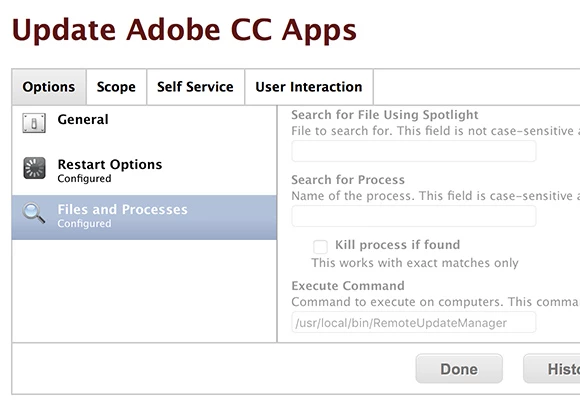
This is my policy:

You also don't need sudo if you're running it from Self Service.

Hope this helps!


Forum|alt.badge.img+3
  • Author
  • New Contributor
  • July 22, 2016

The full path did it. So dumb! Thanks all. I knew it was a slight oversight.


Forum|alt.badge.img+4
  • Contributor
  • July 22, 2016

I wrote a script that ceates a logfile, open it with console, start RUM so the end user can see RUM is doing something (or not).

#!/bin/sh 

### Niels Illem
### 7 december 2015
### Version 2.0
### For OS X 10.11 change path to /usr/local/bin

### Script to start the Adobe RemoteUpdateManager using Self Service

# Close all Adobe App's and browsers
kill $(pgrep Adobe)

killall "Google Chrome"
killall Safari
kill -9 $(ps -x | grep 'firefox' | awk '{print $1}')

# Get current user
currentuser=`ls -l /dev/console | cut -d " " -f 4`
echo Current user: $currentuser

# Remove existing logfile
rm -rf /Users/$currentuser/Library/Logs/RemoteUpdateManager.log

# Show Console so you can see RUM is running/installing
touch /Users/$currentuser/Library/Logs/RemoteUpdateManager.log
chmod 777 /Users/$currentuser/Library/Logs/RemoteUpdateManager.log

sleep 1

open /Users/$currentuser/Library/Logs/RemoteUpdateManager.log

sleep 1

# Start RUM
/usr/local/bin/RemoteUpdateManager 

# Close console when RUM is ready
sleep 10
killall Console

exit 0