Question

scripting ask user for login/password to create local nonmotile account

  • June 4, 2018
  • 4 replies
  • 9 views

Forum|alt.badge.img+2

Folks,

Looking for a way to make the JAMF magic happen so that when a computer is first turned on and prestage starts up, it will prompt the user via a script to add themselves to the computer as a local account. I have a script now that runs to name the computer following our naming conventions, but that's after logging into the computer and starting up self service...

Hmm, is there a way to get self service to begin immediate after coming out of prestage ???

4 replies

Hugonaut
Forum|alt.badge.img+15
  • Esteemed Contributor
  • September 21, 2018

@fsteffy i know this is old and you probably found a solution but incase you were still wondering this may help!

https://www.jamf.com/jamf-nation/discussions/18296/launch-self-service-upon-completion-of-dep-based-enrollment


Forum|alt.badge.img+13
  • Valued Contributor
  • September 21, 2018

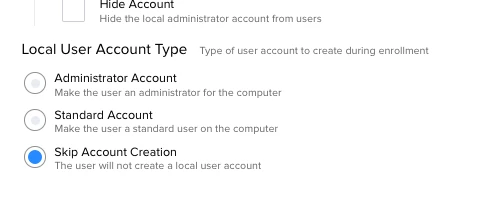
you can do this via the PreStage enrollment, just tick one of these buttons....
admin or Standard..


Forum|alt.badge.img+13
  • Valued Contributor
  • September 21, 2018

I mean, create the local user account without using a script / self service ;-)


Chris_Hafner
Forum|alt.badge.img+25
  • Jamf Heroes
  • September 21, 2018

Are we talking DEP, or BYOD? I ask because I just spent quite a lot of time working on this in a BYOD environment and might be able to give some pointers and point out my mistakes. We successfully on-boarded our student BYOD machines and converted their local admin accounts to local, Standard accounts using Enterprise Connect (AD) credentials.

P.S>JAMF just bought NoMAD, who just so happens to have a product that does this... So, one way or another onboarding is going to get a LOT easier. We're Enterprise Connect users here, but I would happily swap that for a JAMF/NoMAD solution next year.