Question

Self Service doesn't activate

  • November 15, 2023
  • 42 replies
  • 299 views

Forum|alt.badge.img+2

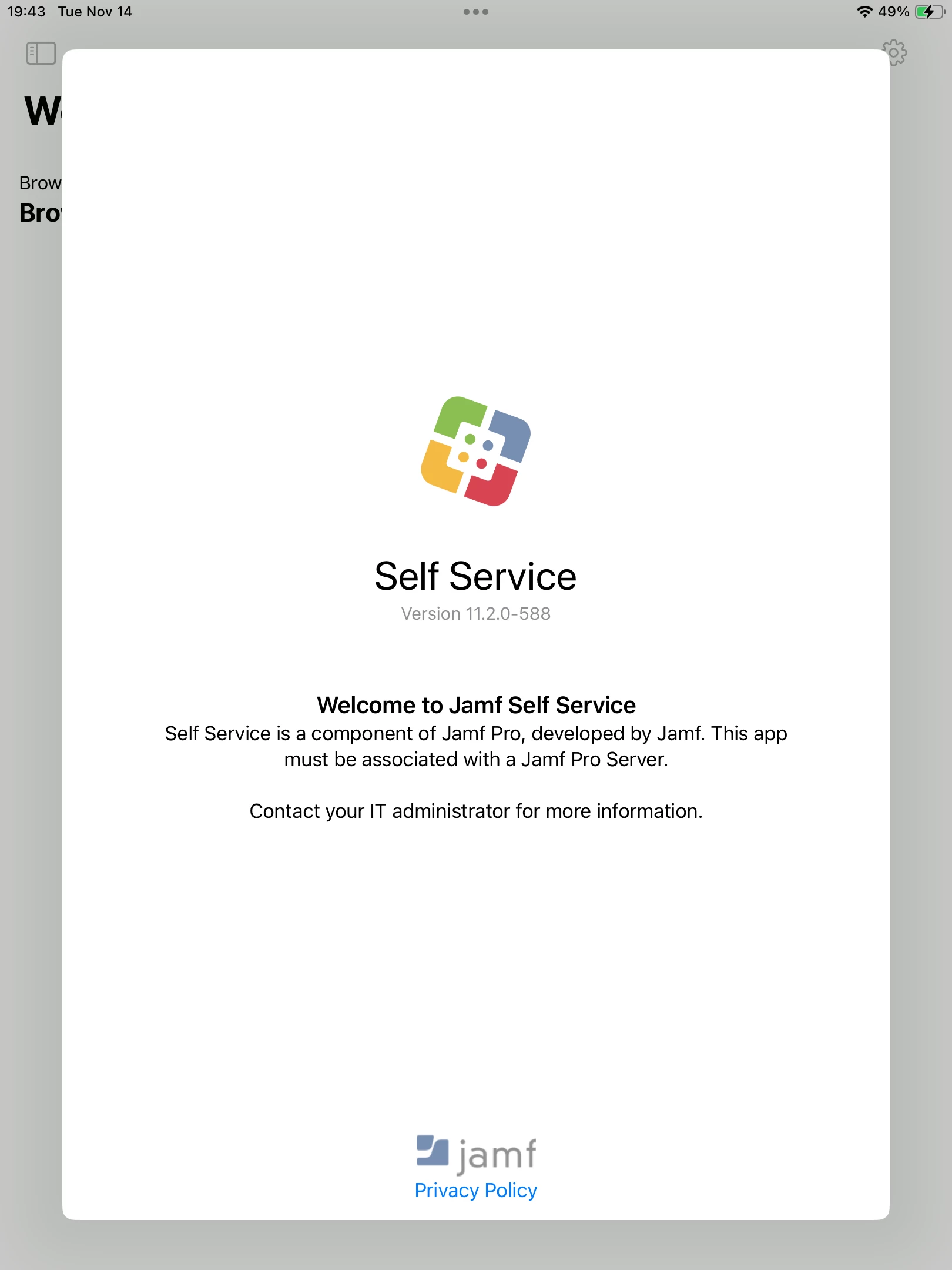
After installing Self Service (ver11.2.0-588) to managed iPad device, the app requests log in to JAMF Software Server.

This happens iOS 16.6.1 and 17.1.1, then it's possible to access internet.

Even after reseting iPad, reinstall App, it occurs.

I have no idea to solve it.

Help me.
42 replies

Forum|alt.badge.img+2
  • Author
  • New Contributor
  • November 15, 2023

I can't continue and use the app.

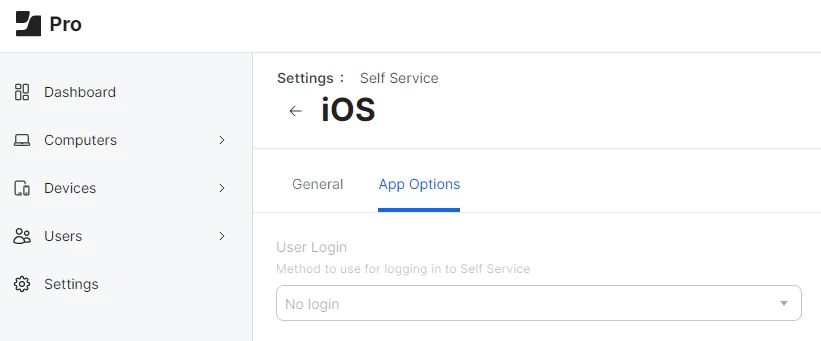
On Jamf Pro Console, the system doesn't request user login.


Forum|alt.badge.img+7
  • Valued Contributor
  • November 15, 2023

We have the same problem and it's a HUUUUGE issue for us! Any insights?


naominix
Forum|alt.badge.img+1
  • New Contributor
  • November 15, 2023

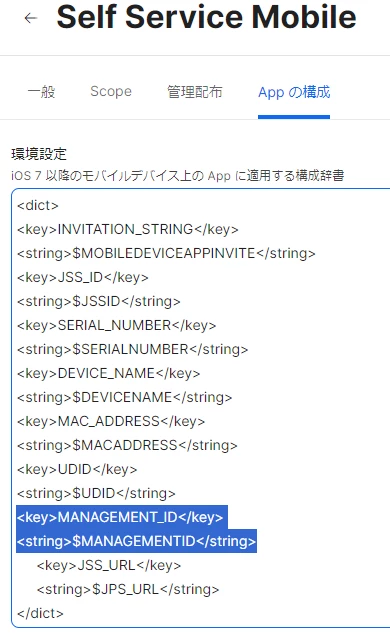
In my environment, I was able to work around this by adding the following to the app configuration of the Self Service Moblie App. 

<key>MANAGEMENT_ID</key>
<string>$MANAGEMENTID</string>


m_ruehl
Forum|alt.badge.img+3
  • New Contributor
  • November 15, 2023

In my environment, I was able to work around this by adding the following to the app configuration of the Self Service Moblie App. 

<key>MANAGEMENT_ID</key>
<string>$MANAGEMENTID</string>


@naominix  schrieb:

In my environment, I was able to work around this by adding the following to the app configuration of the Self Service Moblie App. 

<key>MANAGEMENT_ID</key>
<string>$MANAGEMENTID</string>


This Workaround also works in our Environment 👍


Forum|alt.badge.img+4
  • New Contributor
  • November 15, 2023

In my environment, I was able to work around this by adding the following to the app configuration of the Self Service Moblie App. 

<key>MANAGEMENT_ID</key>
<string>$MANAGEMENTID</string>


This also worked for our environment! :D


Forum|alt.badge.img+3
  • New Contributor
  • November 15, 2023

In my environment, I was able to work around this by adding the following to the app configuration of the Self Service Moblie App. 

<key>MANAGEMENT_ID</key>
<string>$MANAGEMENTID</string>


Chipping in that this worked for us too!
Initially we replaced UDID with MANAGEMENTID which didn't work, needed to have them both in the config.
Jamf told me that they have an open case for this: #PI115080


vickih
Forum|alt.badge.img+5
  • Contributor
  • November 15, 2023

Yes, I'm having the exact same issue.  I have enough licenses because that was the first thing I thought of.  And then I just updated the App Configuration under the app as we deploy it using the VPP.  And there is apparently a string missing.

So I updated the App Configuration per Jamf manual 

https://learn.jamf.com/bundle/jamf-pro-documentation-current/page/Jamf_Self_Service_for_iOS.html

Then after I updated our iPad to 17.1.1 this is when my issue's started. 

VickiH


vickih
Forum|alt.badge.img+5
  • Contributor
  • November 15, 2023

In my environment, I was able to work around this by adding the following to the app configuration of the Self Service Moblie App. 

<key>MANAGEMENT_ID</key>
<string>$MANAGEMENTID</string>


I had hoped this would work for us, because I saw this from another post but my gut says iPadOS 17.1.1 compatibility issue.  LOL


Forum|alt.badge.img+3
  • New Contributor
  • November 15, 2023

I had hoped this would work for us, because I saw this from another post but my gut says iPadOS 17.1.1 compatibility issue.  LOL


Worked on our 17.1.1 devices! Couldn't be bothered with waiting for the Managed App Configuration to queue so I just reinstalled the Self Service app instead and voila!


Forum|alt.badge.img+1
  • New Contributor
  • November 15, 2023

cdenesha
Forum|alt.badge.img+14
  • Honored Contributor
  • November 15, 2023

THANK YOU for documenting the fix. It is working in my district.


vickih
Forum|alt.badge.img+5
  • Contributor
  • November 15, 2023

Manually Installing Self Service with Volume Purchasing https://learn.jamf.com/bundle/jamf-pro-documentation-current/page/Jamf_Self_Service_for_iOS.html#ariaid-title3.


I have also done what you mention above and copied the App Configuration from the Jamf online Admin Manual and it still does not work.  I know this workaround works for some but there are others that it does not fix. I read somewhere Jamf has an open case for this.


vickih
Forum|alt.badge.img+5
  • Contributor
  • November 15, 2023

Chipping in that this worked for us too!
Initially we replaced UDID with MANAGEMENTID which didn't work, needed to have them both in the config.
Jamf told me that they have an open case for this: #PI115080


I will try adding the UDID back as well.

Thank You. 


Forum|alt.badge.img+3
  • New Contributor
  • November 15, 2023

Thank you - this worked for our district as well!  Out of curiosity, since I'm not the normal JAMF Admin, how long for the devices to pick up the parameter change?  I forced an update to inventory and that did not update on the device.  I had to remove the Self Service app and reinstall it.  


vickih
Forum|alt.badge.img+5
  • Contributor
  • November 15, 2023

Chipping in that this worked for us too!
Initially we replaced UDID with MANAGEMENTID which didn't work, needed to have them both in the config.
Jamf told me that they have an open case for this: #PI115080


So yes adding the UDID worked for me.  Thank you.


Forum|alt.badge.img+20
  • Valued Contributor
  • November 15, 2023

Im still getting the error after adding this to the Self Service App Config. This issue is so annoying.

<dict> <key>INVITATION_STRING</key> <string>$MOBILEDEVICEAPPINVITE</string> <key>JSS_ID</key> <string>$JSSID</string> <key>SERIAL_NUMBER</key> <string>$SERIALNUMBER</string> <key>DEVICE_NAME</key> <string>$DEVICENAME</string> <key>MAC_ADDRESS</key> <string>$MACADDRESS</string> <key>MANAGEMENT_ID</key> <string>$MANAGEMENTID</string> <key>JSS_URL</key> <string>$JPS_URL</string> </dict>


vickih
Forum|alt.badge.img+5
  • Contributor
  • November 15, 2023

Im still getting the error after adding this to the Self Service App Config. This issue is so annoying.

<dict> <key>INVITATION_STRING</key> <string>$MOBILEDEVICEAPPINVITE</string> <key>JSS_ID</key> <string>$JSSID</string> <key>SERIAL_NUMBER</key> <string>$SERIALNUMBER</string> <key>DEVICE_NAME</key> <string>$DEVICENAME</string> <key>MAC_ADDRESS</key> <string>$MACADDRESS</string> <key>MANAGEMENT_ID</key> <string>$MANAGEMENTID</string> <key>JSS_URL</key> <string>$JPS_URL</string> </dict>


Matt this is what worked for me the UDID string needs to be added back which is not in the Jamf Admin Documentation.


change the $JSS_URL string to match your https://xxxx.jamfcloud.com instance.


<dict>
<key>INVITATION_STRING</key>
<string>$MOBILEDEVICEAPPINVITE</string>
<key>JSS_ID</key>
<string>$JSSID</string>
<key>SERIAL_NUMBER</key>
<string>$SERIALNUMBER</string>
<key>DEVICE_NAME</key>
<string>$DEVICENAME</string>
<key>MAC_ADDRESS</key>
<string>$MACADDRESS</string>
<key>MANAGEMENT_ID</key>
<string>$MANAGEMENTID</string>
<key>UDID</key>
<string>$UDID</string>
<key>JSS_URL</key>
<string>$JSS_URL</string>
</dict>


Forum|alt.badge.img+20
  • Valued Contributor
  • November 15, 2023

May have a winner!!!! If this works thank you everyone. I have been going back and forth with JAMF about this for over a month! This community to the rescue again.


Forum|alt.badge.img+20
  • Valued Contributor
  • November 15, 2023

Thank you - this worked for our district as well!  Out of curiosity, since I'm not the normal JAMF Admin, how long for the devices to pick up the parameter change?  I forced an update to inventory and that did not update on the device.  I had to remove the Self Service app and reinstall it.  


Depends, MDM is pretty hit or miss. Could be instantly, could take a few minutes.


Forum|alt.badge.img+1
  • New Contributor
  • November 15, 2023

Matt this is what worked for me the UDID string needs to be added back which is not in the Jamf Admin Documentation.


change the $JSS_URL string to match your https://xxxx.jamfcloud.com instance.


<dict>
<key>INVITATION_STRING</key>
<string>$MOBILEDEVICEAPPINVITE</string>
<key>JSS_ID</key>
<string>$JSSID</string>
<key>SERIAL_NUMBER</key>
<string>$SERIALNUMBER</string>
<key>DEVICE_NAME</key>
<string>$DEVICENAME</string>
<key>MAC_ADDRESS</key>
<string>$MACADDRESS</string>
<key>MANAGEMENT_ID</key>
<string>$MANAGEMENTID</string>
<key>UDID</key>
<string>$UDID</string>
<key>JSS_URL</key>
<string>$JSS_URL</string>
</dict>


Will this work even with cloud hosted Jamf environments?  Just checking as I know some things work differently in configuration for us cloud vs on prem instances.


Forum|alt.badge.img+20
  • Valued Contributor
  • November 15, 2023

Will this work even with cloud hosted Jamf environments?  Just checking as I know some things work differently in configuration for us cloud vs on prem instances.


I'm on prem and it fixed one of my phones, verifying with some clients right now.


vickih
Forum|alt.badge.img+5
  • Contributor
  • November 15, 2023

Will this work even with cloud hosted Jamf environments?  Just checking as I know some things work differently in configuration for us cloud vs on prem instances.


Yes I am cloud based. I've never been on-prem :-) We also don't require a user to log into Self-Service that's why we have it setup for volume purchase install.


Forum|alt.badge.img+20
  • Valued Contributor
  • November 15, 2023

Yes I am cloud based. I've never been on-prem :-) We also don't require a user to log into Self-Service that's why we have it setup for volume purchase install.


So it fixed our issues. We are on-prem with no login required and it fixed it right away.


vickih
Forum|alt.badge.img+5
  • Contributor
  • November 15, 2023

So it fixed our issues. We are on-prem with no login required and it fixed it right away.


Excellent news !


Forum|alt.badge.img+20
  • Valued Contributor
  • November 15, 2023

Excellent news !


We have been going back and forth with JAMF about this for over a month, doing DB edits, repairs, etc. So nice to know that the issue is finally fixed.