Question

Self Service doesn't activate

  • November 15, 2023
  • 42 replies
  • 298 views

Show first post

42 replies

vickih
Forum|alt.badge.img+5
  • Contributor
  • November 15, 2023

We have been going back and forth with JAMF about this for over a month, doing DB edits, repairs, etc. So nice to know that the issue is finally fixed.


That is unfortunate, my issue just started yesterday.  I'm glad you were able to get your fix from the Jamf Nation world.  It's where I come to first because there are a lot of smart people in these forums. 


Forum|alt.badge.img+20
  • Valued Contributor
  • November 15, 2023

That is unfortunate, my issue just started yesterday.  I'm glad you were able to get your fix from the Jamf Nation world.  It's where I come to first because there are a lot of smart people in these forums. 


Yeah I've been a part of this community since it was an email list but was away from the JAMF world for a few years. Nice to see its still the defacto place to go.


Forum|alt.badge.img+6
  • Contributor
  • November 15, 2023

Hi All,

This seems to have worked for us as well.

Thanks for the discussion and let us know if anyone hears from Jamf directly on their fix.


Forum|alt.badge.img+20
  • Valued Contributor
  • November 15, 2023

Hi All,

This seems to have worked for us as well.

Thanks for the discussion and let us know if anyone hears from Jamf directly on their fix.


Yeah im wonder if this is a JAMF thing or an iOS thing. Defining a variable doesn't seem to be a long term solution IMHO.


Forum|alt.badge.img+7
  • Valued Contributor
  • November 15, 2023

So, new managed app config has been pushed and verified installed on my device. We already know that reinstalling self service will fix it. But what about if you DON'T reinstall self service? What needs to happen then for the new managed app configuration to take effect? Or is the only solution to unscope and re-scope self service?


Forum|alt.badge.img+20
  • Valued Contributor
  • November 15, 2023

So, new managed app config has been pushed and verified installed on my device. We already know that reinstalling self service will fix it. But what about if you DON'T reinstall self service? What needs to happen then for the new managed app configuration to take effect? Or is the only solution to unscope and re-scope self service?


For my environment it updated when the check in process happened.


vickih
Forum|alt.badge.img+5
  • Contributor
  • November 15, 2023

So, new managed app config has been pushed and verified installed on my device. We already know that reinstalling self service will fix it. But what about if you DON'T reinstall self service? What needs to happen then for the new managed app configuration to take effect? Or is the only solution to unscope and re-scope self service?


I was just able to confirm with what Matt said, I turned on a device it checked in (its been awhile) and it updated to the new self-service app and then the app configuration deployed out.

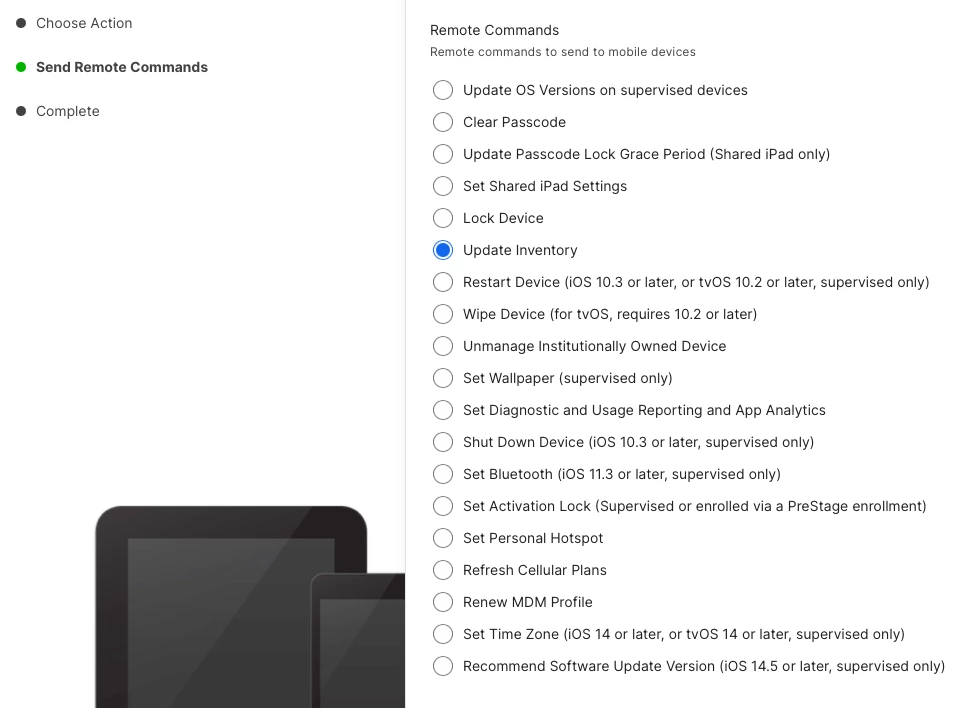
You can force them to check inventory automatically

VickiH


Forum|alt.badge.img+20
  • Valued Contributor
  • November 15, 2023

I was just able to confirm with what Matt said, I turned on a device it checked in (its been awhile) and it updated to the new self-service app and then the app configuration deployed out.

You can force them to check inventory automatically

VickiH


I just did a mass command too and had a ton of messages of people saying "Self Service works!"


vickih
Forum|alt.badge.img+5
  • Contributor
  • November 15, 2023

I just did a mass command too and had a ton of messages of people saying "Self Service works!"


WooHoo!


Forum|alt.badge.img+14
  • Valued Contributor
  • November 15, 2023

Just read this post and not 1 minute later a student came down with this issue.  Oddly on the device Self Service and Settings were both listed twice.  I was able to delete and redeploy SS and that fixed the issue.  Are others also seeing Self Service duplicates if you search for it on the iPad before this "fix"?


Forum|alt.badge.img+14
  • Valued Contributor
  • November 15, 2023

vickih
Forum|alt.badge.img+5
  • Contributor
  • November 15, 2023

Jamf is now posting this message


https://jamf.service-now.com/kb_view.do?sysparm_article=KB0035429


I don't have access to view that.. :-( 


Forum|alt.badge.img+14
  • Valued Contributor
  • November 15, 2023

I don't have access to view that.. :-( 


You must be able to log into the Jamf Service portal.  It basically states what others have posted about - adding the management id key


Forum|alt.badge.img+14
  • Valued Contributor
  • November 15, 2023

You must be able to log into the Jamf Service portal.  It basically states what others have posted about - adding the management id key


Also that it is an issue with Self Service 11.2 and was effecting iOS 16 and 17


vickih
Forum|alt.badge.img+5
  • Contributor
  • November 15, 2023

Also that it is an issue with Self Service 11.2 and was effecting iOS 16 and 17


Ok I stumbled my way in accessing the portal. LOL...Don't know how but I'm in...LOL


Forum|alt.badge.img
  • New Contributor
  • November 16, 2023

Thanks everyone for discussing and teaching how to solve it.

I made the app work well after change setting as @naominix said.

Honestly, this post is the first time for me, and I was worried about if this issue occured just only my environment, then it wouldn't have been solved. But thanks for everyone's help, I achieved my goal and felt I'm not lonly.

If I'm in trouble again, I'll also post Jamf Nation Community.


naominix
Forum|alt.badge.img+1
  • New Contributor
  • November 21, 2023

This problem seems to have been fixed in the following version.


11.2.1 (2023-11-16)
Resolved Issues

[PI115080] Resolved an issue that required the use of both the MANAGEMENT_ID and UDID keys in the Preferences field on the App Configuration tab for Self Service for iOS.

https://learn.jamf.com/bundle/jamf-self-service-release-notes/page/Jamf_Self_Service_for_iOS_Release_History.html