Question

Self-Service upgrade to 10.10.3 with createosxinstallpkg not booting into OS X installer

  • June 4, 2015
  • 48 replies
  • 249 views

Forum|alt.badge.img+10

I'm seeing inconsistent results trying to get a Self Service policy to install OS X 10.10.3 with a package created using createosxinstallpkg. The policy reboots the computer (set to reboot immediately whether user is logged in or not) but some systems are not booting into the OS X installer but are instead booting the normal system and the upgrade never occurs.

I've tried setting the Startup Disk in the Restart Options to Current Startup Disk, Current Startup Disk (No Bless), and OS X Installer. None of these has resolved the issue. I also tried not having Casper do the reboot and instead issuing 'shutdown -r +1' via the Files and Processes tab.

We ran essentially the same process last year with Mavericks and had no issues. Our end users are not admins, so the JAMF method of running the installer.app won't work.

Computers being upgraded are 10.9.5 with FileVault2 enabled. The policy also disables sleep (script before), changes the management account password, runs a script to also change the management account keychain password (after), and changes the computer name (another script, set to after).

Any ideas? Does anyone know how to manually issue a bless command to boot to the OS X Installer?

Thanks,
Eric

48 replies

Forum|alt.badge.img+33
  • Hall of Fame
  • June 4, 2015

Don't use the JSS's built-in option to reboot the machine. Instead, have it run reboot or shutdown -r now as a Unix command to reboot.

I have a script that I'm using in Self Service for Yosemite upgrades. It works with two other policies which have manual triggers:

cache-yosemite-installer
run-yosemite-install

  • cache-yosemite-installer goes with a policy that caches the createOSXInstallPkg-built Yosemite installer on the Mac in question
  • run-yosemite-install goes to a policy that installs the cached createOSXInstallPkg-built Yosemite installer

After that, I run the following command to trigger a restart:

shutdown -r now

For those interested, the script is available from here:

https://github.com/rtrouton/rtrouton_scripts/blob/master/rtrouton_scripts/Casper_Scripts/self_service_yosemite_os_install/self_service_yosemite_os_install.sh


dvasquez
Forum|alt.badge.img+16
  • Valued Contributor
  • June 4, 2015

Hello I can second that comment by: rtrouton

I have always used those commands as "Run Unix commands" and all works perfectly.

No troubles or inconsistencies with our policies running OS packages created with createosxinstallpkg.

I have used the package in a cache policy once and all was good.


Forum|alt.badge.img+10
  • Author
  • Contributor
  • June 4, 2015

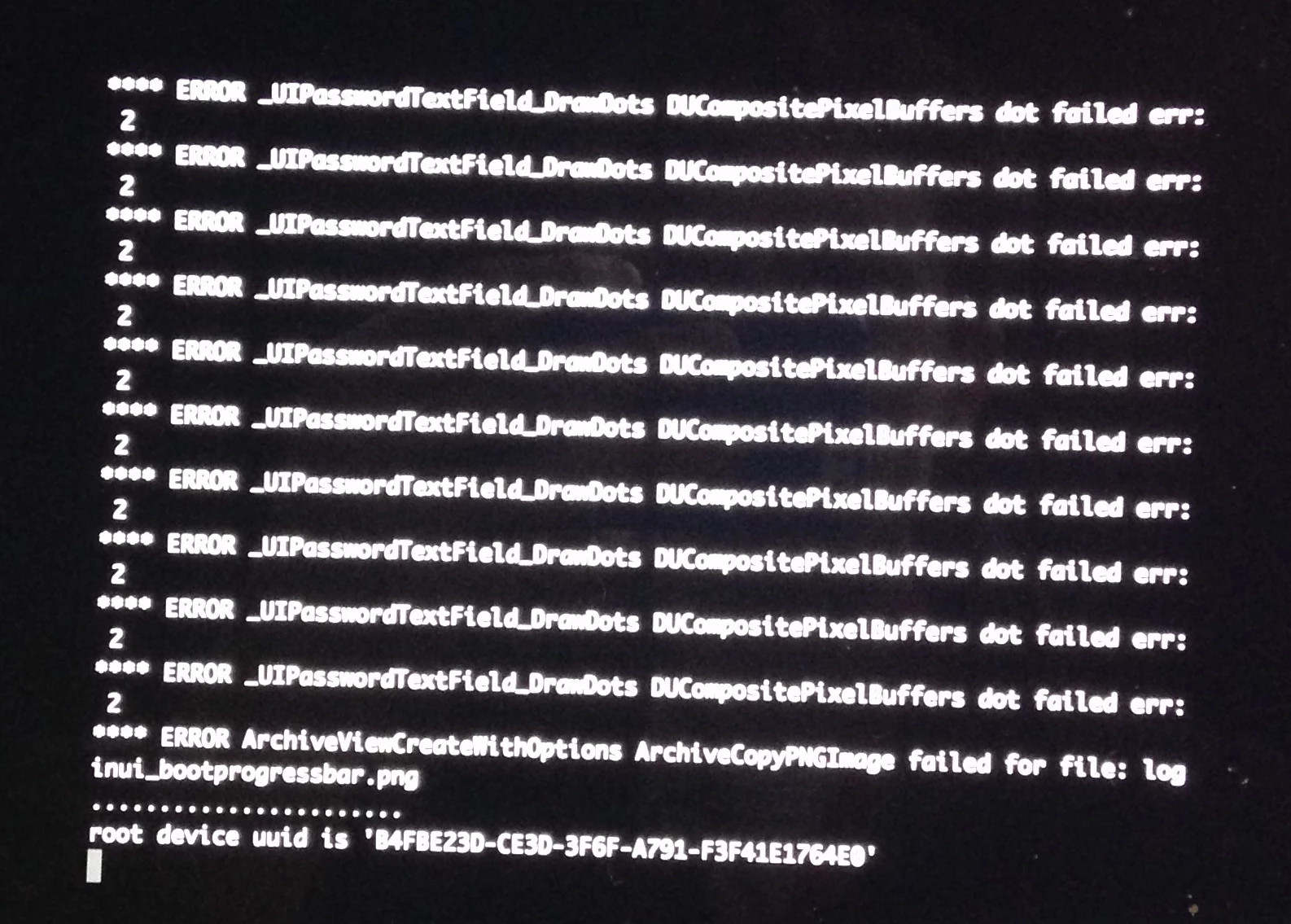
I did try it with 'shutdown -r +1' and am still having issues. No change. I'm continuing testing on one of the problem systems, though, and have noticed that the FV pre-auth window is not properly drawing the dots in the password field. I did a verbose boot and see the following:
ERROR _UIPasswordTextField_DramDots DUCompositePixelBuffers dot failed err: 2
[repeated]
ERROR ArchiveViewCreateWithOptions ArchiveCopyPNGImage failed for file: loginui_bootprogressbar.png

The computer continues booting but the FileVault password is not handed off properly to the login window and I am forced to select a user and input the password in order to finishing booting into the OS. I've tried this with multiple FV enabled users and have seen no change in behavior, so I wonder if there isn't a FV issue going on. @rtrouton might you be able to provide any insight, oh wise sage of FileVault? :)


Forum|alt.badge.img+10
  • Author
  • Contributor
  • June 4, 2015

I also checked /var/log/install.log for any errors with createosxinstall.pkg and all looks fine. No errors reported.


Forum|alt.badge.img+10
  • Author
  • Contributor
  • June 4, 2015

@rtrouton Rich, I'm also wondering why you wrote the custom script. Is there any reason why I shouldn't be able to use a Casper policy to install (without first caching) the createosxinstallpkg package and then run 'shutdown -r now'?

Thanks!
Eric


Forum|alt.badge.img+33
  • Hall of Fame
  • June 4, 2015

@etippett,

The reason I wrote a custom script is that I wanted to accomplish several things, but still ensure my users only had to deal with clicking the Install button in Self Service.

Goals:

  1. Make sure the Mac has enough free space available for an OS upgrade, plus a little extra for insurance
  2. Make sure that encrypted Macs were able to stop at the OS login window (to ensure that the post-upgrade processes I included would run normally.)
  3. Do everything possible to make sure that the OS installer could be run successfully.

Goal 1

I've set a minimum amount of free space available on the Mac being upgraded, which on my JSS is configured to be 40 GBs (this is defined by the $4 parameter for the script.) This allows for the 8 GBs of free space needed as a bare minimum for OS X Yosemite's system requirements, the 5.65 GBs of space taken up by the installer, then a generous safety margin.

To enforce this, the script checks the Mac being upgraded for the actual amount of free space available and compares it against the value which I've set as the minimum amount of free space available.

https://github.com/rtrouton/rtrouton_scripts/blob/master/rtrouton_scripts/Casper_Scripts/self_service_yosemite_os_install/self_service_yosemite_os_install.sh#L10-12

If a Mac does not have the specified amount of free space, a message appears to let them know that they need to have X amount of space to install the OS using Self Service and they have an amount of free space which is less than X.

https://github.com/rtrouton/rtrouton_scripts/blob/master/rtrouton_scripts/Casper_Scripts/self_service_yosemite_os_install/self_service_yosemite_os_install.sh#L7

If they do have sufficient space available, a note is made in the log and and the script proceeds:

https://github.com/rtrouton/rtrouton_scripts/blob/master/rtrouton_scripts/Casper_Scripts/self_service_yosemite_os_install/self_service_yosemite_os_install.sh#L14-15

Goal 2

To help make sure that both encrypted and not-encrypted Macs will stop at the OS login window for the running of the post-upgrade process, the script will check to see if the Mac is encrypted or isn't. If it is, a setting is added to /Library/Preferences/com.apple.loginwindow.plist to disable FileVault 2's automatic login

https://github.com/rtrouton/rtrouton_scripts/blob/master/rtrouton_scripts/Casper_Scripts/self_service_yosemite_os_install/self_service_yosemite_os_install.sh#L17-42

Goal 3

Once the script has gotten past the check for free space and the encryption check, a message appears to let the user know that the installer is downloading and that the Mac will automatically restart to begin the OS upgrade process.

https://github.com/rtrouton/rtrouton_scripts/blob/master/rtrouton_scripts/Casper_Scripts/self_service_yosemite_os_install/self_service_yosemite_os_install.sh#L8

https://github.com/rtrouton/rtrouton_scripts/blob/master/rtrouton_scripts/Casper_Scripts/self_service_yosemite_os_install/self_service_yosemite_os_install.sh#L44

At that point, it downloads and caches the installer using the cache-yosemite-installer policy. This is to ensure that all the parts of the OS installer downloaded properly before proceeding with the installation process:

https://github.com/rtrouton/rtrouton_scripts/blob/master/rtrouton_scripts/Casper_Scripts/self_service_yosemite_os_install/self_service_yosemite_os_install.sh#L45

Once the cache-yosemite-installer policy has completed, the run-yosemite-install policy runs and installs the cached installer. If the cached installer isn't found, the policy fails but otherwise won't cause problems:

https://github.com/rtrouton/rtrouton_scripts/blob/master/rtrouton_scripts/Casper_Scripts/self_service_yosemite_os_install/self_service_yosemite_os_install.sh#L46

Once the run-yosemite-install policy completes, then the script triggers a restart:

https://github.com/rtrouton/rtrouton_scripts/blob/master/rtrouton_scripts/Casper_Scripts/self_service_yosemite_os_install/self_service_yosemite_os_install.sh#L47

Hopefully, that helps explain why I took the course I did. Please let me know if you have more questions about it.


Forum|alt.badge.img+10
  • Author
  • Contributor
  • June 4, 2015

@rtrouton Thanks for the detailed explanation! We have the same overall goal of making sure that the process is as easy as possible for the end users.

Like you I make sure there is enough free space, although that is part of another policy the user must run first that checks several things (recent Time Machine backup, connected to AC power, etc). This policy then writes a dummy receipt file and runs inventory to bring the computer into scope for the Yosemite upgrade.

Based on the comments in your script, it looks like goal 2 is solely related to installing additional packages during the upgrade process (I assume you mean additional packages built in to the createosxinstallpkg package, right?). I'm not installing any additional packages, so I wouldn't think goal 2 would have any bearing on my scenario.

Perhaps I'll try caching the installer first and then installing it to see if that has any bearing on things.

Eric


Forum|alt.badge.img+10
  • Author
  • Contributor
  • June 4, 2015

Whoops, forgot to ask @rtrouton if you've ever seen anything like what I'm describing with the FileVault pre-auth login screen not displaying the password dots correctly or those error messages? They don't turn up on Google. I thought this pointed a big red flag at a possible issue with FileVault or my RecoveryHD, but I tried running the installer locally (both via GUI and command line) from an external drive instead of from Casper and it worked without issue. Then I thought perhaps my installer on the JSS's distribution point had gotten corrupted, so I re-uploaded it. This didn't fix anything, though.

Other things I've tried:
- Running my original Casper policy on a non-FileVault computer=works fine
- Manually mounting Casper distribution point in Finder, copying installer package locally, and running=works fine
- Installing a local copy of the installer using the 'jamf' binary=works fine

This all has me grasping at straws. It seems there's no issue with the installer itself, as it has worked in other scenarios without issue. It also doesn't seem like there's anything wrong with the policy, as it has worked at times. The computers I'm having issues on don't seem to be the culprit either, as I've been able to successfully run the installer locally after the Casper policy failed (and having reset PRAM and deleted the OS X Install Data folder from the hard drive).

If anyone sees any holes in my logic, please let me know!

Thanks!
Eric


Forum|alt.badge.img+33
  • Hall of Fame
  • June 5, 2015

@etippett

Can you post a picture of what you're seeing? From your description, I'm not familiar with the problem but it may be something I'll need to see before I recognize it.


Forum|alt.badge.img+33
  • Hall of Fame
  • June 5, 2015

@etippett

One thing that may be affecting the install process is that you're waiting a minute before rebooting, with shutdown -r +1. Generally, the installer expects that it'll be able to reboot once it's done setting up the OS X Installer boot environment.


Forum|alt.badge.img+10
  • Author
  • Contributor
  • June 5, 2015

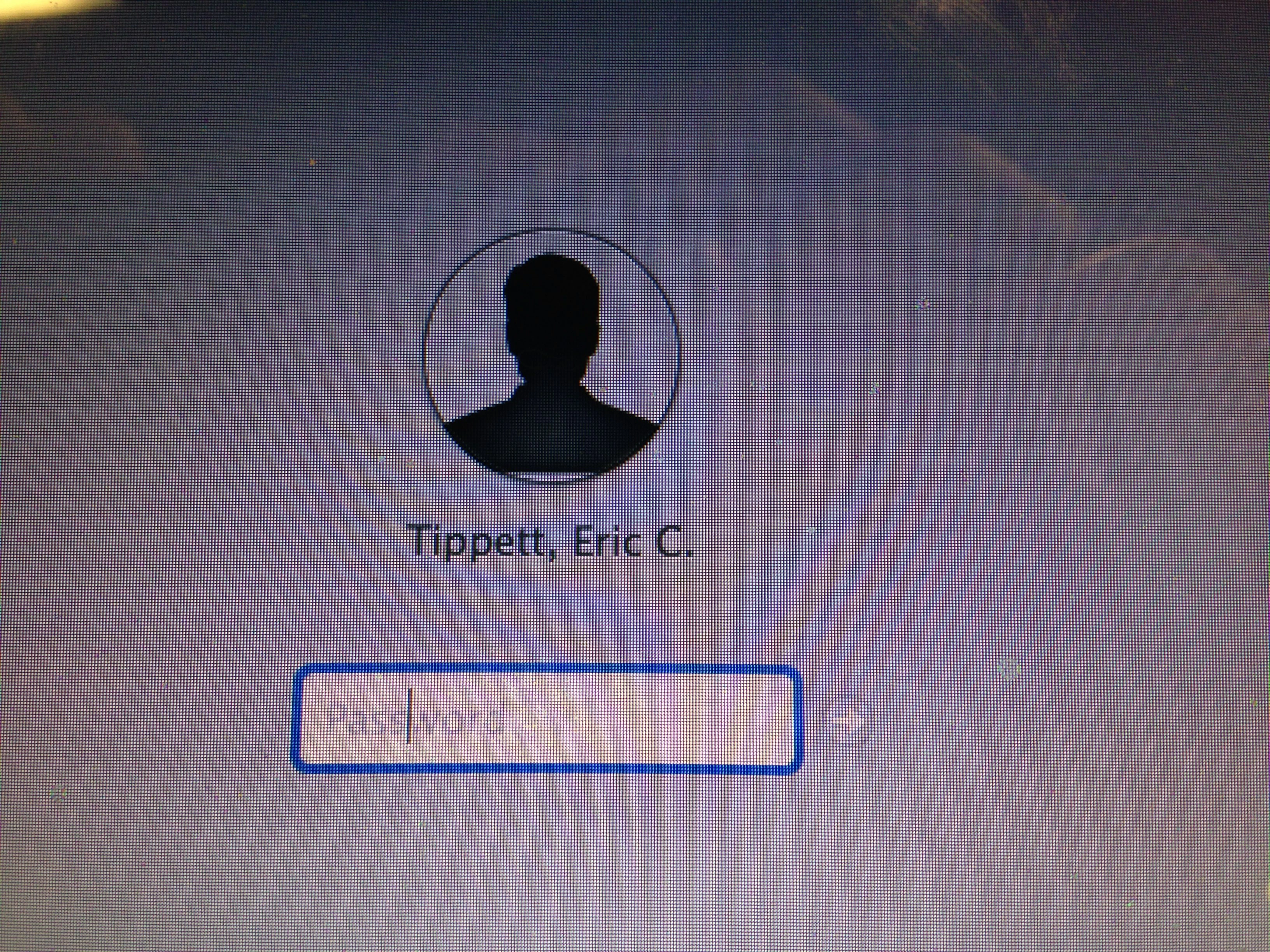
@rtrouton Here are pics of the FileVault pre-auth screen GUI bug

Characters have been entered and the cursor moved, but no dots are displayed

Errors that show up if doing a verbose boot


Forum|alt.badge.img+10
  • Author
  • Contributor
  • June 5, 2015

So far in testing this morning the culprit appears to be re-setting the management account password (which is enabled for FileVault) as part of the policy that also installs Yosemite. With it still in the policy, I've had consistent issues; with it removed I've had consistent success.

Also, the reason I went with "+1" for my shutdown command is because issuing a "shutdown now" doesn't allow the policy to actually succeed and I get no logs in my JSS, since the command runs before the final step of uploading to the JSS.

Thanks,
Eric


Forum|alt.badge.img+33
  • Hall of Fame
  • June 5, 2015

One of my post-upgrade tasks is to force the running of the following tasks:

  1. Run jamf manage to enforce Casper management
  2. Run a recon to send an updated inventory to the JSS, to report that the OS upgrade has happened.

For those interested, the script is available from here:

https://github.com/rtrouton/rtrouton_scripts/blob/master/rtrouton_scripts/Casper_Scripts/post_os_upgrade_inventory_update/post_os_upgrade_inventory_update.sh


Forum|alt.badge.img+10
  • Author
  • Contributor
  • June 9, 2015

For everyone's future reference, it does seem like changing the password on our local admin/JSS management account had something to do with this issue. I've got another thread going where I'm working on other methods for changing the password of that account, since it is FileVault-enabled:
Change Password for Filevault-Enabled Management Account


Forum|alt.badge.img+16

@rtrouton

I followed your steps and used your script but once the machine reboots and I log in it still takes me to the 10.9 .5 the waiting room is empty and installation .pkg that I created with the createOSXinstallPkg script and wrapped in a DMG is now in the root of the Macintosh HD.

The log file for the run-yosemite-install says failed and this is in the log on the JSS.

Executing Policy run-yosemite-install...
Verifying package integrity...
Installing InstallOSX_10.10_14A389.dmg...
Closing package...
Creating directory structure for /Library/Application Support/JAMF/Downloads/
Downloading http://jss.cigna.com/CasperShare/Scripts/installPKGfromDMG.sh...
Running script installPKGfromDMG.sh...
Script exit code: 1
Script result: Variable "dmgName" value is set to: InstallOSX_10.10_14A389.dmg
Mounting the DMG InstallOSX_10.10_14A389.dmg...
DMG mounted successfully as volume on device .
Installing Package pkgutil from mount path ...
Error: The package (pkgutil) could not be found.
There was an error installing the package. Exit Code: 1
Unmounting disk ...


Forum|alt.badge.img+33
  • Hall of Fame
  • June 15, 2015

@Seangallagher,

I'm not using installPKGfromDMG.sh and I'm not wrapping the installer package in a .dmg as part of my process.

Instead, I'm caching the installer package with the cache-yosemite-installer policy and installing the installer package with the run-yosemite-install policy.


Forum|alt.badge.img+16

@rtrouton

I just wanted to be clear on this because I have been having the exact same issue as @etippett described. Are you using the createosxinstallpkg script to package the installer and then caching that?


Forum|alt.badge.img+33
  • Hall of Fame
  • June 16, 2015

@Seangallagher,

Correct. Here's what I'm doing:

  1. Creating the OS X installer package with the createOSXinstallPkg tool.
  2. Opening Casper Admin and copying the createOSXinstallPkg-generated OS X installer package to my Casper repo. Casper Admin zips up the OS X installer package as part of adding it to the repo.
  3. Setting the cache-yosemite-installer policy to cache the OS X installer package
  4. Setting the run-yosemite-install policy to run a cached install of the OS X installer package.
  5. Calling the cache-yosemite-installer policy and run-yosemite-install using my script:

https://github.com/rtrouton/rtrouton_scripts/blob/master/rtrouton_scripts/Casper_Scripts/self_service_yosemite_os_install/self_service_yosemite_os_install.sh


Forum|alt.badge.img+16

@rtrouton

Hey Rich, I am trying to do this now but keep running into an issue while trying to copying the createOSXinstallPkg-generated OS X installer package to my Casper repo with Casper Admin. I uploads the file and then at the very end when it tries to create the BOM for the package Casper Admin becomes non-responsive. Have you seen this or encountered it before? I am working with my Jamf Account manager to resolve this. I have not had a problem like this with any other package, and I have rebuilt the package with the createOSXinstallPkg tool and tried again with the same results.

Sean


Forum|alt.badge.img+33
  • Hall of Fame
  • June 17, 2015

@Seangallagher,

I have not experienced an issue like this. Have you migrated your Casper repo? The reason I'm asking is that createOSXinstallPkg-generated OS X installer packages are bundle-style packages and are not flat packages.

I had migrated my repo, so my createOSXinstallPkg-generated OS X installer package was zipped automatically when I added it to Casper Admin.


Forum|alt.badge.img+16

@rtrouton

Hey Rich,

I want to thank you for your help. I had not migrated at the time of your last response I have since then. I also recreated the createOSXinstallPkg-generated OS X installer package and uploaded it to the JSS. In following what you have done I changed only one part and chased the package first on the client machine and then I removed the caching line "jamf policy -trigger cache-yosemite-installer" from your script since I am caching it earlier.
On a side note I have been able to get it to work know on all but one machine. With the one it will not work on it reboots to install screen that looks the same as when you boot from a recovery partition, only up are booting from the Yosemite install.dmg. It will not let you run the installer from there to upgrade and if you quit and choose the startup disk you can see and select the Hard drive and it has the 10.9.5 listed under it. When you choose that are reboot it presents you a login screen, you login and ir boots into the same recovery screen over and over again. I spoke to my account rep and he has never seen anything like it and can't find anything on it in the internals. Weird.

Fortunately I can Target boot it, connect it to another computer, enter the FileVault 2 password and access the data to copy it off then rebuild the device. It will just slow the overall roll out so we don't get slammed with rebuilds.

Thank you again with your help.

Sean


Forum|alt.badge.img+19
  • Employee
  • July 22, 2015

My 2c worth...

I had a LOT of trouble with this - even with @rtrouton 's excellent documentation. In the end I packaged it up using the createOSXinstallPkg tool, Put it in /Users/shared, then ran the following command to trigger it:

> installer -pkg /Users/Shared/OSX1010.pkg -target /
> shutdown -r now

Not the most elegant solution but might get someone out of a pickle in a hurry


Forum|alt.badge.img+14
  • Contributor
  • October 1, 2015

Just a note that I'm having good success with 10.11 upgrade and @rtrouton 's method described here

FV2, AD-Joined ... pretty smooth. Thanks again Rich!


Forum|alt.badge.img+11
  • Contributor
  • October 20, 2015

Hi All,

Please excuse my ignorance, I am new to the JSS. I manage about 300 macs and have been given ownseship of the whole JAMF environment. I have managed to get all the individual pieces for this upgrade process working well. @rtrouton 's method is very slick (Thanks Rich!)

My problem comes from what I need to make available in Self Service. If I create a policy with just Rich's script and call it from self service it runs fine but the process false because the Casper Share is mounted to run the script. The other policies fail because the share is already mounted. I'm positive it is how I have crafted the self service policy and how I am presenting the script. I don'e a lot of searching here and through Google and can't seem to find a way to, maybe, cache the script and have it run that way? Perhaps it s standard to use a policy to cache a script and another in Self Service that calls the script?

I'd appreciate and suggestions you might have.


Forum|alt.badge.img+10
  • Author
  • Contributor
  • October 22, 2015

I'm not familiar with Rich's method so hopefully he can chime in on that. I looked on his blog for it but couldn't find it, so if you can post a link, please do. Also, not knowing what the script is doing makes this harder to assist with, so please post its contents.

My process is to build an installer package for Yosemite using the latest OS downloaded from the App Store and CreateOSXInstallPkg. Upload the package it outputs into Casper Admin. Then make a policy that caches it, installs all cached packages, and reboots the computer. I also added Rich's script to suppress iCloud and Diagnostics pop-ups, but that's purely optional. For the reboot, I run the command 'shutdown -r +1' using the files and processes portion of the policy, which reboots the computer after one minute; using the built-in reboot commands in the JSS seemed to cause issues with the computer not booting into the OS X Installer properly.

Good luck!
Eric