Solved

Shell scripts only work in JAMF Recon

  • October 24, 2018
  • 7 replies
  • 56 views

Forum|alt.badge.img+5

Hi everyone,

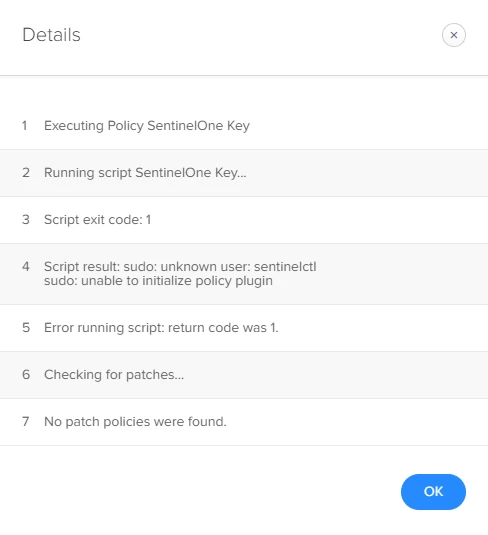
I'm a bit of a beginner when it comes to scripts, and I'm running into this problem. I have to script in JSS, and when I assigned it to a policy and run "sudo jamf policy" it runs no problem. However, when it deploys at check-in I get an error code return of 1, and the policy fails. The application that uses this command is installed onto the computer.

sudo sentinelctl set registration-token /Volumes/*/com.sentinelone.registration-token

Any help would be greatly appreciated. I'm assuming I'm missing how JAMF handles scritps on the root level.

Best answer by kgregg

Thanks everyone! I figured it out by doing this:

sudo /usr/local/bin/sentinelctl set registration-token /Volumes/*/com.sentinelone.registration-token

7 replies

Forum|alt.badge.img+5
  • Contributor
  • October 24, 2018

First off, when a script or command is ran through a policy, it is ran as root so no need to include sudo in the command. Second, when you run "sudo jamf policy" it is checking in with the JSS and triggering the policy as if it were triggering it as a normal check-in. Are you running this command as a script payload or as a command payload?


Forum|alt.badge.img+5
  • Author
  • New Contributor
  • October 24, 2018

I have the script in a policy that runs at check-in. If I force the check-in, the policy runs no problem. If I let it check-in normally, the policy fails.


Forum|alt.badge.img+16
  • Valued Contributor
  • October 24, 2018

My guess is the command your running requires user context, when you invoke it manually it runs with some reference to the user. When it runs on check-in it's a pure background task with no context.
Get the current user and try something like

sudo -u $Current_User sentinelctl set registration-token /Volumes/*/com.sentinelone.registration-token

You might want to wrap an if around it to make sure itonly runs when there is a current user.


Forum|alt.badge.img+5
  • Author
  • New Contributor
  • October 25, 2018

Sadly, still no luck with that command.


Forum|alt.badge.img+16
  • Valued Contributor
  • October 25, 2018

Sorry it was just a snippet, I should have clarified you need to get the user first and then run it as the user. Something like.

Current_User=$(last -1 console | awk '/still logged in/ {print $1}')

However looking at what Sentinel One is, I'm quite surprised it needs this... Looks like some kind of security software, if it needs to be run as the user, then it probably needs it for evrery user?


Forum|alt.badge.img+5
  • Author
  • New Contributor
  • Answer
  • October 29, 2018

Thanks everyone! I figured it out by doing this:

sudo /usr/local/bin/sentinelctl set registration-token /Volumes/*/com.sentinelone.registration-token

Forum|alt.badge.img+8
  • Contributor
  • October 29, 2018

test