

Solved

Smart Policy for Missing Encryption Keys

  • April 19, 2017
  • 4 replies
  • 24 views

easyedc
Forum|alt.badge.img+16

Working through a migration performed on JSS servers a while back. I'd set up a policy to reissue the FileVault 2 key following a few people's work (mostly @rtrouton's FV2 stuff) by deploying a .plist, importing, reissuing, yada yada yada. It's failed on a group that has some bad user identities (wrong admin service account that has local FV2 rights, etc). I don't mind manually touching each one to do

fdesetup add -usertoadd JAMFSERVICEACCOUNT

but I'm having a hard time identifying the right search criteria to separate


out the 2 configurations to identify the FV2 not configured. I've tried a number of the search criteria around FV2 and none of my attempts seem to properly identify the group which shows as

"Not Configured"

Please help me. I'm stuck in a forest and I desperately can't find the trees.
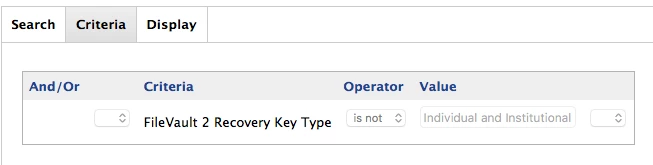
Best answer by easyedc

So I think the solution that works for me is

FileVault 2 Recovery Key Type

with selection

is not

and criteria

Individual and Institutional

which seems to successfully capture whether the key is missing for me.

4 replies

Forum|alt.badge.img+8
  • Contributor
  • April 19, 2017

@easyedc Have you tried a Smart Group with a FileVault 2 Status criteria with a value No Partitions Encrypted? That should at least let you find machines that didn't have FV2 enabled although that may not be equivalent to configured.


easyedc
Forum|alt.badge.img+16
  • Author
  • Esteemed Contributor
  • April 19, 2017

@StoneMagnet the issue with that is that they already are FV2 encrypted. But there isn't a current key on file, which this policy regenerates that key.


Forum|alt.badge.img+8
  • Contributor
  • April 19, 2017

@easyedc I'd think a smart group like (Criteria FileVault 2 Institutional Key is Not Present) AND (Criteria FileVault 2 Status is All Partitions Encrypted or Criteria FileVault 2 Status is Boot Partitions Encrypted) would be the machines you're looking for.


easyedc
Forum|alt.badge.img+16
  • Author
  • Esteemed Contributor
  • Answer
  • April 27, 2017

So I think the solution that works for me is

FileVault 2 Recovery Key Type

with selection

is not

and criteria

Individual and Institutional

which seems to successfully capture whether the key is missing for me.