Question

SMTP Server

  • July 4, 2018
  • 13 replies
  • 108 views

Forum|alt.badge.img+8

Hi All

Does anyone have trouble setting up their smtp server with gmail? I assume I'm using all the correct settings, but when i come to test the connection I get unable to connect to smtp server ( tested the username and password to login directly to gmail and they work fine )

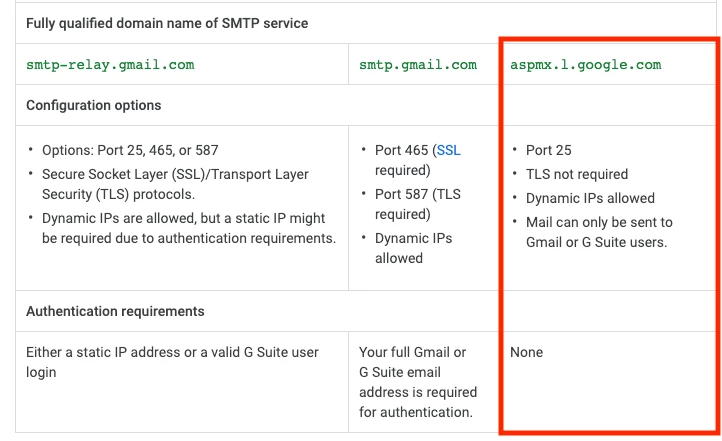
url - smtp.gmail.com port - 465
protocal - SSL

13 replies

Forum|alt.badge.img+7

You probably need to "allow less secure apps" https://support.google.com/accounts/answer/6010255?hl=en


Forum|alt.badge.img+8
  • Author
  • Contributor
  • August 14, 2018

Tried that and still not able to connect and I also tried using outlook.com smtp server and got the same error


Forum|alt.badge.img+11
  • New Contributor
  • August 14, 2018

I quickly tried this today using jamf cloud and could not get it work. I also tried an on prem server with the same gmail account/details and it worked fine. Are you using jamf cloud ? If so, we may need to contact jamf support.


Forum|alt.badge.img+8
  • Author
  • Contributor
  • August 14, 2018

I'm using Jamfcloud. I got it working with a normal Gmail account, but it doesnt seem to like a google business account ( If with all the added security it has like MFA )


Forum|alt.badge.img
  • New Contributor
  • April 8, 2019

I don't know if you found a solution, but I got it working with the below settings with our company business Google account.


Forum|alt.badge.img+7
  • Contributor
  • January 31, 2020

You'll need to turn on "Less Secure Apps" within your Gmail account that you're connecting.

https://support.google.com/accounts/answer/6010255?hl=en


Forum|alt.badge.img+11
  • Contributor
  • February 24, 2020

Note that Less Secure will be deprecated soon.
https://gsuiteupdates.googleblog.com/2019/12/less-secure-apps-oauth-google-username-password-incorrect.html


Forum|alt.badge.img+1

Hi,

what I did to successfully configure a GSuite Business account in a 10.20 Jamf Pro Instance :

In Jamf Pro Instance : https://<my-custom-url>:8443/smtpServer.html

Server and Port : smtp.gmail.com 465
Encryption : SSL
Connection Timeout : 30
Sender Display Name : Jamf Pro Server
Sender email address : prefix>@<custom-domain-name-managed-in-gsuite
Requires authentication : Yes
Username : prefix>@<custom-domain-name-managed-in-gsuite
Password : <APP PASSWORD>

It means that I activated 2-Steps Verification for prefix>@<custom-domain-name-managed-in-gsuite email, then I created an App Password specifically for Jamf Pro.

Security settings for GSuite can be found here : https://myaccount.google.com/security
App password can be configured here : https://myaccount.google.com/apppasswords (only works after 2-steps enabled)


PatrickD
Forum|alt.badge.img+9
  • Valued Contributor
  • April 15, 2020

Following


Forum|alt.badge.img+1
  • New Contributor
  • January 26, 2021

This worked for me...arnaud_mombrial
Thanks!


Forum|alt.badge.img+3
  • New Contributor
  • April 18, 2022

Sorry to necropost, but with "Less secure apps" being unsupported by Google as of May 30th of 2022 what are people doing about this?

Edit: I found this: https://community.jamf.com/t5/jamf-pro/how-to-use-gmail-as-smtp-server-the-right-way/m-p/179105/highlight/true#M167953 Thank you thanks to @user-NhRawIIVsG 


Forum|alt.badge.img+1
  • New Contributor
  • April 19, 2022

it sucks, but I just don't have jamf email configured.  I suggest everyone upvote this feature request: 

https://ideas.jamf.com/ideas/JN-I-17162 


Forum|alt.badge.img+11
  • Contributor
  • April 19, 2022

or upvote this one for OAuth

https://ideas.jamf.com/ideas/JN-I-15765