Question

(some) Mobile Apps not installing (Auto install or Self Service) (for some clients)

  • April 7, 2020
  • 59 replies
  • 400 views

Show first post

59 replies

Forum|alt.badge.img+6
  • Contributor
  • May 12, 2020

Kind of an obvious and simple answer, but do your devices have enough space? We have a number of 32GB iPads that have little to zero space. Apps are not going to install on them until space is freed.


Forum|alt.badge.img+12
  • Valued Contributor
  • May 12, 2020

Can't speak for anyone else, but just checked one of our problem iPads and it has 80GB free.


Forum|alt.badge.img+6
  • Contributor
  • August 21, 2020

@atomczynski and anyone else... Any solutions to this issue? We have a bunch of iPads from one school which apps refuse to install.


Bcodom
Forum|alt.badge.img+4
  • Contributor
  • September 1, 2020

I'm going to thrown my hat into the ring here as well. We've had this with a large group of iPads not wanting to install certain apps like IXL and SeeSaw. I've already tried all of the tricks (Blank Push, Inventory Update, Restart, etc.) and all of them have plenty of storage. It seems the best solution would be to wipe them, as we had a cart of iPads giving us fits that somehow we were able to wipe them and all of the apps installed just fine.

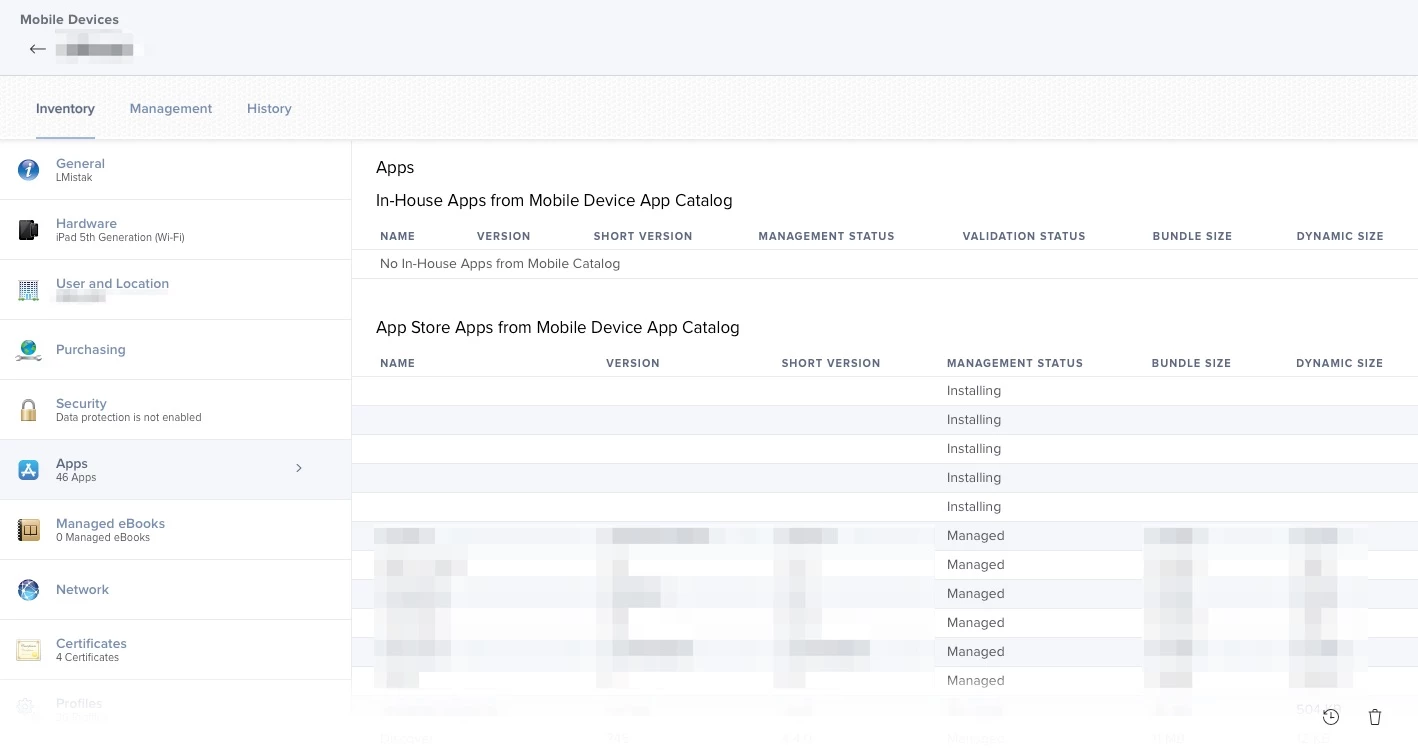
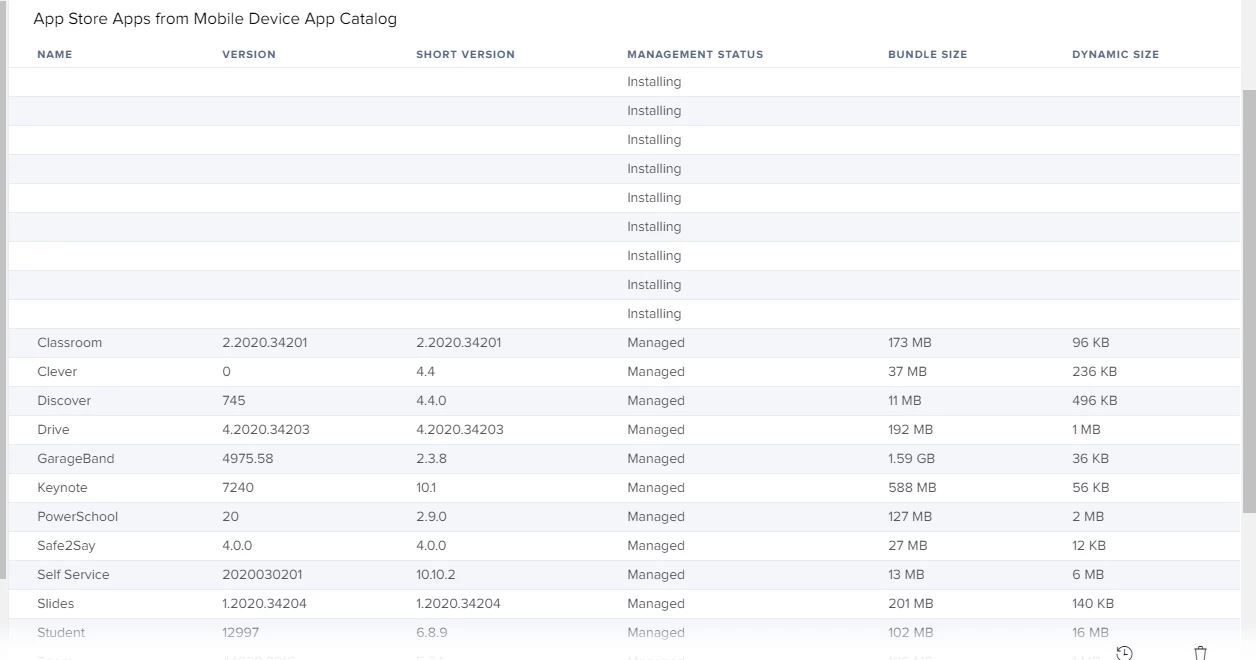
One thing I noticed under Apps in the inventory for a few of the iPads was that for most of the apps it did not show a name or any info other than "Installing". There were a few apps below on the list that gave the name and other info, but a good portion of the list only said "Installing" on it.


atomczynski11
Forum|alt.badge.img+18
  • Author
  • Jamf Heroes
  • September 1, 2020


That's exactly what I'm seeing.

Attached a screenshot of what I'm seeing. Last inventory update was yesterday. Installing for days.

Just:
"Installing" without any additional fields.

I also see install command will complete but no app icon.

Temporarily we have relaxed our restrictions to allow app removal (if it's grayed out app) the user would delete, and try to install again.


Forum|alt.badge.img
  • New Contributor
  • September 15, 2020

I just wanted to chime in and say that my district is also having the same issue. I think the only fix right now is either a wipe or if you remove the user from their current smart groups/re-add. Seems to fix the configuration

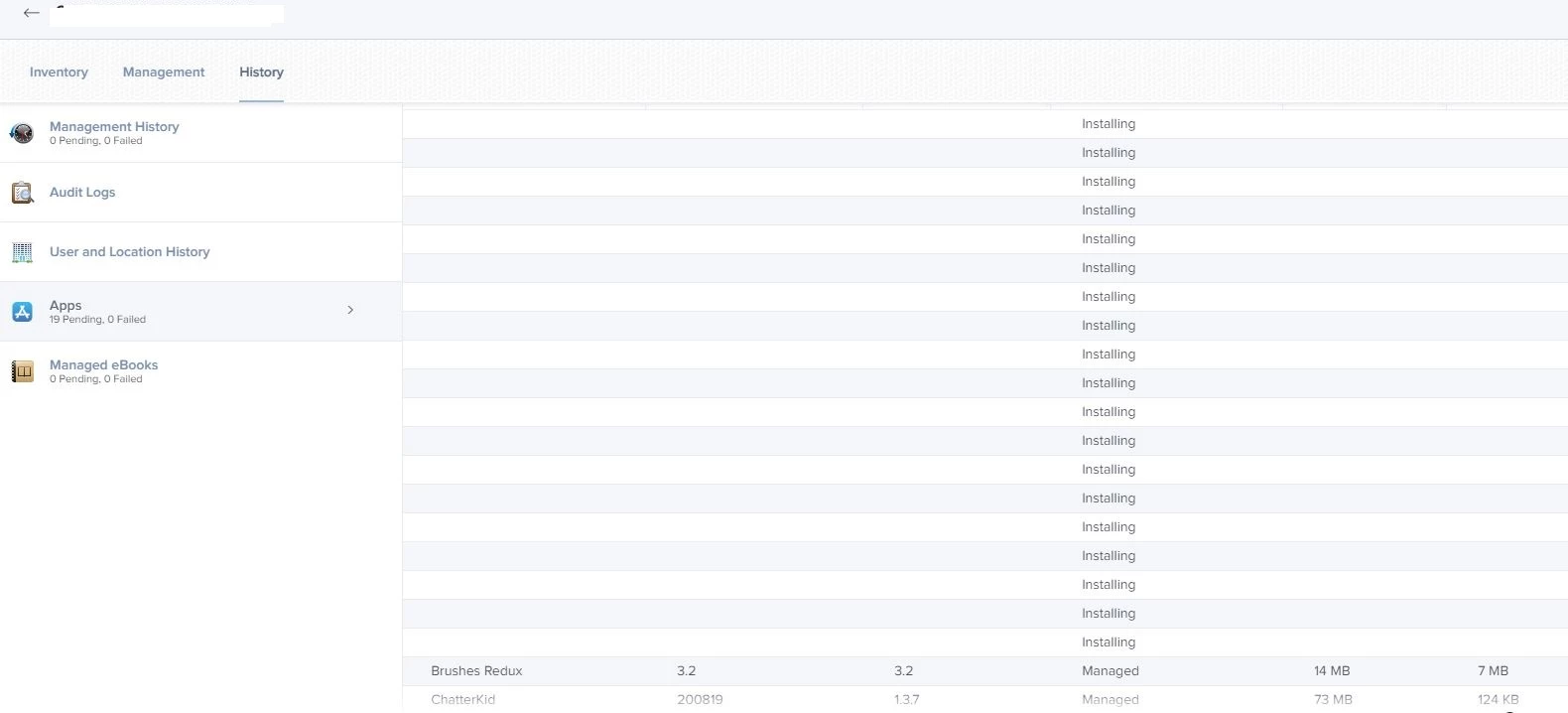
See attached. An example of one of our users that are having this self service bug. My guess is that Self-Service is working but theres an issue with it pulling App Data? No idea but assistance is welcomed.


Forum|alt.badge.img+6
  • Contributor
  • September 15, 2020

As @atomczynski says in the first post, try refreshing the app in the list below. It works, it's a pain, but it works, and you can only refresh one app at a time.

Management Settings > Global Settings>VPP Accounts>Account>Content>Select Category (iOS App), locate the app from the list and select Refresh.


djs9812
Forum|alt.badge.img+4
  • Contributor
  • September 15, 2020

We are having the same issues here. Pending application. Self service will not install now and even using all of the fixes stated above I am unable to get the apps I need the most pushed to the devices.


atomczynski11
Forum|alt.badge.img+18
  • Author
  • Jamf Heroes
  • September 15, 2020

Jamf support tells me for the devices which do not install apps to nuke the device and enroll again.


Forum|alt.badge.img+6
  • Contributor
  • September 15, 2020

@atomczynski that most likely will not work. It’s happening on newly enrolled devices here. Refreshing the app is the only thing that has worked for us.


Forum|alt.badge.img+12
  • Honored Contributor
  • September 18, 2020

We are also seeing this. Apps are completing commands to install the app but the app doesn't appear on the iPad and we have lots of apps that are blank.

This app was installed several weeks ago
For example: Install App - Google Docs - Auto Install 1.2020.36201 03/09/2020 at 11:54 AM

When checking the list of installed apps we have lots set to "Installing" that are blank which I assume are apps that have successfully processed the install command but the app hasn't installed properly and is now stuck.


Forum|alt.badge.img+4
  • New Contributor
  • November 13, 2020

We are also having the same issue. I have tried all the steps mentioned and enrolling again after a complete wipe and still having apps in this Installing mode. I have also refreshed the apps for this device and still says installing for days. They have installed fine on other iPads same version iOS same model. Has anyone ever found a fix for this?


Forum|alt.badge.img+12
  • Honored Contributor
  • November 16, 2020

Only solution I found was to wipe the device and try again.


YanW
Forum|alt.badge.img+11
  • Contributor
  • November 20, 2020

We have the same issue for a while and later found some of our students have the wrong time or time zone on their iPad. Once that corrected, the apps got pushed out. Weird...


user-JqAgeiEivA
Forum|alt.badge.img+5

First day setting up Jamf Pro and ran into this issue with my first device. Device > Management Commands > Update Inventory button immediately installed two apps that were missing after pre-stage enrollment. I tried the previous mentioned solutions so it may be a combination of steps.


Forum|alt.badge.img+4
  • New Contributor
  • February 3, 2021

I am so glad someone else is seeing this also. We have been fighting it for a while. I will keep sending a blank push to get them to take. I have to go into each device and push the apps. It takes 30 minutes for each device to install everything and that is because I am doing the blank push. This is pushing and going to history and back again to management commands. I will go back and forth to get these installed. Not sure if this helps but it does seem to. It is almost like it is timing out. When you are trying to a room at a time this is very time-consuming. We have had an issue with Self-service for quite some time so we just removed it to eliminate an instance because it is not working.


Forum|alt.badge.img+4
  • New Contributor
  • March 2, 2021

Anyone still having this issue? I have a few devices doing the same thing, just wondering if there was ever a resolution.


atomczynski11
Forum|alt.badge.img+18
  • Author
  • Jamf Heroes
  • March 3, 2021

I've opened a support case today and received:

... PI-008633. The current workaround is to wipe and re-enroll...

So at least they are aware of it.


Forum|alt.badge.img+5
  • New Contributor
  • March 9, 2021

Just about to submit a ticket for our instance as well, with none of the earlier suggestions in this thread seeming to provide a consistent solution to installing or updating apps. Everything else seems to be working fine though.


atomczynski11
Forum|alt.badge.img+18
  • Author
  • Jamf Heroes
  • March 10, 2021

We have an app that is set to auto install and may have stumbled upon a workaround.
I'm trying to gather more details.

I don't know (yet) if the device is experiencing the issue as above (and I don't have a physical access to such device).
The tech was able to use spotlight/search for the app and click on that. Then they were presented with a message that the app is not installed.
The icon for the app was showing but it was grayed out. As if the install was on pause.

I thought I'd share this in case someone may have access to such device and can try it in their environment.


Forum|alt.badge.img+5
  • New Contributor
  • March 11, 2021

It's starting to look like in our situation, it's tied to particular apps (one example in our case is Adobe Acrobat Reader), and clearing the affected apps will allow all other apps in the queue to install.

In this case, I do recall a similar situation a couple of years ago where a couple of recently updated VPP apps started to do this. We might be seeing the same thing occurring here.


atomczynski11
Forum|alt.badge.img+18
  • Author
  • Jamf Heroes
  • March 11, 2021

I'm not 100% sure if the device we had access to today was experiencing this problem.

We did see the app icon displayed (grayed out) with the words: Waiting
Selected the app and saw the following message:

Unable to Install "appnamehere"
You must purchase this app to install it.
View in App Store
OK

and selected OK, then deleted the app on the glass,
then opened Self Service and install.

I know this is not a solution to all cases, as I have seen no pending apps waiting, on some devices yet apps would not install, but something to try.


Forum|alt.badge.img+5
  • New Contributor
  • March 12, 2021

@atomczynski

This sounds like an issue a heap of admins were encountering had a while back.

Hopefully the thread might point you in right direction.

https://www.jamf.com/jamf-nation/discussions/29299/apps-staying-grayed-out


Forum|alt.badge.img+6
  • Contributor
  • March 15, 2021

We have the same problem.
Seemingly random iPads wouldn't enroll.
We narrowed it down to a user > scoping > particular app.

When that particular app is scope for that iPad - the enrollment will fail.
Its "fairly" easy to see the possible candidates by going to the device > Management History.
You will probably see one or more apps and a few management commands pending.

Solution #1 Unscope the app(s) from the particular iPad(s)
Cancel the management command(s)
Send blank push.
The rest of the commands will go through and you'll end up with 0 (zero) pending commands - won't fix the app though...

Solution #2 (more permanent) - recently discovered - this solution will also fix the app.
Choose another location for the app under the "Managed Distribution" tab.
If yo do not have another location - delete the app and "buy" it again.

Feel free to comment...


Forum|alt.badge.img+2
  • New Contributor
  • March 15, 2021

Our iPads experienced the exact same as RLR (please refer to that picture). The only work-around was to manually identify missing apps (teachers went one by one through their iPads - EXCRUCIATING!). EXCLUDE the iPad "installing" from that APP ASSIGNMENT. Update Inventory, Restart, then UN-EXCLUDE - then - the app may install. As for available space or iPad system settings. All iPads are G7 (the same make, model, size) - and have plenty of space available.