Question

struggling with grep (even if I'm sure it is so simple)

  • January 13, 2020
  • 9 replies
  • 55 views

Forum|alt.badge.img+4

Hi Nation,
(total noob so sorry if this is a dumb request)

context: pre imaging partition

I want to do a simple thing but cannot find online how to do it:
-I have 2 disks, both have a partition with an Apple_hfs type
-I want to grep the disk of only one by doing:

diskutil list | grep GUID_partition_scheme | grep -v ???? | awk '{print$5}'

I want to exclude

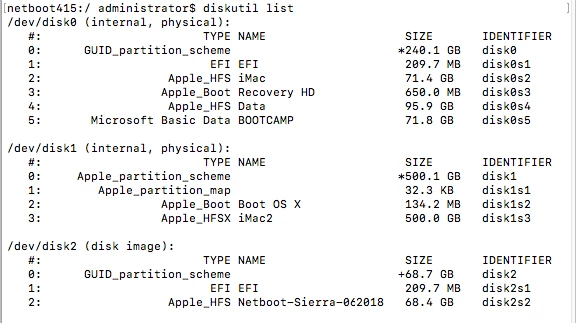
/dev/disk2 (disk image): #: TYPE NAME SIZE IDENTIFIER 0: GUID_partition_scheme +68.7 GB disk2 1: EFI EFI 209.7 MB disk2s1 2: Apple_HFS Netboot-Sierra-062018 68.4 GB disk2s2

and use Netboot-Sierra-062018 with the switch -v

any ideas?

(hope all of this makes sense)

PS: how do you pronounce grep? g-rep or grrep?

9 replies

Forum|alt.badge.img+4
  • New Contributor
  • January 13, 2020

diskutil list | awk '/GUID_partition_scheme/{print $5}'

you can use AWK command to search and print out the column you need


Forum|alt.badge.img+3
  • New Contributor
  • January 13, 2020
PS: how do you pronounce grep? g-rep or grrep?

It's just "grep". Rhymes with "strep" and "hep".


Forum|alt.badge.img+4
  • Author
  • Contributor
  • January 13, 2020

thanks @james.spencer but GUID_partition_scheme will print 2 results in my case, and I need a command to remove one and get only one print.


Forum|alt.badge.img+11
  • Contributor
  • January 13, 2020

This should do the trick:

diskutil list | awk '/Apple_HFS Netboot-Sierra/ {print$5}'

Forum|alt.badge.img+4
  • Author
  • Contributor
  • January 13, 2020

thanks @athomson but I think I screwed up my explanation because this is not what I want. lol

pic speaks louder that my English :)
(ignore disk1 in the pic)
I need to grep disk0 to partition before imaging, my problem is GUID-partition_scheme is shown on 2 disks so when I run

cheese=$(diskutil list | grep GUID_partition_scheme | '{print$5}')

it returns 2 results so I cannot run

diskutil partitionDisk $cheese 3 GPT JHFS+ Imac 30% JHFS+ Data 40% MS-DOS BOOTCAMP R;

Hope all of this makes sense, I m all new to this.

tia


Forum|alt.badge.img+10
  • Valued Contributor
  • January 13, 2020

It appears that you are attempting to dual boot systems. Will you always be partitioning disk0 or will it be possible to need to partition say disk2 for some reason?


Forum|alt.badge.img+4
  • Author
  • Contributor
  • January 13, 2020

@m.donovan in theory it is always disk0 but we never know, hence using variable to make sure it is always consistent


Forum|alt.badge.img+10
  • Valued Contributor
  • January 13, 2020

You could try:

diskutil list internal

This should only include the disk0 in your example.


Forum|alt.badge.img+4
  • Author
  • Contributor
  • January 13, 2020

@m.donovan works perfectly like I wanted! thanks