Question

Tableau Desktop (candidate for worst vendor package in 2017 so far?)

  • May 6, 2017
  • 16 replies
  • 91 views

donmontalvo
Forum|alt.badge.img+36

Ok, so the product page is up to date, showing 10.2.1.

https://www.jamf.com/jamf-nation/third-party-products/405/tableau-desktop

The only thread I could find is couple years old and appears to hint at older versions being drag install.

https://www.jamf.com/jamf-nation/discussions/12543/package-tableau-suggestions

Took a look at the newest 10.2.1 installer package, and had suspicions because it looked, well, wonky (Suspicious Package, Pacifist).

Suspicion confirmed...when their installer package is deployed to a logged off computer, it runs/exits fine...but it leaves a convoluted mess of bits on the computer.
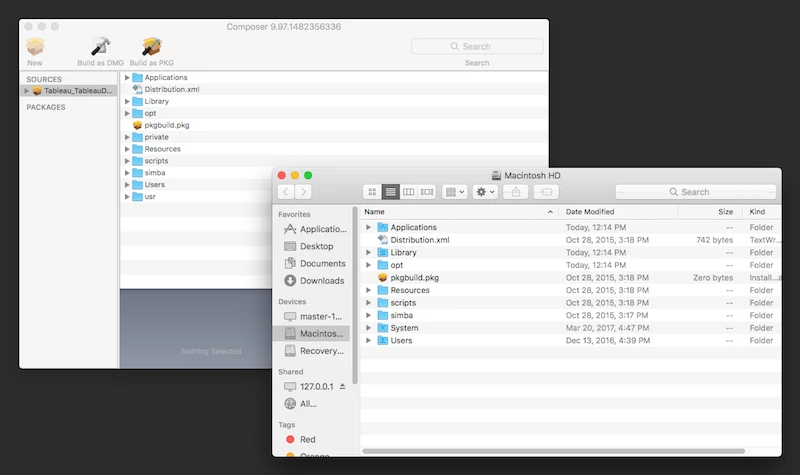
Thought I'd post this here to shine a light on what might be the worst installer so far in 2017.

It's GREAT software, from the feedback we've received from folks who use it...but their installer can sure use a revisit.

Especially some of their many embedded scripts, which seem more like duct tape and a BFH than anything, for example:

#!/bin/sh
chown root '/Library/Application Support/FLEXnet Publisher/Service/11.14.0/FNPLicensingService'
chmod 4755 '/Library/Application Support/FLEXnet Publisher/Service/11.14.0/FNPLicensingService'
mkdir -p '/Library/Preferences/FLEXnet Publisher'
chmod -R 777 '/Library/Preferences/FLEXnet Publisher'
exit 0

Some info, some of it useful, some of it sort of hail-mary:

Install <-- yea, right, eat your own dog food much?
https://onlinehelp.tableau.com/current/desktopdeploy/en-us/desktop_deploy_automate.htm#install-mac

Activate
https://onlinehelp.tableau.com/current/desktopdeploy/en-us/desktop_deploy_automate.htm#license

De-Activate https://onlinehelp.tableau.com/current/desktopdeploy/en-us/desktop_deploy_automate.htm#deactivate

Register
https://onlinehelp.tableau.com/current/desktopdeploy/en-us/desktop_deploy_automate.htm#register

Uninstall <-- a real doozie
https://onlinehelp.tableau.com/current/desktopdeploy/en-us/desktop_deploy_automate.htm#Uninstall

Has anyone packaged Tableau Desktop 10.2.1 for distribution? Thoughts?

16 replies

bentoms
Forum|alt.badge.img+35
  • Hall of Fame
  • May 6, 2017

@donmontalvo I think @foigus has created an AutoPkg recipe for this.


pete_c
Forum|alt.badge.img+16
  • Honored Contributor
  • May 7, 2017

FWIW this scripting mess started with their 10.2.x branch. I was deploying 10.1 through 10.1.5 of Tableau Reader as a drag and drop.


Forum|alt.badge.img+4
  • New Contributor
  • May 7, 2017

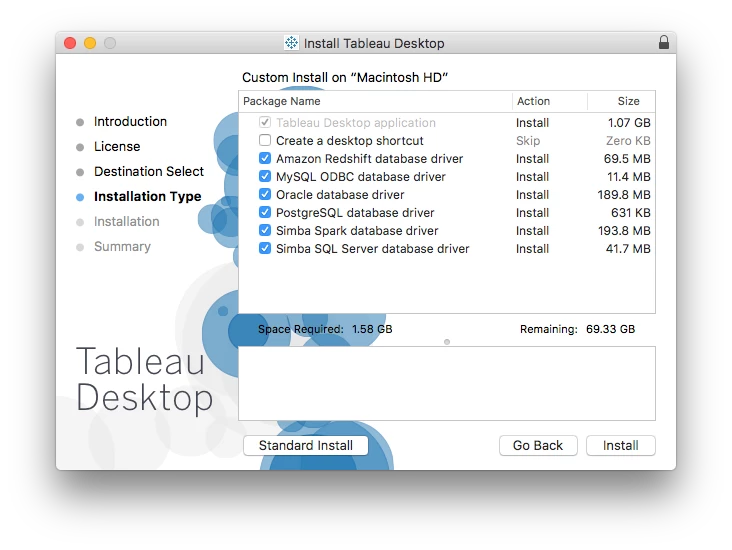
Per a Twitter exchange, Tableau now includes some third-party "drivers" and a lot of the untidiness can be blamed on the drivers. They're optional via Installer Choices:

In order, those choices are:

  • com.tableausoftware.desktop.app
  • com.tableausoftware.desktopShortcut (note this choice is isn't enabled (it's off) default)
  • com.amazon.redshiftodbc
  • com.tableausoftware.mysql
  • com.tableausoftware.oracle
  • com.tableausoftware.postgresql
  • com.simba.sparkodbc
  • com.simba.sqlserverodbc

Note my AutoPkg recipe doesn't change any of those options though.

I imagine Tableau's desire was to provide one installation methodology for application and drivers. I honestly don't know how well or poorly Tableau Desktop functions without the drivers, but I'm under the impression they weren't previously included.


donmontalvo
Forum|alt.badge.img+36
  • Author
  • Hall of Fame
  • May 7, 2017

Wow so the app is still a drag install. I guess I can split it out to be its own installer and see how that goes.

Then I can deal with those pesky third party installers. May as well stick an ice pick through my cojones while I'm at it.

I sent them a polite thank you in Twitter. ;)

https://twitter.com/donmontalvo/status/861370949693722624


donmontalvo
Forum|alt.badge.img+36
  • Author
  • Hall of Fame
  • May 14, 2017

10.2.2 was released on Thursday...and no, they did not fix the wonky installer.


mgshepherd
Forum|alt.badge.img+11
  • Contributor
  • June 13, 2017

Is anyone getting better results with 10.3? I uploaded the package file straight to my JSS instance and created a policy to run the installer along with a script that runs afterwards to activate the software. Works great for me.


Forum|alt.badge.img+7
  • Contributor
  • July 24, 2017

Hey @mgshepherd can you share what you are doing to activate? I hear people use a script and a key... but since we have individual keys, this isn't very clean.


mgshepherd
Forum|alt.badge.img+11
  • Contributor
  • July 24, 2017

Sure thing, since we're education I was able to apply for a single key which makes a world of difference. I'm hoping this could be an option for you or if there's a way you could reach out to them to convert the licenses to a single code. For installing I have a policy that first installs the package then I have a script that runs afterwards that activates the license. The following code is what I use to activate Tableau.

#!/bin/sh
/Applications/Tableau Desktop 10.3.app/Contents/Frameworks/FlexNet/custactutil -served -comm soap -commServer https://licensing.tableausoftware.com:443/flexnet/services/ActivationService?wsdl -entitlementID [your product key] -activatable 1

donmontalvo
Forum|alt.badge.img+36
  • Author
  • Hall of Fame
  • August 4, 2017

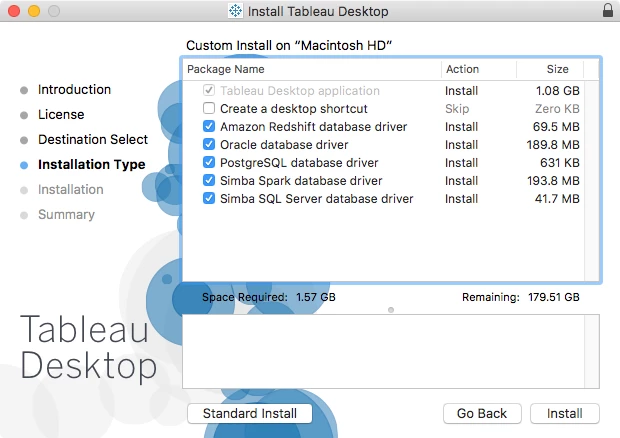
10.2.4 was released the other day, still wonky, except no MySQL ODBC database driver.

So we still have to use an installer choices XML file to disable the drivers that are not needed.


Forum|alt.badge.img+9
  • Contributor
  • November 6, 2017

@donmontalvo I'm a total rookie at the choices XML. I don't expect you do to all or any of the work but building XML is very new to me...or at least parsing out the choices from the installer. I totally get:

<key>choiceIsSelected</key>
<integer>1</integer>

represents that the feature is enabled and that 0 means it's disabled.

If I wanted to not have it install the Amazon Redshift driver, what would the XML look like for that or if you have resources that you could point me to that would be great!

Any help is appreciated :)
Thanks!
Chris


donmontalvo
Forum|alt.badge.img+36
  • Author
  • Hall of Fame
  • December 25, 2017

@cgiordano my apologies, I didn't notice your post in November. Figured I'd circle back today to post that 10.4.2 still comes with a bunch of drivers bundled and enabled in the installer. They also continue to put the version number in the name (ugh).

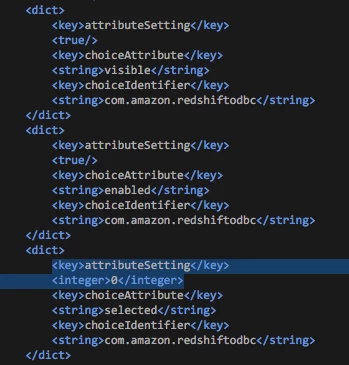
While I'm here...when you generate your installerChoices.xml file there are three configurations for each installer choice item:

  1. visible This controls whether the item is visible in the (true|false) and is only relevant in GUI.
  2. enabled This controls whether the item is greyed out in the GUI (true|false) and is only relevant in GUI.
  3. selected This controls whether the item is checked or unchecked (1|0).

Leave visible and enabled alone, and change the integer for the selected to 0 to disable.

Here are the three parts for com.amazon.redshiftodbc with the relevant value highlighted:

Ok finished my coffee, off to do holiday stuff.

Merry Christmas!


ImAMacGuy
Forum|alt.badge.img+23
  • Esteemed Contributor
  • February 22, 2018

what is the best way to hide the updates? can it be done as part of the post install script?

defaults write com.tableau.Tableau-10.5 AutoUpdate.AutoUpdateAllowed "0"

sdagley
Forum|alt.badge.img+25
  • Jamf Heroes
  • June 17, 2019

@jwojda Did you ever get an answer to disabling Tableau auto updates?


mgshepherd
Forum|alt.badge.img+11
  • Contributor
  • July 30, 2019

It looks like Tableau Desktop will only obey an actual plist to turn off updates as mentioned by @jwojda. It's so frustrating that creating a Config Profile is ignored by the software. ¯_(ツ)_/¯


donmontalvo
Forum|alt.badge.img+36
  • Author
  • Hall of Fame
  • February 11, 2020

@mgshepherd Tableau Support can answer that one, if you have a contract with them, like "What's the best way to disable updates, in programatic fashion?" This way you have a ticket and a paper trail to follow up on.


Forum|alt.badge.img+10
  • Valued Contributor
  • November 5, 2020

Hi all,

How about the uninstall? Currently within my work, I have users saying they want to go back from Tableau Desktop 2020.3 back to Tableau Desktop 10.2.

I have uninstalled Tableau Desktop 2020.3 (drag application to bin).
I have also cleaned up the /Library directory as mentioned above.

But when I tried to install Tableau Desktop 10.2 via Self Service, I am getting error messsage (This is JAMF log):

Installation failed. The installer reported: installer: Package name is Tableau Desktop installer: Upgrading at base path / installer: The upgrade failed. (The Installer encountered an error that caused the installation to fail. Contact the software manufacturer for assistance. The package is attempting to install content to the system volume.)

it still thinks it's an upgrade, which means it still thinks there is a version of Tableau somewhere within macOS.
Any suggestions where to look next would be much appreciated :)

Edit: Pls ignore my question.
Turns out the issues has nothing to do with the uninstaller at all.
Rather, Tableau Desktop 10.2 is not compatible with macOS Catalina, and hence the error message during installation "The Installer encountered an error that caused the installation to fail. Contact the software manufacturer for assistance. The package is attempting to install content to the system volume.".