Solved

The DEP service reported an error. (https://mdmenrollment.apple.com [403])

  • September 22, 2015
  • 26 replies
  • 110 views

Forum|alt.badge.img+18

Getting The DEP service reported an error. (https://mdmenrollment.apple.com [403]) when I try to set up a prestage enrollment on an ipad currently. Any ideas?

Gabe Shackney
Princeton Public Schools

Best answer by GabePPS

Clock skew was off by 10 min on our casper server for some reason. Fixed it by updating the time.

Gabe Shackney
Princeton Public Schools

26 replies

Forum|alt.badge.img+12
  • Valued Contributor
  • September 22, 2015

We currently have this error at the DEP setting in JSS:
Unable to contact https://mdmenrollment.apple.com to get the list of devices


Forum|alt.badge.img+18
  • Author
  • Esteemed Contributor
  • Answer
  • September 22, 2015

Clock skew was off by 10 min on our casper server for some reason. Fixed it by updating the time.

Gabe Shackney
Princeton Public Schools


Forum|alt.badge.img+18
  • Valued Contributor
  • October 1, 2015

I'm seeing this right now. The error reads : Unable to contact https://mdmenrollment.apple.com to get the list of devices We are running 9.73 My DEP key/token says it is good till Feb 2016.


Forum|alt.badge.img+11
  • Contributor
  • October 1, 2015

Go into the DEP site and agree to the new agreements


Forum|alt.badge.img+18
  • Valued Contributor
  • October 1, 2015

Thanks for the tip @don.cochran ! Just went in and agreed to them.


Forum|alt.badge.img
  • New Contributor
  • September 14, 2016

Thank you don.cochran. That fixed my issue as well.


Forum|alt.badge.img
  • New Contributor
  • October 5, 2016

Phew, me too! I had just added a cert for Microsoft Intune (testing) and was terrified that I had broken something that would required re-enrolling everything in the JSS...fortunately it was just that I needed to agree to the updated terms since iOS 10 and macOS Sierra came out. Thanks!


Forum|alt.badge.img+8

After multiple troubleshooting steps

Renewed server token file
Replaced the public key
made sure the time and date were correct on the JSS Server
Restart Tomcat
Accepted the new Terms and Agreement from Apple

I ended up renewed server token file, replaced the public key again and creating a new Prestage Enrollment

so far we do not have any errors


Forum|alt.badge.img+7
  • Contributor
  • June 28, 2017

@Chriskmpruitt , this was extremely helpful! Replacing the public key and server token file were the exact fix for me. Thank you!


Forum|alt.badge.img+4
  • Contributor
  • July 13, 2017

I'm not really sure what you mean about accepting new terms and agreements


chris_kemp
Forum|alt.badge.img+20
  • Jamf Heroes
  • September 4, 2017

Ran into this issue Friday as well. Replacing the server token seems to have fixed it.


Forum|alt.badge.img+5
  • Contributor
  • September 7, 2017

Yep we are getting this today, can you do this using apple school manager to fix the issues? and if you replace any tokens do you have to push anything out to all clients?


Forum|alt.badge.img+5
  • Contributor
  • September 8, 2017

Fixed 1. Click Gear icon then Global Management then Device Enrollment Program.
2. Click Public Key button to download the public key.
3. Log into https://school.apple.com/ and click Manage Servers then click on our MDM and then click the replace public key link.
4. Upload the new public key. 5. Generate and download new token. 6. Edit our existing DEP and upload the newly generated token.
7. Restart Tomcat on server

All working, happy days :)


Forum|alt.badge.img+11
  • New Contributor
  • September 20, 2017

We just had this issue. The account that issued the tokens in deploy had it's admin rights removed by another admin. The original admin had left the organization. Something to check first if you have multiple DEP "servers" & multiple JAMF servers making re-issuing certs just to test problematic.

Giving the account that issued the tokens admin rights again re-allowed the tokens to be accepted. Passable work around until a service account can be created and new tokens can be issued for everything. Something to watch out for in Higher Ed when every department is an separate entity in itself and Apple only allows one DEP contract. Issue your tokens from a service account.


Forum|alt.badge.img+8
  • Valued Contributor
  • September 21, 2017

We noticed that DEP broke with the publishing of the new Software License Agreements for 10.13., tvOS, iOS.
Accepting the new agreements in school.apple.com did not do the trick alone, but getting a new token as mentioned above got everything working again.


jmahlman
Forum|alt.badge.img+17
  • Valued Contributor
  • September 21, 2017

Accepting the new terms fixed mine.


Forum|alt.badge.img+3

We had this issue last week but after accepting the new terms it was fixed ! But to our surprise yesterday morning we had the same issue again. I renewed the token, replaced the public key but with no luck. We are using the cloud service so we cannot change the time or restart the tomcat server.
Created an ticket with Jamf.


Forum|alt.badge.img+5
  • New Contributor
  • December 19, 2017

We had removed admin rights from our organizational email address in Apple School Manager and received this error. Giving back admin rights to this account fixed the issue for us.


Forum|alt.badge.img+8
  • Contributor
  • September 18, 2018

Our issue was "Unable to contact https://mdmenrollment.apple.com to get the list of devices" and after PreStages were saved they would have a yellow error sign beside them.

@don.cochran Thank you! I logged into school.apple.com (ASM) and accepted the new terms and conditions. I got the notification from Apple to do so over the weekend but never saw the terms post yesterday like they were supposed to. All is fixed now!


Forum|alt.badge.img+4
  • Contributor
  • September 26, 2018

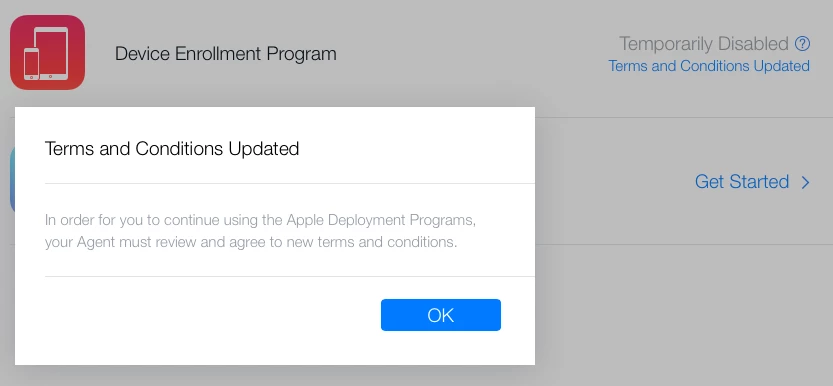
Has anyone seen this when going into accept new terms and conditions?


cdenesha
Forum|alt.badge.img+14
  • Honored Contributor
  • September 27, 2018

@Steven5342 Only the primary Agent can approve the new T&C, unless they have elevated someone else to do so


Forum|alt.badge.img+4
  • Contributor
  • September 27, 2018

@cdenesha where would I find who the primary agent is? Thank you.


cdenesha
Forum|alt.badge.img+14
  • Honored Contributor
  • September 27, 2018

Accounts -> Filter -> Role = Administrator


Forum|alt.badge.img+10
  • Contributor
  • September 28, 2018

I was having the error message in my PreStage Enrollment settings, also. The fix for me (from Jamf Support) was to remove a device from the PreStage Enrollment assignment, save, and then re-add that device back in.


Forum|alt.badge.img+5

I had the same error message and after some troubleshooting, I found the issue was caused by checking Enabled Shared iPads in the pre-enrollment profile. Once I removed the check from the checkbox the message went away.