Question

Time Machine Destination EA Issues

  • June 10, 2013
  • 17 replies
  • 82 views

Forum|alt.badge.img+10

I've added in the "from template" extension attribute to record the system's Time Machine backup destination. However, I've noticed that it's not always working. After digging into it some on affected systems, it looks like there are multiple different keys that store this information in /Library/Preferences/com.apple.TimeMachine.plist. The JAMF template is looking at a key called "DestinationVolumeUUID" but I've also seen "DestinationVolumeUUIDs" on 10.7.5 and the 10.8.4 system I'm currently working with has it as "DestinationUUIDs"

Does anyone have a working EA that takes into account all of these differences before I go attempting to engineer one that checks for all the possible different keys?

Thanks,
Eric

Here is the JAMF default script for reference:

#!/bin/sh
enabled=/usr/bin/defaults read /Library/Preferences/com.apple.TimeMachine AutoBackup

if [ "$enabled" == "1" ];then
validateDestination=/usr/sbin/diskutil info $(/usr/bin/defaults read /Library/Preferences/com.apple.TimeMachine "DestinationVolumeUUID") | awk '{print $1, $2}'

if [ "$validateDestination" == "Could not" ];then echo "<result>Destination not mounted</result>"
else backupDestination=/usr/sbin/diskutil info $(/usr/bin/defaults read /Library/Preferences/com.apple.TimeMachine "DestinationVolumeUUID") | grep "Mount Point" | /usr/bin/cut -c 30- echo "<result>$backupDestination</result>"
fi

else
echo "<result>Not enabled.</result>"
fi

17 replies

charliwest
Forum|alt.badge.img+9
  • Contributor
  • April 16, 2015

Did you ever get anywhere with this, having the same issue and really would like to be able to report on back up location.


davidacland
Forum|alt.badge.img+18
  • Valued Contributor
  • April 16, 2015

Taking a bit of code from @rtrouton's scripts, you can use

osvers=$(sw_vers -productVersion | awk -F. '{print $2}')

to get the OS version, then a bit of

if [ "${osvers}" = "10" ]; then 
  # read 10.10 key and echo to <result>
fi

if [ "${osvers}" = "9" ]; then 
  # read 10.9 key and echo to <result>
fi

#etc...

charliwest
Forum|alt.badge.img+9
  • Contributor
  • April 16, 2015

hi @davidacland bit confused how that gets the time machine back up location?


davidacland
Forum|alt.badge.img+18
  • Valued Contributor
  • April 16, 2015

Sorry I was just looking at the "how to get different results depending on the OS version" bit, going by the initial comment from etippett, the time machine destination key is in /Library/Preferences/com.apple.TimeMachine.plist, the problem seems to be that the key name is different depending on the OS version. It looks to be more complicated since the OS started supporting multiple TM destinations.

Taking a step back, it would probably be easier now just to use

tmutil destinationinfo

You can then clean it up with grep and sed to just get the name.


charliwest
Forum|alt.badge.img+9
  • Contributor
  • April 16, 2015

thanks @davidacland with that and some help from the IRC channel I put this together, probably not useful for everyone, but might be a starting point for those wanting a bit more function.

#!/bin/sh
tmlocation="tmutil destinationinfo | awk ' /URL/ { print $3 }'"
if [ -n "$tmlocation" ];then echo "<result>Location</result>"
else
echo "<result>No Location</result>"
fi

This is for when the tm location is an afp mount point, and the tmlocation is the name of the server, for me the result 'Location' is the server name.


davidacland
Forum|alt.badge.img+18
  • Valued Contributor
  • April 16, 2015

Cool, should be pretty easy to adjust if anyone needs local disk info instead.

I couldn't get onto IRC today, working at a school with pretty heavy filtering :(


charliwest
Forum|alt.badge.img+9
  • Contributor
  • April 16, 2015
 awk 'match($0,"@"){print substr($0,RSTART+1,5)}'`

might also be helpful, this prints the 5 characters after the @ symbol which is actually what I used


Forum|alt.badge.img+10
  • Author
  • Contributor
  • April 16, 2015

The problem I've had with 'tmutil destinationinfo' is that it only reports the volume mount point if the volume is currently mounted. Since we use external hard drives for our mobile users, the drive is rarely mounted. The command output also lists a UUID, but this is different than the UUID used by diskutility and I can't find any documentation on where information about that UUID is stored. If I issue a 'diskutility info' command referencing that ID, it reports "could not find disk".

It's on my to-do list for this week actually to work up a way to use the DestinationUUIDs key in /Library/Preferences/com.apple.TimeMachine.plist, which contains the same UUID as what diskutility uses for the disk. This way I can translate the UUID into an actual volume name, as diskutility seems to be able to provide this info even if the disk isn't mounted (at least in my limited testing thus far).

Hopefully this works, but again, I haven't had time to develop or test yet.

Eric


davidacland
Forum|alt.badge.img+18
  • Valued Contributor
  • April 16, 2015

Thats odd, if I run it on my Mac I can see a local disk that isn't currently attached:

Name        : Delorean
Kind          : Local
ID              : 131D0CDC-C684-4AE0-9F1E-647F80960266

Forum|alt.badge.img+10
  • Author
  • Contributor
  • April 20, 2015

@davidacland Hmmm...yup, you're definitely right about that! I was recalling all of my previous comments from memory. I can't recall now what it was I was previously trying to determine about the backup disk that 'tmutil destinationinfo' was not giving me. Oh, well!


Forum|alt.badge.img+10
  • Author
  • Contributor
  • April 20, 2015

For reference, here is my final EA. I use this for local disks.

#!/bin/sh

enabled=`/usr/bin/defaults read /Library/Preferences/com.apple.TimeMachine AutoBackup`

if [ "$enabled" == "0" ];then
    echo "<result>TM not enabled</result>"
elif [ "$enabled" == "1" ];then
    echo "<result>`tmutil destinationinfo | grep "Name" | awk -F ": " '{print $2}'`</result>"
else
    echo "<result>ERROR: Unknown value for AutoBackup</result>"
fi

Forum|alt.badge.img+4
  • Contributor
  • January 10, 2017

Thanks to @etippett for the EA for local disks.

It works fine on a test Mac when run just as a script, but isn't pulling any data as an EA, the field is just blank. Any advice?


Forum|alt.badge.img+10
  • Author
  • Contributor
  • January 10, 2017

@avail The only thing I can think is to double- and triple-check your EA for any syntax errors. If it isn't echoing information with the proper result tags, then you'll get a blank result. Unless there's a mistake somewhere, there's no reason it should return different information when run locally versus via the JSS. Sorry to not be able to offer more help!


Forum|alt.badge.img+4
  • Contributor
  • January 10, 2017

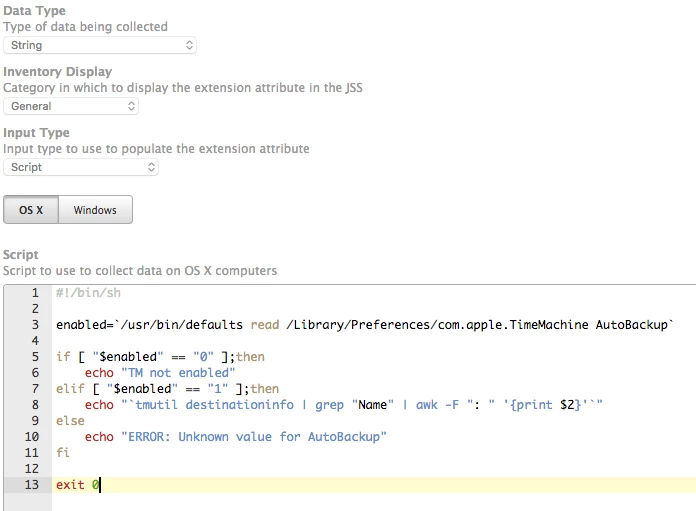
Thanks @etippett , if you don't mind I've attached a screen shot. Figured it would be good to have a second set of eyes give it a glance :)


Forum|alt.badge.img+10
  • Author
  • Contributor
  • January 10, 2017

Ah, that is helpful. It's what I thought. Take a look at my EA posted above. Notice how in each echo command there are "<result>" and "</result>" tags? Those indicate to the JSS what information is supposed to be stored in the EA (it filters the output of the script looking for these). Without them you get a blank result. Since your EA is missing them, that's the problem.


Forum|alt.badge.img+4
  • Contributor
  • January 10, 2017

D'oh! That must have been me tinkering around and not going back to your original code. Thank you! Let me fix that :)


Forum|alt.badge.img+4
  • Contributor
  • January 10, 2017

And there we go - working now. Go figure ;D. Thank you so much for your help.