Solved

UAPI GET specific data

  • July 7, 2020
  • 31 replies
  • 205 views

Show first post

31 replies

Forum|alt.badge.img+20
  • Employee
  • Answer
  • September 10, 2021

Since I continue to explore the UAPI :). do you know by any chance if PATCHing computer name on JSS is not available yet as well?

As I get 404 error when trying to do it:


curl --request PATCH \\ --url "https://jss.MYCOMPANY.com:8443/uapi/v1/computers-inventory-detail/$id" \\ --header "Accept: application/json" \\ --header "Authorization: Bearer $token" \\ --header "Content-Type: application/json" \\ --data ' { "general": { "name" : "'$computernameinput'" } } '


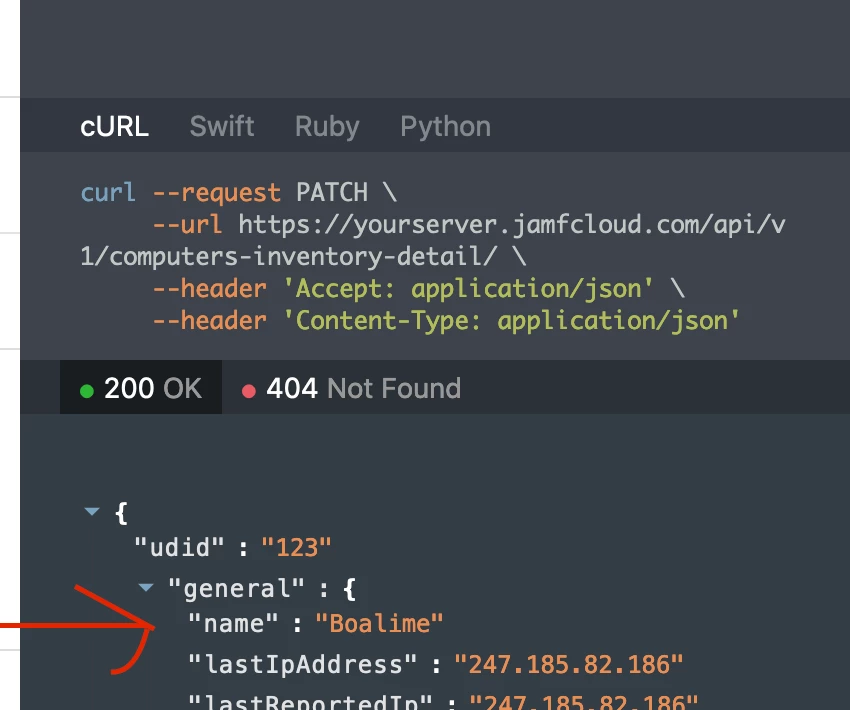
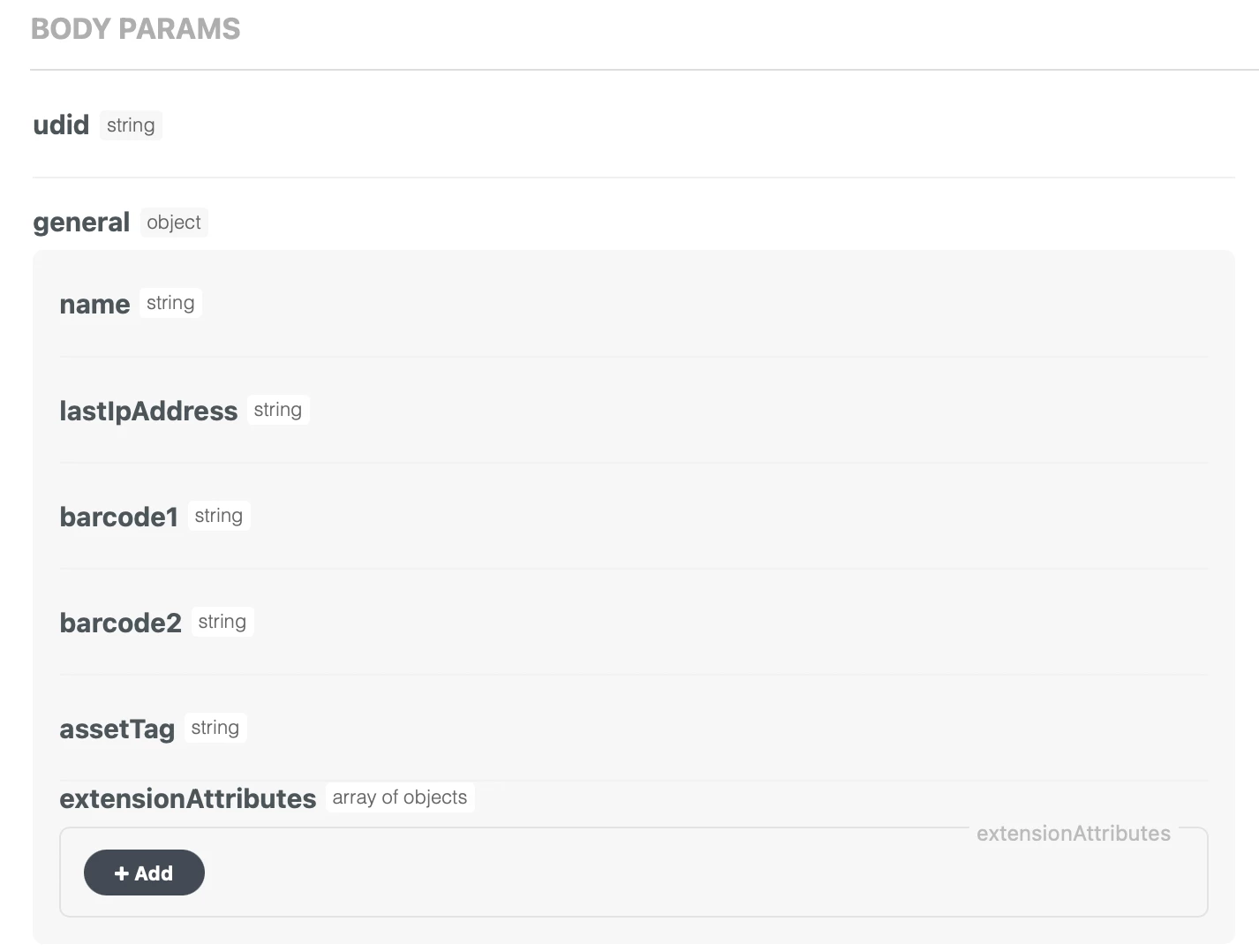
Yes, updating the name is supported. Make sure to check the center column of the documentation to determine what inputs are allowed by the endpoint you're referencing. The right column, which you included a screenshot of provides an example of a successful response (not the request). I've included a screenshot for reference, which shows that "name" is a supported element in the request body:

The following format is a valid request body:

{ "general": { "name": "NewDeviceName" } }

Finally, the error you're getting seems to be unrelated to the request body. 404 means that the server couldn't find the resource that you specified, in this case, the device ID. Make sure the variable you're using is set properly and/or being passed properly. If you're not super familiar with an API operation or the coding language, it's generally a good idea to ensure the code you're writing works first with hardcoded values, then work backwards to make it scalable/reusable, by substituting in the variables.


akamenev47
Forum|alt.badge.img+10
  • Author
  • Valued Contributor
  • September 10, 2021

Yes, updating the name is supported. Make sure to check the center column of the documentation to determine what inputs are allowed by the endpoint you're referencing. The right column, which you included a screenshot of provides an example of a successful response (not the request). I've included a screenshot for reference, which shows that "name" is a supported element in the request body:

The following format is a valid request body:

{ "general": { "name": "NewDeviceName" } }

Finally, the error you're getting seems to be unrelated to the request body. 404 means that the server couldn't find the resource that you specified, in this case, the device ID. Make sure the variable you're using is set properly and/or being passed properly. If you're not super familiar with an API operation or the coding language, it's generally a good idea to ensure the code you're writing works first with hardcoded values, then work backwards to make it scalable/reusable, by substituting in the variables.


You are the best 🙂

404 means that the server couldn't find the resource that you specified, in this case, the device ID - that was the case, I had a miss-type for the JSS URL so it couldn't locate the actual ID, I guess I misinterpreted the 404 error, once I set the correct JSS URL it worked like a charm. Thank You!


akamenev47
Forum|alt.badge.img+10
  • Author
  • Valued Contributor
  • September 10, 2021

What I was working on mainly is LAPS to work via the new UAPI, if anybody has a need for it - you can find it here: https://gist.github.com/shurkin18 

A bunch of thanks to @SamF , I would be otherwise stuck for a while 🙂


akamenev47
Forum|alt.badge.img+10
  • Author
  • Valued Contributor
  • October 1, 2021

@sam11, hey Sam, so far UAPI is working well for me. The only thing is, when I update something on the UAPI using curl --request PATCH - it updates fine, but also prints out all the information about the mac as well, which is making it hard to read the logs...


For example, this command:


curl --request PATCH \\ --url "$apiURL/uapi/v1/computers-inventory-detail/$id" \\ --header "Accept: application/json" \\ --header "Authorization: Bearer $token" \\ --header "Content-Type: application/json" \\ --data ' { "general": { "extensionAttributes": [ { "definitionId" : "'$currentstatusid'", "values" : ["'$issuedstatus'"] } ] } } '


updates an extension attribute by it's id correctly, but also parses ALL the information about the mac, such as:


{ "id" : "2670", "udid" : "55FC5FA2-21********************", "general" : { "name" : "MM-MA*******", "lastIpAddress" : "172**********6", "lastReportedIp" : "19***********56", "jamfBinaryVersion" : "10.30.3-t1624643096", "platform" : "Mac", "barcode1" : null, "barcode2" : null, "assetTag" : "6*******6", "remoteManagement" : { "managed" : true, "managementUsername" : "ak******" }, "supervised" : true, "mdmCapable" : { "capable" : true, "capableUsers" : [ "ak*****v" ] }, "reportDate" : "2021-10-01T13:22:28.216


I just included a small portion, it prints basically ALL the data about the mac, like if I would run curl GET without trimming.


Any ideas how to prevent it from printing all of that info?


Forum|alt.badge.img+5
  • New Contributor
  • November 9, 2021

@sam11, hey Sam, so far UAPI is working well for me. The only thing is, when I update something on the UAPI using curl --request PATCH - it updates fine, but also prints out all the information about the mac as well, which is making it hard to read the logs...


For example, this command:


curl --request PATCH \\ --url "$apiURL/uapi/v1/computers-inventory-detail/$id" \\ --header "Accept: application/json" \\ --header "Authorization: Bearer $token" \\ --header "Content-Type: application/json" \\ --data ' { "general": { "extensionAttributes": [ { "definitionId" : "'$currentstatusid'", "values" : ["'$issuedstatus'"] } ] } } '


updates an extension attribute by it's id correctly, but also parses ALL the information about the mac, such as:


{ "id" : "2670", "udid" : "55FC5FA2-21********************", "general" : { "name" : "MM-MA*******", "lastIpAddress" : "172**********6", "lastReportedIp" : "19***********56", "jamfBinaryVersion" : "10.30.3-t1624643096", "platform" : "Mac", "barcode1" : null, "barcode2" : null, "assetTag" : "6*******6", "remoteManagement" : { "managed" : true, "managementUsername" : "ak******" }, "supervised" : true, "mdmCapable" : { "capable" : true, "capableUsers" : [ "ak*****v" ] }, "reportDate" : "2021-10-01T13:22:28.216


I just included a small portion, it prints basically ALL the data about the mac, like if I would run curl GET without trimming.


Any ideas how to prevent it from printing all of that info?


@akamenev47 is it possible you could throw in a silent argument in with your headers? 

--url "$apiURL/uapi/v1/computers-inventory-detail/$id" \\ --silent \\ --header "Accept: application/json" \\ --header "Authorization: Bearer $token" \\


If you aren't looking to get data back, this should run the curl silently in Terminal. 


akamenev47
Forum|alt.badge.img+10
  • Author
  • Valued Contributor
  • November 9, 2021

@akamenev47 is it possible you could throw in a silent argument in with your headers? 

--url "$apiURL/uapi/v1/computers-inventory-detail/$id" \\ --silent \\ --header "Accept: application/json" \\ --header "Authorization: Bearer $token" \\


If you aren't looking to get data back, this should run the curl silently in Terminal. 


@JDGates, tried that, unfortunately it still prints all that data...