Question

Unable to contact https://mdmenrollment.apple.com PreStage enrollment

  • March 24, 2014
  • 95 replies
  • 488 views

Show first post

95 replies

Forum|alt.badge.img+10
  • Contributor
  • May 27, 2016

I looked up this thread as we started getting this error message yesterday morning after updating to JSS 9.92. The issue was resolved this morning by downloading a new token from Apple and installing it. Corrupt token downloaded yesterday?


Forum|alt.badge.img+15
  • Valued Contributor
  • July 1, 2016

Started getting this message yesterday. I remembered seeing this error about 2 years ago and it was due to new Terms and Conditions on Apple's deployment website. However I checked, and there were no new terms. So I tried updating the PublicKey.pem file and token...but no dice. As suggested in this thread, I thought I'd check the time on our JSS.... noticed that my server time was off by about 5 minutes. Fixed it. No more error :)


Forum|alt.badge.img+5
  • New Contributor
  • July 25, 2016

Just ran across this one myself and reloading the tokens fixed it.

In the past, the servers time/date being out of sync was also an issue causing a similar error on our end.


Forum|alt.badge.img+10
  • Contributor
  • September 28, 2016

hi to all... giving this thread a try....

we updated to 9.96... and now we can't configure ipad with prestage anymore...

updated Publickey and token.

Nothing good anymore.... anything im missing ?


Forum|alt.badge.img+5
  • New Contributor
  • September 28, 2016

@jmercier Have you tried logging into DEP and accepting the new terms and conditions? I wasn't able to change any prestage settings until accepting the new conditions.


Forum|alt.badge.img+10
  • Contributor
  • September 28, 2016

yes i did logged in because i had to update my public key.. it did not ask me any confirmation for terms and conditions...

i just restarted again my tomcat and now error -1012 is gone... but im getting the error :

a server with the specified hostname could not be found


mpermann
Forum|alt.badge.img+22
  • Valued Contributor
  • September 28, 2016

@jmercier are your permissions Admin or Agent? Only an Agent can accept the terms and conditions.


Forum|alt.badge.img+10
  • Contributor
  • September 28, 2016

logged in with admin

we only have one admin no agent


mpermann
Forum|alt.badge.img+22
  • Valued Contributor
  • September 28, 2016

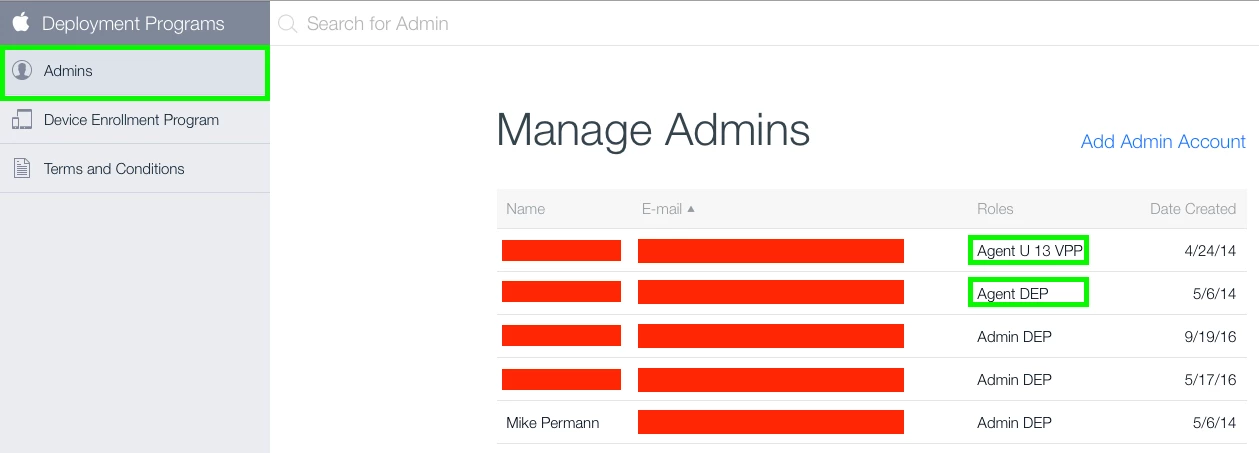
@jmercier when you log into http://deploy.apple.com/ and click on Admins it will list all the accounts that have access to your DEP account. See the attached screen shot for what I am referring to.
We have five in ours. But only the two highlighted in green have the ability to accept the terms and conditions. Those people will get an email from Apple typically telling them they need to accept the new terms and conditions. If they don't do that your DEP instance doesn't work correctly until they have.


Forum|alt.badge.img+10
  • Contributor
  • September 28, 2016

everything is fine... renew all certs... restarted server... all ok...

thanks for help


Forum|alt.badge.img+10
  • Contributor
  • September 28, 2016

sorry... with agent... misread the info


Forum|alt.badge.img+3
  • New Contributor
  • January 9, 2017

I am having this exact same issue and I've done just about everything listed. I've converted the built of our ipad inventory with prestage to JAMF 9.96 successfully but i have 3 iPad 2's and 2 new iPad Pro's I cannot do this with. I am getting the NSURL -1012 error. I've ensured my time is correct on the iPads and JSS. I've reissued new keys and certs everywhere. I've added the PKI anchor cert to the prestage. I've also ensured the iPads are attached to the JSS in School Manager and still i get this error on just these iPads.


Forum|alt.badge.img+5
  • New Contributor
  • January 9, 2017

@GHDJAMF Are you seeing any Errors in the JSS or only on your iPads? Where in the enrollment stage do you see an error on the iPads?


Forum|alt.badge.img+3
  • New Contributor
  • January 9, 2017

I'm not seeing an errors in the JSS infact what I do see is it reports the ipads as assigned then when i get the error, which is after I click next on ipad where it says my organization will automatically configure you iPad, I receive a completed log but the iPad shows the NSURL -1012 error


Forum|alt.badge.img+7
  • Contributor
  • January 10, 2017

I encountered this issue multiple of times. One of the solution for me was to put the iOS device in recovery mode and preform a factory restore.


Forum|alt.badge.img+3
  • New Contributor
  • January 10, 2017

Usually that works but in this case for me it hasn't as I've been able to successfully get 25 or so iPads into Prestage properly but not 3 iPad 2's.


Forum|alt.badge.img+8

After multiple troubleshooting steps

Renewed server token file
Replaced the public key
made sure the time and date were correct on the JSS Server
Restart Tomcat
Accepted the new Terms and Agreement from Apple

I ended up renewed server token file, replaced the public key again and creating a new Prestage Enrollment

so far we do not have any errors


Forum|alt.badge.img+3
  • New Contributor
  • April 2, 2018

@musat This might be a long shot, but do you remember what you did to get Jamf talking to DEP again after the VM move? We're having basically the same issues you described after our VM moved and not finding much help on how to resolve it

Thanks


Forum|alt.badge.img+12
  • Valued Contributor
  • April 4, 2018

@shawnis43, I went through my notes from back then, but don't see anything else listed. Just the moving the VM back to the original host server. I don't recall if there were any OS updates around that time or not. Of course, there have been several OS and Jamf updates since that time.


Forum|alt.badge.img+3
  • New Contributor
  • April 4, 2018

@musat argh, I knew it was a long shot. I really appreciate you checking!