Question

Unable to target disk mode

  • March 1, 2018
  • 8 replies
  • 47 views

Forum|alt.badge.img+4

Hi Folks,

I'm having difficulties to put this macbook air into target disk mode.

Pressing T or ⌘+T during start up doesn't do anything, it will still boot into osx.
Pressing option during start up, and then T also produce the same result (Apple menu with loading bar shown and boot into osx)

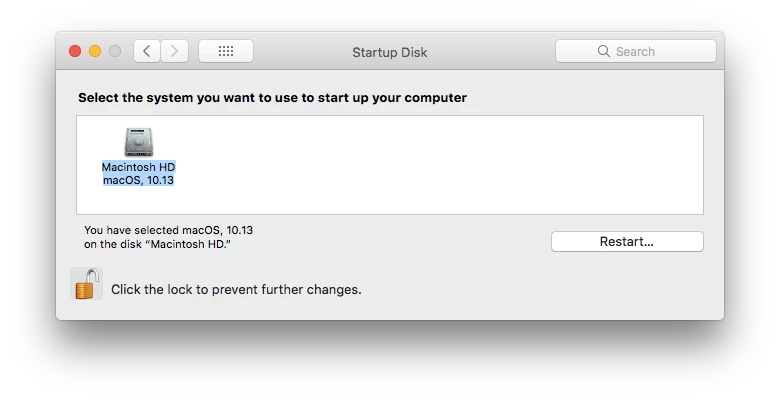
System Preferences >> Start-up disk >> Target disk mode button is missing too!

I've tried wiping the machine, upgrading from 10.12 to 10.13

anyone seen this before??

8 replies

Forum|alt.badge.img+12
  • Valued Contributor
  • March 1, 2018

Do you have a firmware password or filevault enabled? if so, try disabling that then try again.


Forum|alt.badge.img+7
  • Contributor
  • March 1, 2018

Have you tried zapping the PRAM?

option command P + R

wait for reboot chime (I do it 3 times myself)


mm2270
Forum|alt.badge.img+24
  • Legendary Contributor
  • March 1, 2018

As @Dylan_YYC mentioned, if a Firmware Password is enabled, you can't go into TDM from a cold boot. It has to be disabled before holding down "T" will work, among other keyboard shortcuts. But... you should be able to do it from the Startup disk Pref Pane. It's odd that it wouldn't be showing up there.


Forum|alt.badge.img+4
  • Author
  • Contributor
  • March 1, 2018

Hi All,

Firmware/filevault is not enabled.
I have tried reseting PRAM 3x as well, but the strange thing is it took about 10 secs between the chimes.


mm2270
Forum|alt.badge.img+24
  • Legendary Contributor
  • March 1, 2018

What kind of Mac is this on? I'm wondering if it's a combination of the model plus 10.13 at play here. Maybe that model can't be target disk booted and the OS just isn't showing that button due to that.


Forum|alt.badge.img+4
  • Author
  • Contributor
  • March 1, 2018

This is a Macbook Air 6.2 (Early 2014)
Boot ROM Version: MBA61.0103.B00 SMC: 2.13f15


mm2270
Forum|alt.badge.img+24
  • Legendary Contributor
  • March 1, 2018

Ok, well that rules out a newer model being the problem. A 2014 MBA should have no trouble TDM booting that I'm aware of. That leaves 10.13 as a possible culprit. Is the OS on it really just at 10.13, as shown in the screenshot? If so, can you try upgrading it to 10.13.3 to see if that helps? It might be a bug in early 10.13 that you're running into, but that's just a wild guess.


Forum|alt.badge.img+4
  • Author
  • Contributor
  • March 1, 2018

I first noticed this on 10.12.6
Tried updating it to 10.13 then 10.13.3 without luck. hmm....