Question

Updating Google Chrome

  • July 30, 2015
  • 10 replies
  • 54 views

Forum|alt.badge.img+3

Hi All,

I am just wondering how do you guys update Chrome for all your macs? Do you uninstall it and redeploy from JSS? I am asking this because my macs in my environment has outdated Chrome and I need to update them, but unsure how I can achieve this.

Anyone can provide some steps on how it can be done?

Sorry for asking newbie questions as I am not sure if I can do app updates in Casper.

Thanks in advance.

10 replies

Forum|alt.badge.img+10
  • Valued Contributor
  • July 30, 2015

Hello, there's a script available here
update google chrome
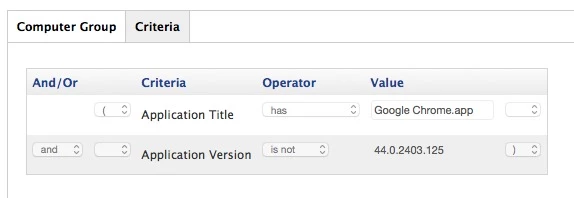
Create and schedule a policy to run the script (at login or other convenient time for environment) scoped to a smart group with the criteria shown the below picture and/or add additional criteria if you wish to limit the policy further
Each time there's a newer version, you'll have to change the value for the "Application Version" field
Tick the "update inventory" option in the "maintenance" within the policy, so that all the successfully updated machines fall out the above smart group.
There might be other/smarter ways to achieve what you need but to me this works just fine.
Hope it helps
Carlo


Forum|alt.badge.img+3
  • Author
  • New Contributor
  • July 30, 2015

Hi Carlo,

Thanks heaps for the tips. I will test it out on my environment and update you if it works.

Thanks again!


acodega
Forum|alt.badge.img+15
  • Valued Contributor
  • July 30, 2015

Before you get too far down the rabbit hole of writing scripts and manually updating policies you should check out AutoPkg and AutoPkgr. There was a talk from last year's JNUC about it and you can check out their website. It's an open source project a lot of us use and contribute feedback to.

In short, AutoPkg automatically downloads updates for your apps and gives it to your JSS for distribution. Either everyone gets it automatically, after a period of testing, or only via Self Service. AutoPkgr is a GUI to make it easy to configure and manage AutoPkg.


Forum|alt.badge.img+13

+1 on using Autopkgr, its a far more complete and stable method than baseline scripting. However, please note that I do feel that the scripting method is an amazing way to learn.


  • July 30, 2015

Another +1 on AutoPkgr, even without using the JSS integration and auto-update-magic, having updated .pkgs makes distribution much easier than re-packaging, uninstalling the old version, then installing the new one.


Forum|alt.badge.img+16
  • Valued Contributor
  • August 1, 2015

Personally I created an AE that checks the current version installed against the best known available in the JSS and returns whether it believes an update is required based on comparisons of the version numbers.
I then have a daily policy against a smart group based on this that deploys Chrome if required.
Each time a new Chrome is available I package it, test it, apply it to the policy and update the best available value in the EA.
Basically I got sick of there not being a less than option for versions.and this was my solution to that, only been running it a week or so, but it seems to do the job (I actually have the same thing for a whole bunch of packages like Firefox, flash, java, silverlight and Adobe Reader).


Forum|alt.badge.img+3
  • Author
  • New Contributor
  • August 3, 2015

Thanks all for the tips.

Carlo - do you put in any packages in the policy or just the script.

About the AutoPkgr seems like an amazing tool. But is there a guide on how to use it?


mscottblake
Forum|alt.badge.img+24
  • Honored Contributor
  • August 3, 2015

AutoPkgr Guide: https://github.com/lindegroup/autopkgr#autopkgr

More information about JSS integration methodologies: https://github.com/homebysix/auto-update-magic#auto-update-magic

The tool has a very large open-source community, full of Mac Admins. It you get stuck with anything, just ask.


Forum|alt.badge.img+11
  • Contributor
  • August 8, 2015

Quick question, how do you keep on top of version numbers outside of literally going to 'About Google Chrome' and looking there?


Forum|alt.badge.img+16
  • Valued Contributor
  • August 8, 2015

@rquigley Personally for most apps I have been using values in the /Applications/The_APP.app/Contents/Info.plist either of

CFBundleShortVersionString
CFBundleVersion

It exists in every app or plugin I have wanted so far and you can compare the appropriate one against what the deployable version has.
Unfortunately different vendors have different ways of dealing with version numbers but usually one of those two values makes some sense.
There are ways to pull it out of System Profiler etc... but I just find this easier when scripting.