Solved

VPP apps not installing with "unable to connect to Jamf Pro server" error?

  • January 18, 2018
  • 9 replies
  • 62 views

Forum|alt.badge.img+4

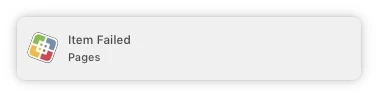
Suddenly I can't pull any VPP apps down via Self Service. On two machines, I get the same result. PKGs I've uploaded appear to work fine, but VPP stuff gives the error in the screenshot. Clicking reconnect gives a DONE and apparently successful checkmark, but it still doesn't work. It will usually throw me out to the App Store, with GET leading to asking for a login. Thoughts?

Best answer by MattAebly

For these impacted computers, could you try running this command in terminal to verify that your computers are able to hit your Jamf Pro server?

sudo jamf checkJSSConnection

If your computers can properly see your Jamf Pro, it might just be the Self Service app unable to see it, at which time I'd recommend removing the app and re-issuing it out to your computers.

9 replies

Forum|alt.badge.img+10
  • Valued Contributor
  • January 18, 2018

I've noticed this on one of my machines as well. No solution here.


MattAebly
Forum|alt.badge.img+16
  • Employee
  • Answer
  • January 18, 2018

For these impacted computers, could you try running this command in terminal to verify that your computers are able to hit your Jamf Pro server?

sudo jamf checkJSSConnection

If your computers can properly see your Jamf Pro, it might just be the Self Service app unable to see it, at which time I'd recommend removing the app and re-issuing it out to your computers.


Forum|alt.badge.img+4
  • Author
  • Contributor
  • January 18, 2018

This worked! I deleted Self Service, then re-added with "sudo jamf policy" and then install then worked without incident.

Thanks!!


mallej
Forum|alt.badge.img+4
  • Contributor
  • March 16, 2018

for me that doesn´t work.
i encountered the same problem with VPP Apps Pages and Keynote. checkJSSConnection is ok. re-adding Self Service doesn´t fix it.
Self Service Notification says:


Forum|alt.badge.img+26
  • Honored Contributor
  • March 16, 2018

I've seen this error in Self Service. I believe the solutions mentioned above are concidental and more about timing. The few computers that have presented the error, will begin working without any changes just by waiting 5 to 60 minutes. It appears to correlate to repeating messages within the JSS log concerning MDM, but that's my speculation. Log example:

2018-03-16 08:21:11,047 [ERROR] [Tomcat-88  ] [MDMController            ] - Error processing mdm request, returning 400. Device: Null, CommandUUID: mraNull
2018-03-16 08:21:11,781 [ERROR] [Tomcat-132 ] [JAXBPlistParser          ] - Error unmarshalling
2018-03-16 08:21:11,781 [ERROR] [Tomcat-132 ] [MDMController            ] - Error processing mdm request, returning 400. Device: Null, CommandUUID: mraNull
2018-03-16 08:21:15,391 [ERROR] [Tomcat-39  ] [JAXBPlistParser          ] - Error unmarshalling
2018-03-16 08:16:45,038 [WARN ] [duledPool-0] [pleMDMCheckInNotification] - Unable to create push notification for device: ComputerShell [ID=2570, Name=computernameabc]. A required field (UDID, APN Token, Push Magic) was empty.
2018-03-16 08:16:45,038 [WARN ] [duledPool-0] [pleMDMCheckInNotification] - Unable to create push notification for device: ComputerShell [ID=2516, Name=computername123]. A required field (UDID, APN Token, Push Magic) was empty.
2018-03-16 08:16:45,038 [WARN ] [duledPool-0] [pleMDMCheckInNotification] - Unable to create push notification for device: ComputerShell [ID=4203, Name=computernamedef]. A required field (UDID, APN Token, Push Magic) was empty.
2018-03-16 08:16:45,038 [WARN ] [duledPool-0] [pleMDMCheckInNotification] - Unable to create push notification for device: ComputerShell [ID=3755, Name=computername456]. A required field (UDID, APN Token, Push Magic) was empty.
2018-03-16 08:16:45,038 [WARN ] [duledPool-0] [pleMDMCheckInNotification] - Unable to create push notification for device: ComputerShell [ID=2839, Name=computernameghi]. A required field (UDID, APN Token, Push Magic) was empty.

mallej
Forum|alt.badge.img+4
  • Contributor
  • March 16, 2018

what worked for me now is to use this:

#!/bin/sh
jamf removeMDMProfile -verbose
rm -rf /var/db/ConfigurationProfiles
sleep 20
jamf mdm -verbose
sleep 20
jamf manage -verbose

i found the script in this post.
i guess it must be something with the "MDM Capable Users" and the VPP App Store


Forum|alt.badge.img+6
  • Contributor
  • March 22, 2018

We have got the same issue, But only with VPP apps which indicates that port 5223 can not be contacted, I am seeing a lot of Push Notification errors from the device.


Forum|alt.badge.img
  • New Contributor
  • December 13, 2018

Did we ever find a resolution to this? I checked JSS Connection and its fine. I re added Keynote to be installed through keynote using VPP and still I'm getting the same error. And when you click to install keynote it takes you to Keynote in the App store.


Forum|alt.badge.img+1
  • New Contributor
  • March 5, 2019

The problem for me was that the computer I was testing on was not enrolled into the Jamf MDM. I had the Jamf agent installed, so I could run policies, however the MDM profile was not enrolled. So for troubleshooting, try unenrolling and re-enrolling device into the MDM.