Question

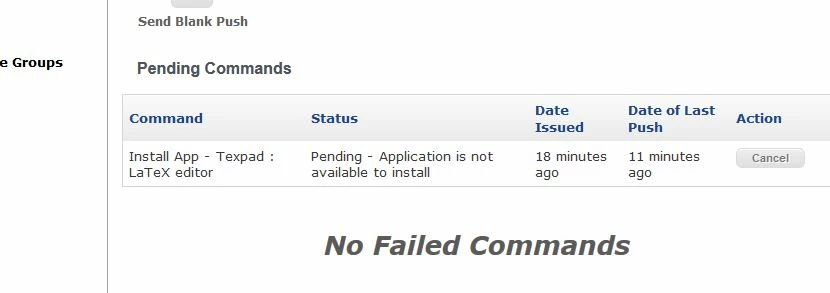
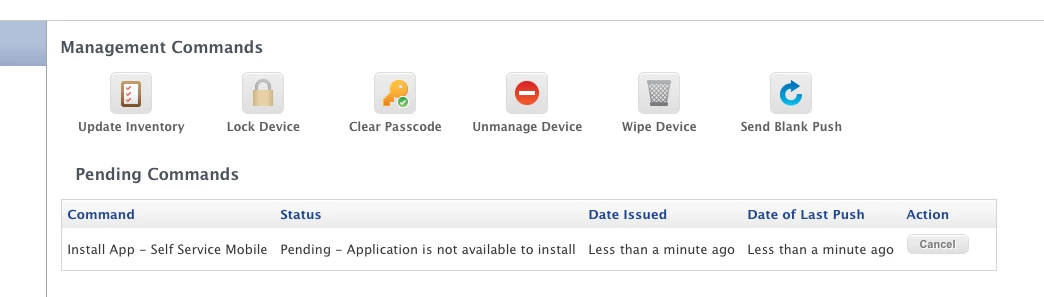
VPP issue: "Pending - application is not available to install"

  • August 5, 2015
  • 41 replies
  • 149 views

Forum|alt.badge.img+2

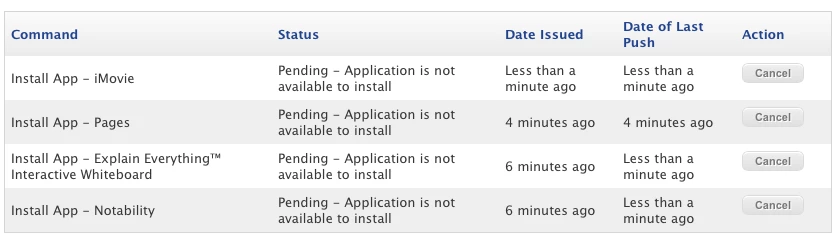
I'm seeing this issue with several of our apps coming from VPP.
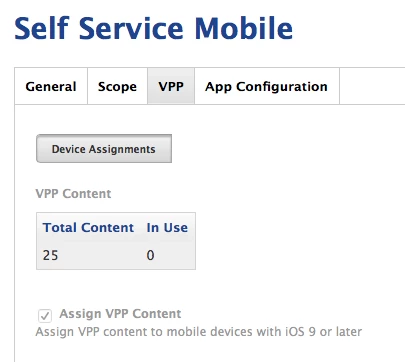
The user is enrolled to receive content and there are plenty of licenses available.

Any ideas??

41 replies

mpermann
Forum|alt.badge.img+22
  • Valued Contributor
  • August 5, 2015

@mvillasana is this for Mac OS or iOS? What version of the OS/iOS are the apps trying to be deployed to?


Forum|alt.badge.img+2
  • Author
  • New Contributor
  • August 5, 2015

Sorry! This is iOS. This particular iPad is on version 8.4.


Forum|alt.badge.img+11
  • Contributor
  • August 6, 2015

Just came here to say I'm seeing the same thing today as our staff has returned and started pushing out apps. Also on 8.4. Been trying to find a rhyme or reason as to why.

The app is assigned to the user in their Purchased tab, they just aren't receiving the push install.


Reno
Forum|alt.badge.img+15
  • Contributor
  • August 6, 2015

Check your VPP program invite logs for the users in question. I encountered this issue and found that even though the JSS had reported the appropriate number of license were in use and the users were enrolled, the accounts displaying this error had a second invitation sent that needed accepting. After that I flushed all errors from the machines' entries and pushed an inventory to trigger redeployment, which worked like a charm.


Forum|alt.badge.img+11
  • Contributor
  • August 6, 2015

Thanks Brad - This location has 100% acceptance on their VPP Invites and the app appears in the users purchased tab after it is assigned, they just aren't receiving or responding to the push correctly.

We're also running a caching server on 10.10.4 that appears to be working as expected as I can see requests going out when they're requested.


Forum|alt.badge.img+12
  • Contributor
  • August 6, 2015

Is this with managed licenses or codes?
Are the devices supervised?


Forum|alt.badge.img+21
  • Valued Contributor
  • August 6, 2015

And they have the license assigned in vpp2, as well as it being in the main app catalog?

It could also be another iTunes outage.


Forum|alt.badge.img+12
  • Contributor
  • August 6, 2015

@freddie.cox I actually seem to be seeing the same behaviour, apps are not silently installing as they should be on supervised devices, but it is appearing under purchased in their app store.


Forum|alt.badge.img+11
  • Contributor
  • August 6, 2015

@Simmo @Emmert supervised & Managed Distribution. I advised the location to wait it out and see where they were at this morning. We could be seeing some throttling. I'll lcheck in with them a bit later on and see where we are.

Thanks - seems like there are several of us in he same boat.


Forum|alt.badge.img+3
  • New Contributor
  • August 13, 2015

We are seeing the exact same behaviour. App shows up in the purchased history (so the VPP assignments/acceptances are ok), but when we go to install via the self help portal it won't install with the same message that the OP had.

Supervised devices, newly erased and enrolled via the DEP. The managed install of Casper Focus as the Self Help portal as well as free apps install without a problem. iOS 8.4 and JSS 9.73

Any update on this???


Forum|alt.badge.img+10
  • New Contributor
  • August 13, 2015

Question.. are you using the Self Service Web clip or the Self Service Mobile App? We've been seeing problems with using the Mobile App, the Web clip is slow, but seems consistent in working.


Forum|alt.badge.img+6
  • Contributor
  • August 31, 2015

Same issue happening for me...but only paid apps. Hope we can discover a solution as I have some not patient teachers.


Forum|alt.badge.img
  • New Contributor
  • September 6, 2015

I got the same problem, paid apps couldn´t be installed on iPads that were enrolled via DEP. I opened a case and got the following solution that worked for me. Maybe it can help you too.

*From the previous communications, it appears as though we are attempting to distribute a paid app to iOS devices using VPP.

Although these devices were enrolled through DEP, VPP will not be automatically installed on the device. However, it is still possible to use VPP -- we will just need to follow a few more steps.

How were we planning to use VPP -- through a spreadsheet uploaded in the JSS or through VPP invitations/VPP assignments?

If we plan to use the latter, than each device will need to accept a VPP invitation sent by the JSS before we can assign content (apps) to them.

Please see pages 9 - 13 of our Technical Guide on DEP/VPP for detailed instructions:
http://www.jamfsoftware.com/resources/simplifying-device-enrollment-and-content-distribution-using-dep-vpp-and-the-casper-suite-v96/
*


Forum|alt.badge.img+2
  • New Contributor
  • September 17, 2015

We are having the same issue with paid apps on ios 8.4.1 and JSS 9.73. In our case the blame is being put on ports in our firewall but, our port scan just showed that the required ports and ip scope for APNs are all fine.

I do hope that a solution is found soon. More troubleshooting to follow.

BTW I am testing on the newly released ios 9 to see if that fixed any of our issues.


Forum|alt.badge.img+3
  • New Contributor
  • September 24, 2015

Having the same issue, anyone have an update on this? I updated my VPP purchases and it shows we bave plenty of licenses.


Forum|alt.badge.img+14
  • Contributor
  • September 24, 2015

I've received reports of this (e.g. Keynote and iMovie). We are at 9.73 (production), Self Service App with majority iOS 8.4.x clients. It was suggested that iOS 9 might provide relief, but (in limited testing) I was able to reproduce with iOS 9.0.1 (*9.73 JSS). Curious if any others having the issue are blocking the App Store? I changed up my scoping (removing App Store restriction) and Keynote and iMovie hit my test iPad. Still need to test a bit more ... iOS and VPP not my forte.


Forum|alt.badge.img
  • New Contributor
  • October 2, 2015

Hi,

I'm experiencing the same problem here. Trying to install "Texpad : LaTeX editor " on 2 of our Teacher-Ipads.
One Ipad is running 8.4.1 the other was updated just now to 9.0.2. Unfortunately the problem still occurs.

Have you been able to fix your issue?

Any Advice?


Forum|alt.badge.img+21
  • Valued Contributor
  • October 2, 2015

Usually these kinds of errors are because there's something stuck on the user end ... try logging out and back into the iTunes ID, and see if they can buy a free app from the App Store or iBooks.

Next, check their VPP email and make sure they accepted it and all prompts. Typically there's some license agreement or something that they still need to click through.


Forum|alt.badge.img+21
  • Valued Contributor
  • October 3, 2015

I'm seeing this now with device based app assignment in 9.81. I'm trying to avoid the need to have users sign into the app store in order to get Self Service Mobile installed. I've purchased more than enough licenses, and (I believe) set it up correctly. Self Service mobile should be installed on iOS 9 devices via VPP, even with no user signed into the store.


Forum|alt.badge.img
  • New Contributor
  • October 5, 2015

Hello,

I have the same problem and actually the only trick I've found is to remove the event pending by push "cancel" and update inventory device for each application that poses problem. The problem being random. The devices are under iOS 9.0.2, the JSS server 9.81, I also used a VPP accounting and device assignments as jcarr
If someone finds a real solution I thank in advance


Forum|alt.badge.img+1
  • New Contributor
  • October 7, 2015

Has anyone found a resolution to this? I am experiencing the same issue. So far two different users both running iOS 9.0.2. Casper hosted JSS 9.73.1436909640.c. Only happening on paid VPP apps. Both users are associated with VPP and I have been able to push out paid VPP apps to them in the past. Trying to push different apps to each user with the same results.


Forum|alt.badge.img+12
  • Valued Contributor
  • October 7, 2015

We're seeing this even with device-based VPP assignments in 9.81. The error message is there, but the app still installs, very strange. There's enough licenses, of course.


Forum|alt.badge.img+5
  • Contributor
  • October 12, 2015

I am seeing this a lot on 9.81 on iOS 9.0.2 too for device based assignments.

Pending - Application is not available to install


Forum|alt.badge.img+5
  • Contributor
  • October 15, 2015

Chiming in to say I am experiencing the same error "Pending - Application is not available to install"

Running:
IOS 9.0.2
JSS 9.81
Free App with 1000 managed app licenses

Have not seen a resolution yet and canceling the "push" and updating inventory has not resolved the error


Forum|alt.badge.img
  • New Contributor
  • October 16, 2015

I'm experiencing the same issue with a few devices (iPad's). Same thing I have enough apps and we are only seeing it on the iWork's/iLife apps right now. Hoping to find an answer soon.