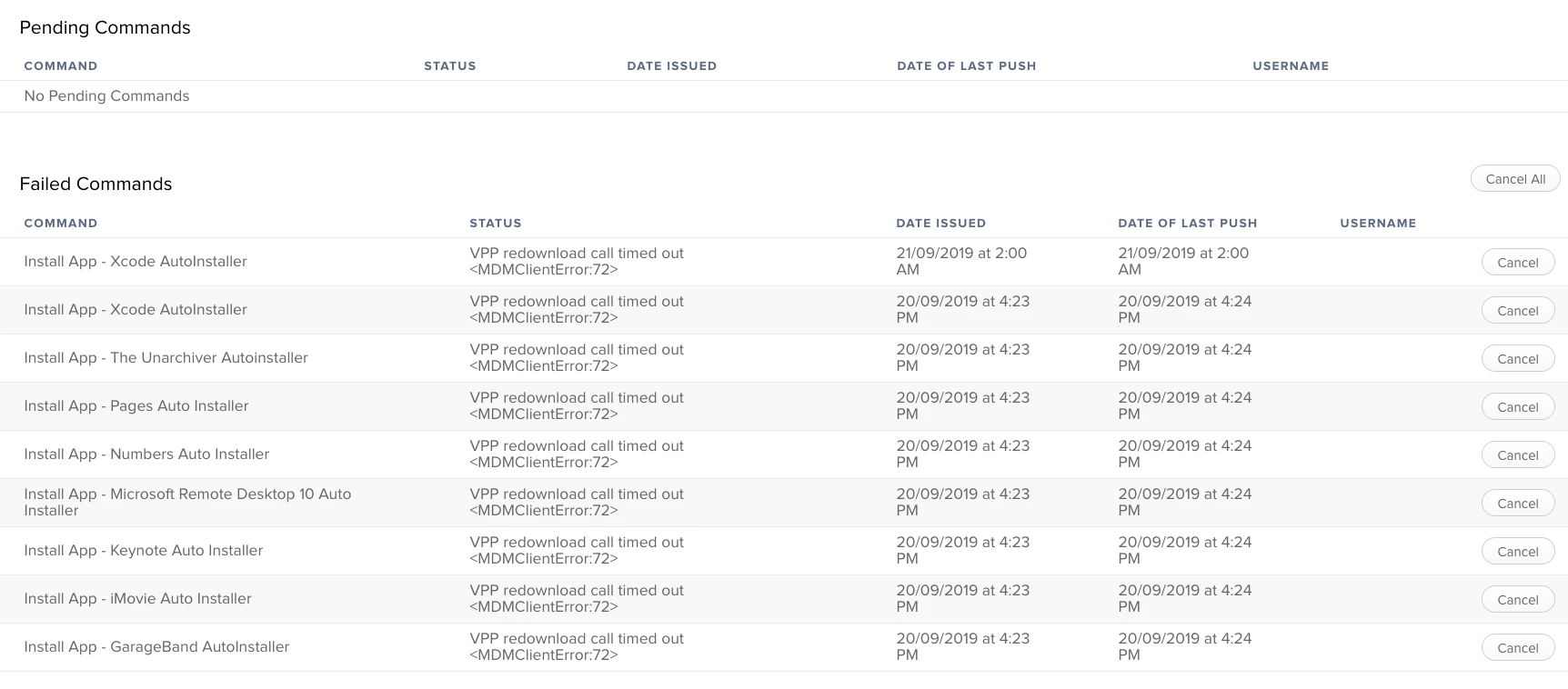
I am seeing a lot of our systems having the "vpp redownload call timed out <mdmclienterror:72>" error when cliets try to install VPP apps via Self Service on MacOS (most clients are 10.14.2).
I have tried clearing the failed commands, reconning, re-enrolling etc with no luck.
I am hesitant to revoke all apps as I have seen suggested because I am concerned about the number of people who will experience iTunes notifications about apps not being assigned (the staff at this school are fragile...).
Any advice would be appreciated.
Best answer by pbowden
@mjames@whitebeer The issue with storedownloadd crashing during MAS installs is fixed in 10.14.4 Beta 4 (18E205e). This is RADAR 47685116. Let me know if you still see problems after the update. For clarity, typical symptoms of this bug: - Larger MAS apps like Xcode and Office fail to install and leave behind an .appdownload stub - Needing to run multiple jamf recon commands to coerce apps to install - MDMClientError:72 failed command seen in JSS
I've updated https://macadmins.software/mas with the latest info. The largest outstanding issue that I'm still tracking is the inability to update MAS apps through MDM when the user has the app perpetually open.
Anyone have any insight on how to fix this at all?
I think there might be a few different things that are causing it as people have mentioned different fixes. Our fix was to remove SSL inspection on the MACs.
I think there might be a few different things that are causing it as people have mentioned different fixes. Our fix was to remove SSL inspection on the MACs.
Can you please specify? As these were clean installs I don't believe we have any SSL stuff enabled at this time.
Basically Apple do not like anything that breaks the TLS encryption between their servers and the EUD, is detected they break the link so the download starts again. SSL inspection, packet sniffing etc.
@Cayde-6 That would be our SAS Operations team but any changes to the network have to go through proper change management and I am part of the committee. As far as I know there has been no changes, but can put one in to fix this issue if need be.
I would suggest anyone that is experiencing this issue contact Jamf and open a support case. There is an open PI (PI-007435) that they are tracking this against. Yes SSL inspection is one of the issues that helps this, so does verifying that you have access to *.mzstatic.com available. However that is not always the issue.
Contact Jamf and get your company attached to that PI so they know the impact.
I would also suggest opening an AppleCare case if you have ACE or Alliance.
3 times on the effected macOS 10.14.6 Macs and then we could install VPP apps without the "vpp redownload call timed out <mdmclienterror:72>" error. Not a fix but maybe a "get me by for now". It was mentioned about SSL Inspection however we tried SSL bypassed and that didn't help. Doing the recon multiple times on the effected machines has worked "so far". Found this suggestion in the thread above "Posted: 3/5/19 at 10:06 AM by pbowden". YMMV
Update: We have had more MacBooks effected since posting and this solution worked on those as well.
Update #2 11/1/2019: Appears it has gotten worse. When in a crunch we are copying the Apple Apps to flash drives (That were pulled down from Jamf to a machine not experiencing the VPP issue) and putting them in Applications on the machines that we can not "jiggle the handle" and get them to pull down via self service, lol.
I am also seeing this on some Macs on 10.14.6 (18G95):
Having seen something similar on iOS in the past I hit cancel all commands, ran through the Auto Installs for VPP Apps and did Edit then Save, did a software update on the Mac in question and the Apps began to install, in my experience with iOS VPP Apps jamming the Software update (to 18G103 Supplemental Update 2) is likely irrelevant. But I have at least two others to check so let's see.
I was setting up a Mac yesterday at around 1:30PM EST and VPP apps started deploying to it after a few minutes. About an hour later, I was setting up a Mac and got the error 72. Tried cancelling the app installs in the Management tab 5 times, but with no success..
We are having the issue even with 10.14.6 and the supplemental update installed. I spoke to JAMF and to Apple. both are saying it is an Apple thing that appeared after one of the updates. We have also tried several fixes including update the token. it still is not downloading Mac Apps. Working with Apple and JAMF simultaneously. hoping it will be resolved soon.