Question

Vulnerability 10.13 - Root

  • November 28, 2017
  • 82 replies
  • 368 views

Show first post

82 replies

Forum|alt.badge.img+10
  • Contributor
  • November 28, 2017

@guidotti Correct. Almost everything on your system that doesn't run as a logged in user, is kicked off by user 0 .... root. If Rich's solution kept the jamf launchdaemons from working, then the whole system would be hosed.


Forum|alt.badge.img+3
  • New Contributor
  • November 28, 2017

I tested the script from https://derflounder.wordpress.com/2017/11/28/blocking-logins-to-the-root-account-on-macos-high-sierra/ on a few machines and I'm getting this error on some of them - any ideas what it means exactly?

Script result: <dscl_cmd> DS Error: -14165 (eDSAuthPasswordQualityCheckFailed)<br/>passwd: DS error: eDSAuthPasswordQualityCheckFailed<br/>Changing root shell from /usr/local/bin/zsh to /usr/bin/false<br/>

EDIT: Figured it out, changed script to a hardcoded password that will always pass Apple's (TERRIBLE) password complexity rules


Forum|alt.badge.img+1
  • New Contributor
  • November 28, 2017

Thoughts on creating a smart group to identify vulnerable systems? (OS >= 10.13 and root password is null)

I'd settle for a quick check to detect if the password is null...


Forum|alt.badge.img+1
  • New Contributor
  • November 28, 2017

charlesteese-mfj's script seems to be working for me


Forum|alt.badge.img+18
  • Honored Contributor
  • November 28, 2017

Here is how I am solving it by setting a root password (using encrypted strings) as well as performing a test to make sure a password is set, and based on that, erroring out or leaving a touch file for an ext attr to pick up:

#!/bin/sh
# This script will set the root password to a known value via encrypted string, check to see that a password is set, and leave a cookie.

#Decrypt String Function for account passwords
function DecryptString() {
    # Usage: ~$ DecryptString "Encrypted String" "Salt" "Passphrase"
    echo "${1}" | /usr/bin/openssl enc -aes256 -d -a -A -S "${2}" -k "${3}"
}

#Encrypted strings for passwords
rootpwd=$( DecryptString "$4" salthere passphrasehere )

#Enable root user and set password
dscl . -passwd /Users/root '$rootpwd'

#Check if root password is enabled
rootpwdtest=$( dscl . -read /Users/root Password )
if [ "$rootpwdtest" == "Password: ********" ]; then
    echo "Root password set. Proceeding."
else
    echo "Root password not set. Exit 1."
    exit 1
fi

#Check for Management directory and create and place touchfile
managementDir="/Library/Management"
touchFile="/Library/Management/.macOSHighSierraRootPassFix"

if [ -d "${managementDir}" ]; then
                    /usr/bin/touch "${touchFile}"
                else
                    mkdir -p "${managementDir}"
                    /usr/bin/touch "${touchFile}"
fi
exit 0

Forum|alt.badge.img+1
  • New Contributor
  • November 29, 2017

Does anyone know if this is remotely exploitable on computers with Casper installed? Or would it require physical access to the machine?


Forum|alt.badge.img+10
  • Contributor
  • November 29, 2017

I've tried just changing the root password and disabling the account in the GUI and the settings take. However they do not appear to survive restart.


easyedc
Forum|alt.badge.img+16
  • Esteemed Contributor
  • November 29, 2017

@BostonMac I believe you have to leave the root user enabled with your password. I haven’t tested but think I read that.


Forum|alt.badge.img+18
  • Author
  • Honored Contributor
  • November 29, 2017

@BostonMac , @easyedc is correct if you do it via gui it's gotta still be enabled.


Forum|alt.badge.img+1
  • New Contributor
  • November 29, 2017

@charlesteese-mfj I am thinking of using your script, but can I later overwrite randomly created root password into something else of my choosing?


Forum|alt.badge.img+10
  • Contributor
  • November 29, 2017

@nojorge If you have admin users enabled for Remote Management (ARD) or Screen Sharing, it seems that it can be exploited remotely.

Twitter link to Patrick Wardle's test results


Forum|alt.badge.img
  • New Contributor
  • November 29, 2017

@adriandupre I just put together this extension attribute that returns if the root password is set or not.

#!/bin/bash

RESULT=$(sudo dscl . -read /Users/root Password)

if [[ $RESULT == "Password: ********" ]]; then
  echo "<result>Root password set</result>"
elif [[ $RESULT == "Password: *" ]]; then
  echo "<result>No root password set</result>"
else
  echo "<result>Unknown</result>"
fi

Then I push @rtrouton's package to any users which does not have "Root password set" and are on 10.13.

I have also set it up to do a recon after the package installs, so the extension attribute should immediately get updated and fall out of scope.


Forum|alt.badge.img+7
  • Contributor
  • November 29, 2017

@rodgerramjet ,

FYI: that will return the first result if the root user exists at all, regardless of its password. An enabled root user with a blank pass will appear there.

Using something like the following could pare down the most-exposed Macs better, but continue reading, as I still don't think this is worth the time:

#!/usr/bin/env bash

if [[ $(dscl . read /users/root Password | awk '{print $2}') = '********' ]]; then
  if dscl . authonly root '' &>/dev/null; then
    RESULT="Root Enabled - No Pass"
  else
    RESULT="Root Enabled - With Pass"
  fi
else
  RESULT="Root Disabled"
fi

echo "<result>$RESULT</result>"

The problem here is that while you can now determine whether root is enabled with or without a password, you cannot determine whether or not that root was enabled legitimately by the user or through the Authorization Plugin exploit (since you can also create any password you want in that prompt, it does not have to be blank).

The safer move is to just randomize all root passwords on all 10.13 machines and let the edge-case users submit a ticket when they find they cant su root anymore (which they shouldn't be doing anyway -- tell them to just use sudo -s or sudo su! ). The following will pre-emptively create a 32-character cryptographically-secure pseudo-random (CSPRNG) passphrase for root:

#!/usr/bin/env bash

dscl . passwd /users/root "$(env LC_CTYPE=C tr -dc 'A-Za-z0-9_ !@#$%^&*()-+=' < /dev/urandom | head -c 32)"

Obviously, every environment is different, and this is not a hard and fast rule; there could be some extenuating circumstances in your particular environment that require an enabled root user and the productivity impact on blowing all out root user passwords is a no-go. Keep in mind, however, that you're essentially unable to differentiate between whether that root user with a password was made legitimately or by an attacker creating a backdoor.

Note: Why I'm generating a random string by redirecting /dev/urandom to tr rather than use openssl rand: https://sockpuppet.org/blog/2014/02/25/safely-generate-random-numbers/. For the majority of cases, both are plenty secure. This is NSA-level threat surface stuff. But I would rather share the safest of the two to make the command applicable to the most environments as possible.


Forum|alt.badge.img+5
  • Contributor
  • November 29, 2017

I don't understand why we go headless chicken mode on this issue. As long as we just need to delete one file to get Admin-rights (and this is an issue since Mac OS X came out) we don't need to try to secure macOS.


donmontalvo
Forum|alt.badge.img+36
  • Hall of Fame
  • November 29, 2017

@tsossong pretty sure you'd need admin rights to delete the file to get admin rights. Or am I missing something? :)


donmontalvo
Forum|alt.badge.img+36
  • Hall of Fame
  • November 29, 2017

@doggles excellent script, we made a couple changes, including setting shebang to #!/bin/sh, and closing the tag in the last line echo "<result>$RESULT/result>". #etherBeerForYou


Forum|alt.badge.img+7
  • Contributor
  • November 29, 2017

@tsossong, the issue is that any user could screenshare to any other discoverable Mac on the network with ARDAgent running and log in as root. At least for our situation, the biggest threat vector is other employees.

@donmontalvo, good eye, closed the XML tag. Shebang won't make a difference, just a habit of mine to use /usr/bin/env bash. I try to avoid calling wih /bin/sh when the script contains bashisms ([[ ]]). Though macOS, the shells are the same except for echo -e AFAIK.


Forum|alt.badge.img+6
  • Contributor
  • November 29, 2017

Great suggestions and scripts. I can confirm this is fixed in beta 4 & 5 of High Sierra.


Forum|alt.badge.img+3
  • New Contributor
  • November 29, 2017

Be warned. I discovered, and have confirmed on a few sites, that if you disable root the exploit returns. When you set the root password you need to keep the account enabled.


Forum|alt.badge.img+3
  • New Contributor
  • November 29, 2017

So is JAMF going to change their OS whitepaper that says "you should upgrade to the latest OS on day one"?


Forum|alt.badge.img+3

@stas21 you can use the same script to later change it to a set password (just set NewPassword to a string) or use the

dsenableroot -d

command once this issue has been fixed.


Forum|alt.badge.img+6
  • Contributor
  • November 29, 2017

I see a few posts here with scripts to make random passwords for root. Sorry if this sounds stupid but I'd like to make sure there is no reason I would ever need the root password? Luckily we've only had a few users upgrade to High Sierra before it was blocked.


Forum|alt.badge.img+7
  • Contributor
  • November 29, 2017

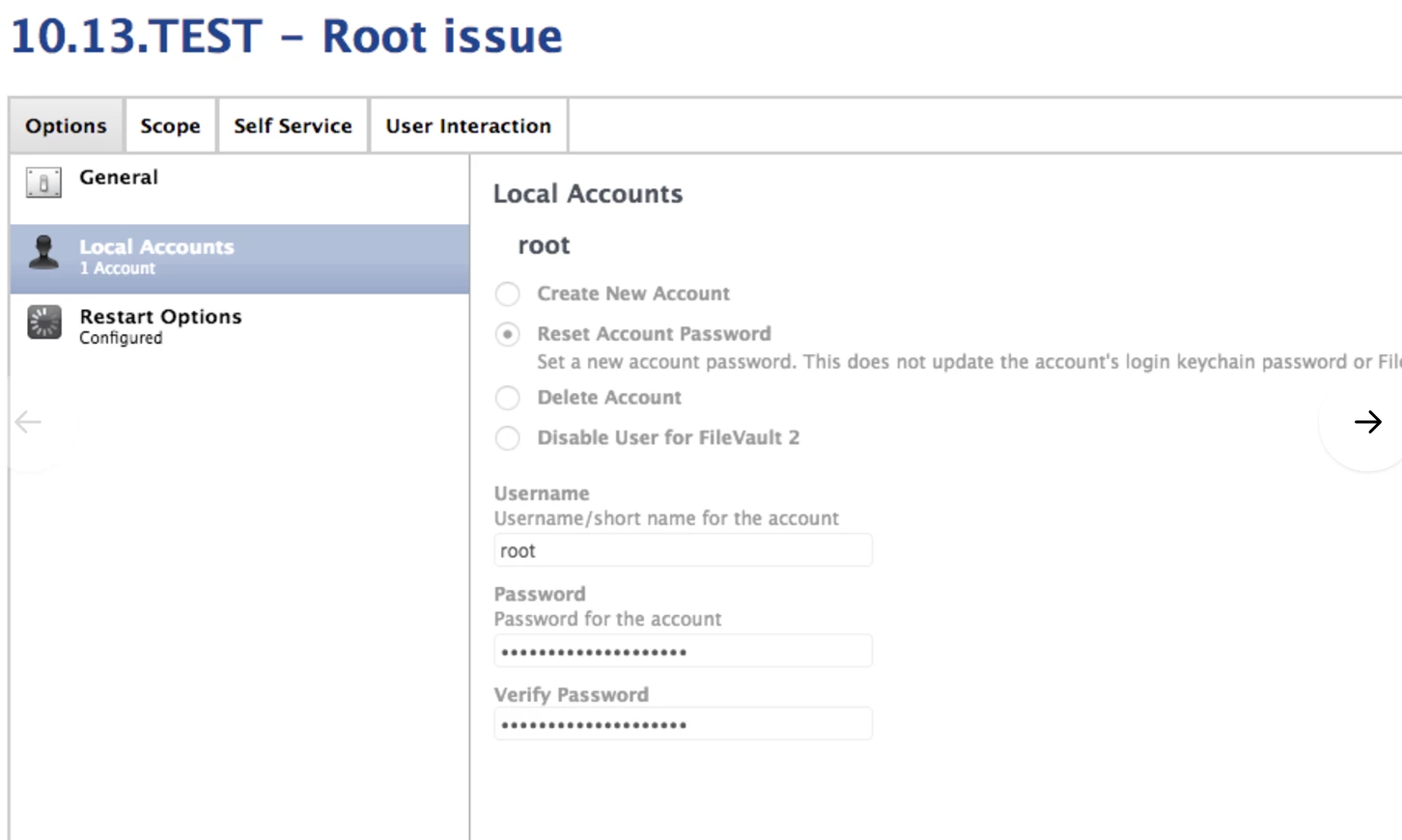
Why is everyone using scripts when this seems to fix the issue? Using scripts to randomize the password instead of setting a single password for everyone?


Forum|alt.badge.img+8
  • Contributor
  • November 29, 2017

Its difficult to log in to all 16,000 macOS devices.


Forum|alt.badge.img+3

@jstine I don't want all my devices to share a root password, I want it to be long and randomly generated.