Question

What do schools that use DEP with iPads do, when a user forgets their passcode?

  • May 7, 2015
  • 57 replies
  • 153 views

Show first post

57 replies

Forum|alt.badge.img+13
  • Valued Contributor
  • May 25, 2015

You may find with the other 10%, they have the wrong date and time.

How do things work if the iPad is passcode disabled? e.g. when they have locked it beyond the point of not being able to enter a passcode.


Forum|alt.badge.img+10
  • Contributor
  • May 26, 2015

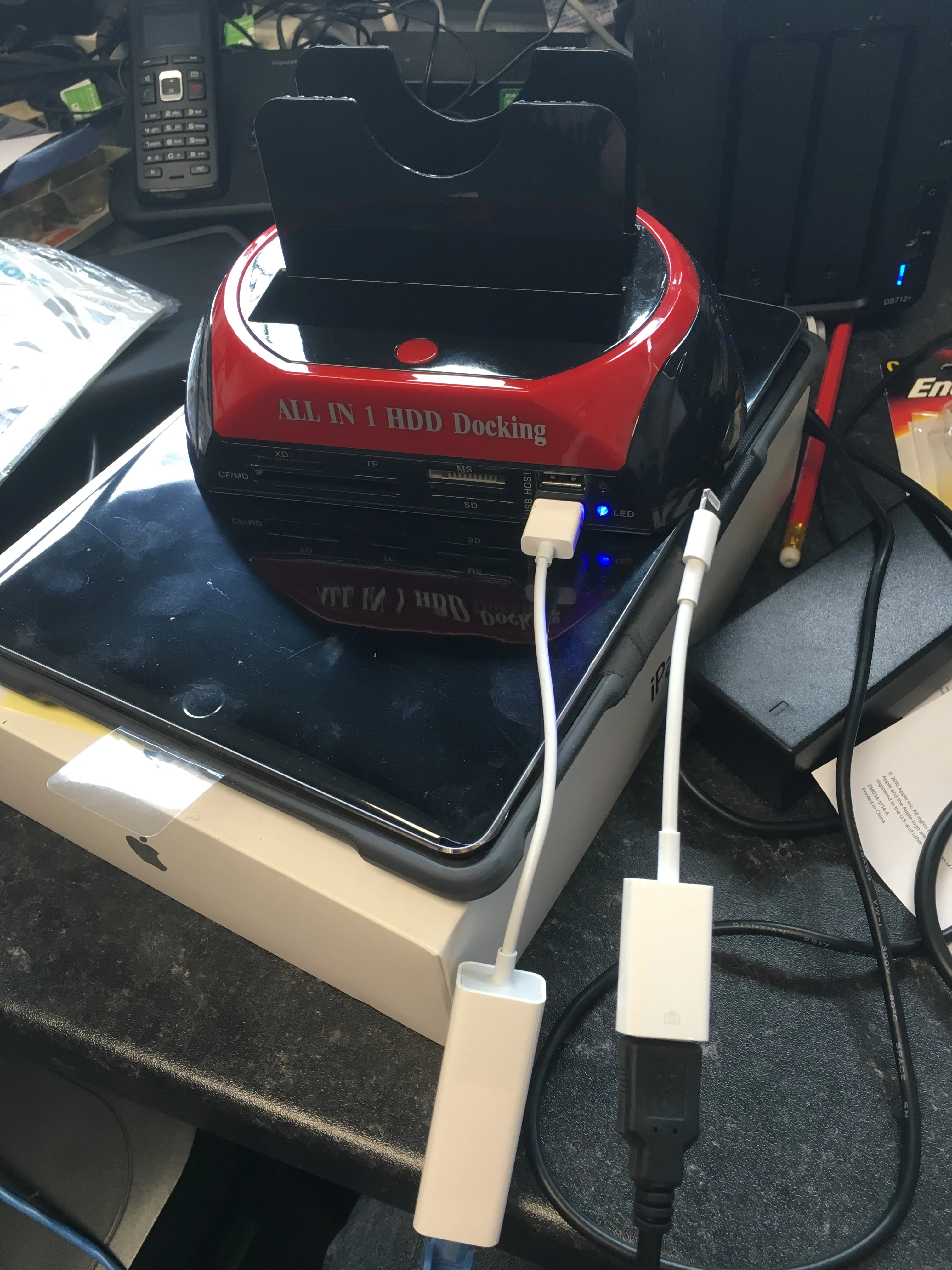
In my deployment (+/-700 devices, 7th and 8th grade), this surprisingly hasn't been much of an issue. One thing I would to chime regarding is the Ethernet/Camera Adapter/Powered Hub - it's certainly not supported and in my experience, it has been hit or miss with around a 50% success rate.


Forum|alt.badge.img+12
  • Contributor
  • May 26, 2015

I don't see Apple 'fixing' this, it's a security feature, not a bug.


Forum|alt.badge.img+12
  • Author
  • Valued Contributor
  • May 26, 2015

Security feature that prevents us from doing our jobs properly? :)


Forum|alt.badge.img+10
  • Contributor
  • May 26, 2015

I can understand why it's locked following a restart, but perhaps there should be an MDM option to include a remote management wireless profile that's always available? If not, even a "join wireless" option on the lock screen itself where you could supply one-time wireless credentials


Forum|alt.badge.img+8
  • Contributor
  • May 26, 2015

Or a master unlock code generated for each device when enrolled.


cdenesha
Forum|alt.badge.img+14
  • Honored Contributor
  • May 26, 2015

All ideas should be fed to Apple as either a radar against the MDM Framework (iOS Enhancement) or at apple.com/feedback!! :)


Forum|alt.badge.img+13
  • Valued Contributor
  • May 31, 2015

Hmm the pictured method does actually connect it to ethernet, ethen though it says its unsupported.

I found swiping up to activate the camera, seems to assist with the connection, as it would immediately prompt for proxy credentials.

I guess this will do for now, but cause it is not a approved method, to rely on it, is a bit dicey, but it will do for now.


MrVenchus
Forum|alt.badge.img+4
  • Contributor
  • May 9, 2016

I posted this to another thread, but that thread is linking here, so I thought I'd try this:

Has anyone been able to get the this to work with the new Lightning to USB 3 Camera adapter (powered by iPad power adapter) plus a USB to Ethernet adapter? I can get online with an iPad that is already unlocked, but when I try to get online with an iPad that's been disabled (but showing passcode unlock screen) it won't connect.


talkingmoose
Forum|alt.badge.img+36
  • Community Manager
  • May 9, 2016

How are you verifying you're not online when at the passcode screen? Because this is a wired connection, the Wi-Fi icon won't appear at the top of the screen.

Test sending an unlock command from your JSS to the device. Verify it unlocks by swiping from left to right as if you're about to enter the passcode.


MrVenchus
Forum|alt.badge.img+4
  • Contributor
  • May 9, 2016

Hi @talkingmoose I did your exact method to test the connection and it was a no go. I was able to verify the connection on an unlocked iPad with wifi turned off, but it seems that the locked iPad has all internet connections disabled.


Forum|alt.badge.img
  • New Contributor
  • May 10, 2016

Hi @timvenchus. We too are having the exact same issue with an iPad running 9.3.1 that is locked with the user unable to remember his passcode. We got the new Lightning to USB 3 Camera adapter and the USB to Ethernet adapter to attempt to get the iPad to connect to the JSS so we could send the "Clear Passcode" command, but it is not working for us either. I can confirm from our DHCP server that the iPad does get an IP address over the Ethernet connection and I can ping the iPad from the server, but for some reason the iPad never seems to talk to the JSS. I'm not sure if the JSS is just not "looking" for this iPad on that IP or if the APN servers don't "recognize" that this iPad is on a different IP.

If anyone has any further tips or tricks to try, please let us know. We are trying to avoid wiping the device if necessary because the student did not have everything backed up and there are finals coming up soon. (Granted, he can't use anything on it right now since it is locked, so maybe this is just a learning lesson for him.) Any and all help is appreciated. Thanks.


Forum|alt.badge.img+12
  • Author
  • Valued Contributor
  • May 10, 2016

Weird, it's working perfectly fine for us in those scenarios. We can restart the iPad, and when it comes back and it's locked with no Wi-Fi, connecting it to the ethernet will get it solved in seconds.


MrVenchus
Forum|alt.badge.img+4
  • Contributor
  • May 10, 2016

@St0rMl0rD Are you using the new Apple Lightning to USB 3 adapter and Apple USB to Ethernet adapter (with power from iPad power adapter), or a different setup e.g. with a powered USB hub? Unfortunately I don't have a powered USB hub hand to test out alternate setups.


talkingmoose
Forum|alt.badge.img+36
  • Community Manager
  • May 11, 2016

@timvenchus, I did some testing here with the USB 3 adapter and found something that may help you.

I'm using the same pieces for the rig found here on Lifehacker.com:

USB 3 Camera adapter and Ethernet rig

At first, my iOS device kept receiving a message that I wasn't supplying enough power for the USB Ethernet adapter. After some trial and error, I determined my power supply (far right in the picture) was the problem. It said "iPod USB Power Adapter" (model A1205) and made no mention of wattage. (After some research online I found it's 5W.)

I found a second adapter that specifically said 10W USB Power Adapter (model A1357). The USB symbol on the cable itself also plugged in upside down compared to the first adapter, so I could tell they were different somehow.

This second adapter worked.


talkingmoose
Forum|alt.badge.img+36
  • Community Manager
  • May 11, 2016

Aaaaaand now that I read further down the thread (maybe I should that before posting things), I see your issue isn't with the device receiving an IP address. Never mind.


Forum|alt.badge.img+12
  • Author
  • Valued Contributor
  • May 11, 2016

@timvenchus we have a powered usb hub set up with all the necessary cables at all times, so if I get an iPad like that, I only look it up in JSS, send clear passcode command and connect it, and voila.


Forum|alt.badge.img
  • New Contributor
  • May 13, 2016

Tried this today on a device and it failed, so i did a bit of testing and think i may have found the issue.

It looks like the MDM root certificate had expired on the device, i checked some more students in his class and they were on and old expired certificate as well.

After getting the student permission to wipe the device, i preceded to inroll the device again and then permanently disable it again with incorrect pin code attempts.

After connecting the iPad via the lighting to usb, usb hub and a usb to ethernet contraption, it work instantly.


Forum|alt.badge.img
  • New Contributor
  • July 29, 2016

does DFU mode can remove MDM mode on iphone and ipad ?


Forum|alt.badge.img+10
  • Contributor
  • July 29, 2016

Yes, but the device would simply re-enroll at activation if it's in DEP and assigned to a pre-stage enrollment.


Forum|alt.badge.img+15
  • Esteemed Contributor
  • April 12, 2017

Anyone else seeing that this no longer works in iOS 10.3? I can still get an IP address with my Apple USB Ethernet adapter, but after reboot I can't run any MDM commands until the passcode is entered.


Forum|alt.badge.img+14
  • Contributor
  • April 13, 2017

Yes what I'm seeing is that I Can't clear any PassCode's any more on device's with 10.3.1 using a wired connection. Testing on my test device if device is Passcode lock no MDM commands are working, If I unlock the device commands do work. This is going to be a Problem clearing Passcode on devices we need to access.


Forum|alt.badge.img+14
  • Contributor
  • April 13, 2017

Just found this also

[http://www.enterpriseios.com/story/2017/04/07/Push_notifications_to_iOS_require_WiFi_link_when_Ethernet_used
](link URL)

There appears to be a bug in iOS (10.3.1) with push notifications and Ethernet. We use the Apple Lightning to USB 3 Camera Adapter and a USB Ethernet adapter to provide network to devices in the field. During a troublesome deployment we discovered that the Apple Push Notification Service (APNS) does not establish a connection if the WiFi radio is off or not joined to a known network. That WiFi network does not need to have valid internet, or even DHCP available, the device will choose a self assigned IP and then the APNS connection will use the Ethernet adapter.

I imagine this has something to do with how APNS behaves when both Cellular and WiFi are available. I'm curious if Apple TV has a similar bug, I imagine not, given the fact the Ethernet is built in and likely a more common scenario. Although a seldom used feature, the Lightning to USB to Ethernet configuration was feature in a past keynote (https://sixcolors.com/post/2016/03/apples-lightning-to-usb-3-adapter-bri...).

MDM commands are triggered by APNS messages which means MDM is not functional in an Ethernet only environment.

It was a tricky one to discover, requiring packet captures, and other network analysis to isolate, I hope this helps someone else in the future.

Radar:
http://www.openradar.me/31494325


Forum|alt.badge.img+3
  • New Contributor
  • July 19, 2017

Was able to connect locked iPad to MacBook through USB and share MacBook's internet connection. Allowed me to get my 10.3.1 iPad unlocked. Thanks to @Emmert suggestion in https://www.jamf.com/jamf-nation/discussions/23801/rj45-adaptor-for-ipads


Forum|alt.badge.img+13
  • Valued Contributor
  • August 8, 2017

so @kuypers does that mean that 10.3.1 and above devices dont work or is there a work around?

As I found the same result as you did, I knew the ipad was communication over ethernet, as it could be pinged, but it wouldn't respond to MDM commands.