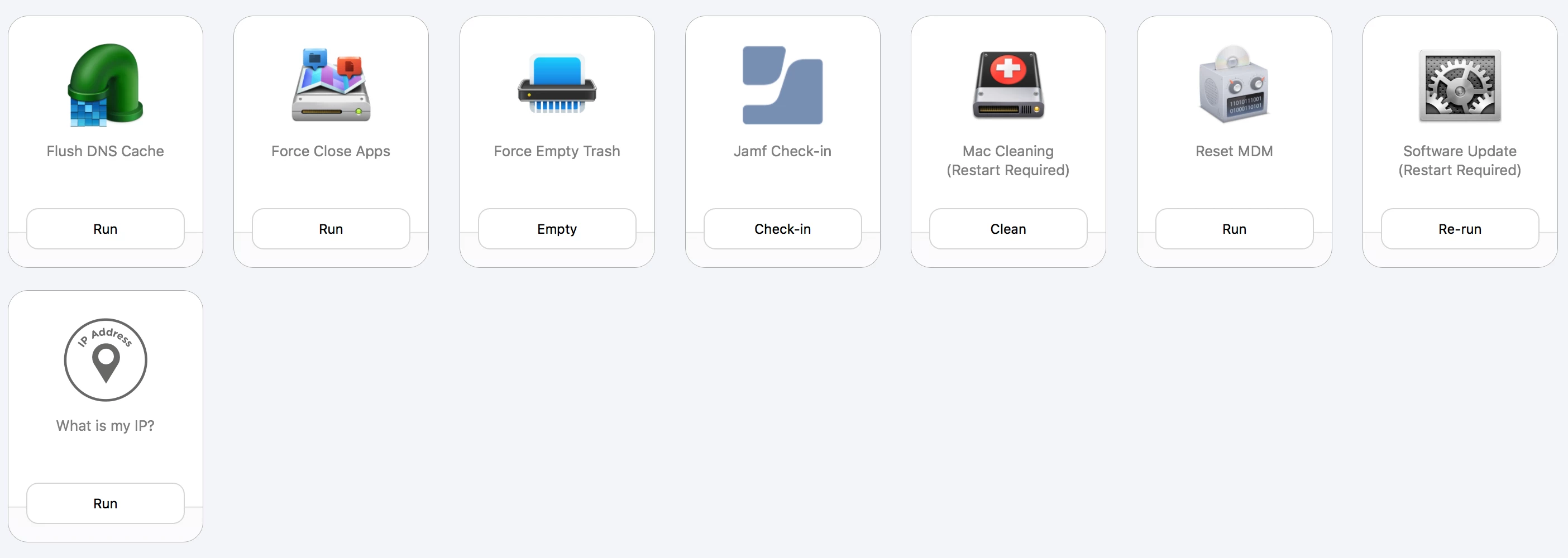
Question

What scripts and helpdesk tools do you use with self service?

  • January 31, 2019
  • 130 replies
  • 762 views

Show first post

130 replies

Forum|alt.badge.img+5
  • New Contributor
  • February 5, 2019

<delete>


Forum|alt.badge.img+5
  • New Contributor
  • February 5, 2019

@txhaflaire do you require logout after "Font rendering macOS Mojave" (i assume its defaults write -g CGFontRenderingFontSmoothingDisabled -bool NO) or it there a way to apply changes without it? thank you.


Forum|alt.badge.img+5
  • New Contributor
  • February 5, 2019

@emily how do you fix parentalcontrolsd issue? i we used to unload the daemon, but it stopped working in 10.12 afair.


Forum|alt.badge.img+5
  • New Contributor
  • February 5, 2019


our one.


jr139
Forum|alt.badge.img+6
  • New Contributor
  • February 5, 2019

Shout out to @neilrooney and everyone who has contributed to this post! You've inspired me and given us some ideas for a "help desk" category of our own in Self Service.


Forum|alt.badge.img+7
  • Valued Contributor
  • February 5, 2019

Hi @defiler , can you tell us more about your "Get Wifi Guest Password"?

Thanks


Forum|alt.badge.img+3
  • Author
  • New Contributor
  • February 6, 2019

@emily I would be really interested what the "assign this mac" function does?


Forum|alt.badge.img+3
  • Author
  • New Contributor
  • February 6, 2019

@wildfrog how are you achieving the reset printer system?


Forum|alt.badge.img+5
  • Contributor
  • February 6, 2019


The "Provision" tile is scoped to computers that have been enrolled to Jamf in the past 3 days and is used on computers by the technician for computers that we either can't enroll into our DEP or computers that, even if we can, we can't reset. Our provision policy that is triggered on enrollment only runs if our local admin account doesn't exist, so for already existing computers it doesn't run. With this policy we can force it to run.


AxelK
Forum|alt.badge.img+1
  • New Contributor
  • February 6, 2019

@emily a bit ot but we are having loggin issues with some users with sfb. i'm looking into this a long time but never found a solution. maybe i'm missing something. your script could be my holy grail?!

Whats the issue for using this script?


DBrowning
Forum|alt.badge.img+25
  • Esteemed Contributor
  • February 6, 2019

Hey @AxelK, I can't speak for @emily, but we had a lot of SfB sign-in issues and we found that basically blowing away a few key files seemed to fix any login issues we saw.

Below is the code we used for our Fix SfB as we have moved over to Teams now.

#!/bin/sh

#gets user name as variable
user=`python -c 'from SystemConfiguration import SCDynamicStoreCopyConsoleUser; import sys; username = (SCDynamicStoreCopyConsoleUser(None, None, None) or [None])[0]; username = [username,""][username in [u"loginwindow", None, u""]]; sys.stdout.write(username + "
");'` 

#Close SFB
if ( pgrep "Skype for Business" > /dev/null ); then
    echo "Killing SFB"
    killall "Skype for Business"
else
    echo "SFB is not running"
fi


#Remove files for SFB
rm -rfv /Users/$user/Library/Preferences/com.microsoft.SkypeForBusinessTAP.plist
rm -rfv /Users/$user/Library/Logs/com.microsoft.SkypeForBusinessTAP
rm -rfv /Users/$user/Library/Application Support/Skype for Business
rm -rfv /Users/$user/Library/Containers/com.microsoft.SkypeForBusiness
rm -rfv /Users/$user/Library/Application Support/com.apple.sharedfilelist/com.apple.LSSharedFileList.ApplicationRecentDocuments/com.microsoft.skypeforbusinesstap.sfl
rm -rfv /Users/$user/Library/Application Support/com.microsoft.SkypeForBusinessTAP
rm -rfv /Users/$user/Library/Cookies/com.microsoft.SkypeForBusinessTAP.binarycookies

#Remove Keychain Items
security delete-generic-password -l "Skype for Business" /Users/$user/Library/Keychains/login.keychain
security delete-generic-password -l "com.microsoft.SkypeForBusiness.HockeySDK" /Users/$user/Library/Keychains/login.keychain
security delete-generic-password -l "com.microsoft.SkypeForBusinessTAP.HockeySDK" /Users/$user/Library/Keychains/login.keychain
security delete-generic-password -l "com.microsoft.skypeforbusiness.webmeetings.HockeySDK" /Users/$user/Library/Keychains/login.keychain

emily
Forum|alt.badge.img+26
  • Hall of Fame
  • February 6, 2019

@defiler it just looks for the process and kills it. It's rarely used by anyone these days so we're likely to retire it.

@AxelK back when we migrated from hosted Exchange to O365 people had trouble getting a fresh sign-in so we made the policy to help get a fresh login prompt. Unsure if that would be related to issues you're seeing. It just goes through the keychain to look for entries for Skype for Business and deletes them, then clears the application cache data.


Forum|alt.badge.img+3
  • New Contributor
  • February 6, 2019

@neilrooney assuming that just removes all printers you can achieve this with lpadmin and use it again to re-add whichever you like
lpstat -p | cut -d' ' -f2 | xargs -I{} lpadmin -x {}


Forum|alt.badge.img+3
  • Author
  • New Contributor
  • February 7, 2019

Thank you @bergmire


wildfrog
Forum|alt.badge.img+11
  • Valued Contributor
  • February 7, 2019

@neilrooney @bergmire posted the exact script we use. I essentially wanted to replicate going into the Printers & Scanners preference pane and right-clicking to 'reset printing system'. One call-out is that when a user clicks to reset the printing system in Self Service we force them to read the card that tells them that this will blow out all their printers and they will need to re-add them.

Similarly, any of these options we have that require a restart (Optimize My Mac, Flush Font Caches, etc) we force the user to read the card telling them clicking will restart their machine and they should first save any work, quit apps, etc.


scottb
Forum|alt.badge.img+18
  • Valued Contributor
  • February 7, 2019

Thanks, @bergmire for that. However, I wonder (and have for years and never got an answer, even from our Apple guys - what exactly does the "Reset printing system..." do? And how do we replicate this in total? It may very well be doing what your script does and just sounds fancier, but I still wonder...


Forum|alt.badge.img+3
  • Author
  • New Contributor
  • February 13, 2019

Thanks @jr139 , this has been a great source of inspiration for my SSP. I hope we can keep it going.


Forum|alt.badge.img+3
  • New Contributor
  • February 19, 2019

I'm seeing a lot of screenshots, but not a lot of scripts... can anyone share scripts along with their screenshot so those of us that are new get an idea on how it all works.


daniel_ross
Forum|alt.badge.img+20
  • Jamf Heroes
  • February 19, 2019

Agreed with @bjhobbs as I'm still learning myself and would love to tap into any GitHub pages, etc. that you guys use or see some scripts posted here.

Also thank you all for the brilliant ideas, scripts and approaches to using self service like this!


Forum|alt.badge.img+20
  • Valued Contributor
  • February 19, 2019

These are all great ideas on how to improve and use self service. I would like to echo other comments here and ask if there could be a repo somewhere where these ideas could be captured and stored for others to follow.

I am thinking of a visual page somewhere, perhaps, a click on any one of these items and it takes you to a site that shares the code or script that makes that piece work? Maybe this is a feature request from Jamf to collectively gather these things?


Forum|alt.badge.img+8
  • Contributor
  • February 26, 2019

Seems like a good use of a new Jamf Marketplace category?


Forum|alt.badge.img+4
  • New Contributor
  • April 12, 2019

@neilrooney This is a great thread and I even found some ideas to update some of our options as well!

Question about access: how are you limiting access to some of these policies only to your helpdesk team? Or are all these policies available to any user that open Self Service?


sdagley
Forum|alt.badge.img+25
  • Jamf Heroes
  • April 12, 2019

@kevinwilemon If your Helpdesk team members are in AD, and assigned to a Helpdesk specific security group, you can use that as a Limitation when scoping Self Service policies you only want available to them. Specifically as an "LDAP User Groups" Limitation.


Forum|alt.badge.img+4
  • New Contributor
  • April 12, 2019

Thanks, @sdagley . No AD here (should have mentioned) so I'm always curious if anyone has gotten this working with JAMF users. It works as it should in regards to displaying the appropriate policies when our Helpdesk log into Self Service, but policies don't actually run displaying "This item is no longer available" and refreshing. When not limited to JAMF users, the policies run fine.

We've a standing ticket open with JAMF about it, but thought I'd ask in case anyone has that function working without AD.


sdagley
Forum|alt.badge.img+25
  • Jamf Heroes
  • April 13, 2019

@kevinwilemon How do your Helpdesk folks log in to Self Service if there's no directory system for them to authenticate against? For policies that display the "This item is no longer available" message, have you looked in the policy log to see if anything was logged regarding the attempt to run? I've seen that behavior on policies that have actually run, and have a inventory update at the end of the policy so they go out of scope at the completion of the policy, which causes Self Service to display that message.